BM Beacon
- By
Automatically assigns and announces Chrono Beacon usage for party members during waves 13-17 in The Black Morass.
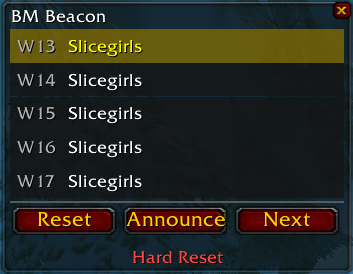
Main UI.png
Description
BM Beacon
Automatically assigns and announces Chrono Beacon usage for waves 13-17 in The Black Morass (TBC Classic).
Tired of figuring out who should use their Chrono Beacon on which wave? BM Beacon handles it for you. It auto-assigns your party members to waves 13 through 17, announces the plan to party chat, and reminds each player when their wave spawns.
Features
- Auto-Assignment — Automatically assigns party members to beacon waves using a round-robin system with role priority (Healer > DPS > Tank).
- Review Before Announcing — On dungeon entry, review assignments with Accept and Edit buttons before anything goes to party chat.
- Per-Wave Reminders — Detects each wave as it spawns and announces in party chat whose turn it is to use their Chrono Beacon.
- Multi-Client Sync — When multiple party members have BM Beacon installed, only one client announces. No duplicate spam, no configuration needed.
- Drag-and-Drop Reordering — Don't like the auto-assignment? Drag and drop player names to swap assignments.
- Editable Wave Numbers — Click any wave label to change which wave it's assigned to. Not locked to 13-17.
Slash Commands
| Command | Description |
|---|---|
/bmb |
Show the help menu |
/bmb show |
Show the BM Beacon window |
/bmb hide |
Hide the BM Beacon window |
/bmb reset |
Hard reset all assignments and state |
/bmb settings |
Open the settings panel |
/bmb help |
Show the help menu |
All commands work anywhere — you don't need to be inside the dungeon.
Settings
Access via /bmb settings:
- Announce assignments after 2nd boss dies — When enabled, automatically re-announces all beacon assignments ~75 seconds after Temporus is killed as a reminder before waves 13-17 begin.
- Auto-announce per wave — Toggle the automatic per-wave party chat announcement on or off.
- Wave announce delay — Slider to control how many seconds after a wave spawns before the announcement fires (default: 12 seconds, range: 2-30).
How It Works
- Enter The Black Morass with your party.
- BM Beacon auto-assigns waves 13-17 to party members and shows them for your review.
- Accept the assignments to announce them to party chat, or Edit to rearrange first.
- As each beacon wave spawns, the assigned player is announced in party chat.
- Adjust assignments at any time via drag-and-drop, or use Hard Reset to start from scratch.
BM Beacon Team