Blocky Loot Frame
- By
Consolidates all Need/Greed/Pass loot rolls into one movable, resizable gold frame. Features class-colored names, item tooltips, real-time scaling, and a built-in 1-100 dice roller.
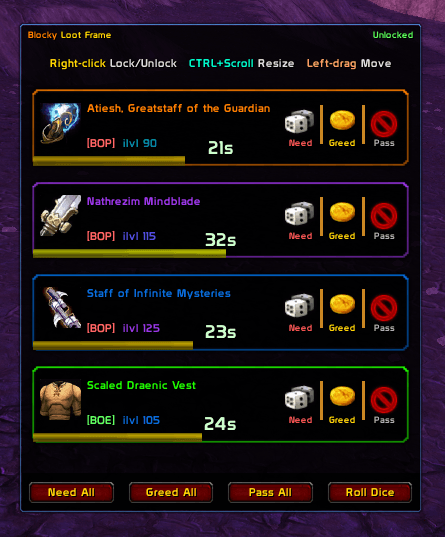
Loot Frame in Test Mode
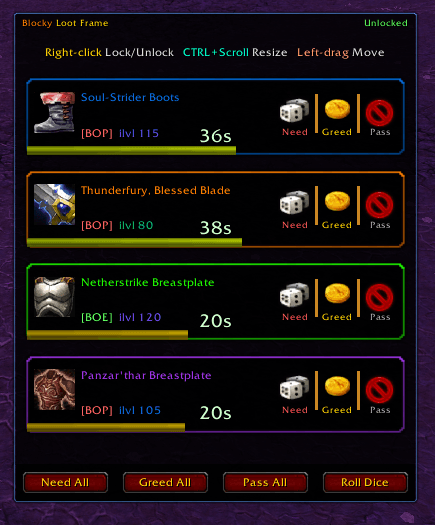
Enhanced Blocky Loot Frame Showing one Green, Blue, Purple and Orange
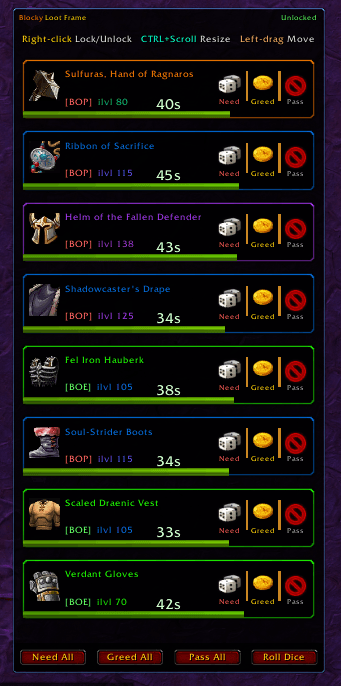
Blocky Loot Frame 1
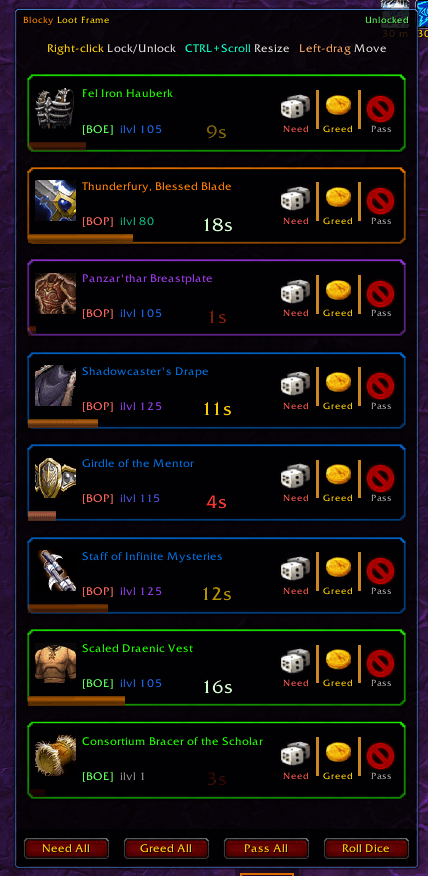
Blocky Loot Frame 2
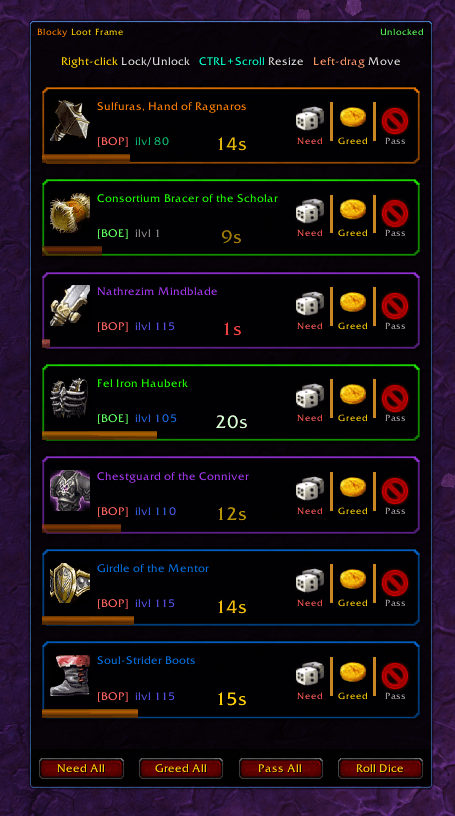
Blocky Loot Frame 3
Description
Blocky Loot Frame
For TBC Classic 2.5.5 (Interface 20504) Author: Toomasu
What is Blocky Loot Frame?
Blocky Loot Frame replaces the entire default loot roll UI with a single, clean, consolidated frame that shows every active roll in one place. All your Need, Greed, and Pass decisions are right there, stacked neatly, with clear timers so you never accidentally let a roll expire.
Features
Core Display
-
Single consolidated frame — all active loot rolls shown together in one scrollable panel instead of scattered individual windows
-
Item quality colouring — item names are coloured by quality: grey, white, green, blue, purple, and orange (legendary), just like the game's native item colouring
-
Item icon — displays the actual item icon for each roll, with a question mark fallback if the icon hasn't loaded yet
-
Binding type — clearly shows [BOP] (Binds when Picked Up) or [BOE] (Binds when Equipped) for every item so you can make informed decisions fast
-
Item level — displays the ilvl of each item, colour-coded on a gradient from grey (low) through green, blue, purple, and burnt orange (high-end raid gear)
-
Countdown timer bar — each row has a live timer bar that runs green → yellow → red as time runs out, with the seconds remaining displayed in large text. Inside the final 15 seconds the bar pulses with increasing urgency
Buttons
-
Need / Greed / Pass buttons per item, right-aligned on every row with matching dice, coin, and no-entry icons
-
Shift-click item name to link the item into chat
-
Hover item name to see the full item tooltip including stats, set bonuses, and comparison with your equipped gear
-
Need All — instantly clicks Need on every active roll where Need is available
-
Greed All — instantly clicks Greed on every active roll where Greed is available
-
Pass All — passes every active roll at once, great for clearing out quickly
-
Roll Dice — rolls /random 1-100 for any loot council or off-spec decisions your raid uses
Frame Management
-
Freely movable — left-drag the title bar to place the frame anywhere on screen
-
Right-click to lock/unlock — prevents accidental movement during a fight; the lock state is shown in the title bar
-
CTRL+Scroll to resize — hold Control and scroll the mouse wheel to scale the entire frame up or down (scale range: 0.5× to 2.0×). The frame scales from its centre, so it stays exactly where you put it
-
Clamped to screen — the frame can never be dragged off-screen
-
Per-character saved settings — your position, scale, and lock state are saved individually for each character and restored exactly on every login
First-Time Setup
-
Screen-aware defaults — on first install, the frame automatically centres itself on screen and picks a scale appropriate for your resolution. No manual setup needed. Works correctly from 800×600 up to 4K
-
/blf reset — restores the frame to the screen-centred default position and recalculates the correct scale for your current resolution at any time
Slash Commands
|
Command |
What it does |
|---|---|
|
/blf |
Show version and command list |
|
/blf test <3-20> |
Spawn N fake loot rolls to preview the UI (test mode) |
|
/blf clear |
Remove all active test rolls |
|
/blf lock |
Lock the frame so it can't be moved |
|
/blf unlock |
Unlock the frame |
|
/blf reset |
Reset position and scale to screen-centred defaults |
Test Mode
Blocky Loot Frame ships with a built-in test harness (BlockyLootFrame_Test.lua) so you can preview and configure the UI without being in a dungeon or raid.
Type /blf test 8 to spawn 8 fake loot rolls — a random mix of uncommon, rare, epic, and legendary items from The Burning Crusade. The Need, Greed, and Pass buttons are fully functional in test mode and print your choice to chat. Rolls auto-expire on their own timers, or use /blf clear to dismiss them all at once.
Compatibility
-
Game version: TBC Classic 2.5.5 (Interface 20504)
-
Saved variables: Per-character (SavedVariablesPerCharacter)
-
No dependencies — no libraries required, no other addons needed
-
Fully compatible with loot council addons, RC Loot Council, EPGP, and similar systems — Blocky Loot Frame only replaces the visual roll UI and does not interfere with loot distribution logic
-
The default Blizzard GroupLootFrame is cleanly suppressed on load and will not appear alongside this addon
Installation
-
Download and unzip the archive
-
Copy the BlockyLootFrame folder into your World of Warcraft\_classic_tbc_\Interface\AddOns\ directory
-
Reload your UI or log in — the addon is ready immediately with no configuration required
Feedback & Bug Reports
Please use the CurseForge issue tracker to report bugs. When reporting, include:
-
A description of what happened and what you expected
-
The full error message if one appeared (the BugSack or !BugGrabber addon makes this easy)
-
Whether the issue occurred in a dungeon, raid, or test mode
Blocky Loot Frame is open source. Feel free to inspect, learn from, or build upon the code.
The Blocky Loot Frame Team