BliZzi Crest Calculator
- By
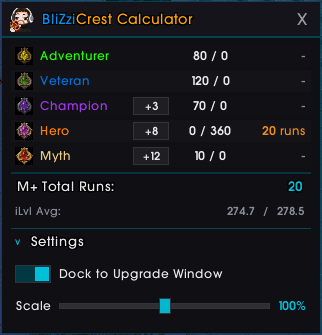
Shows how many Mythic+ runs you need to fully upgrade your gear. Tracks all 5 Midnight Dawncrest tiers, scans your equipped items, and calculates remaining crests per key level.
Lumia_Stream_ibiOYlMfkT.png
Description
BliZzi Crest Calculator
A lightweight addon that shows exactly how many Mythic+ runs you need to fully upgrade all your gear with Midnight Dawncrest currencies.
Scans your equipped items, reads their upgrade tracks, and calculates the remaining crests needed per tier — so you always know how many keys to push.
Features
- All 5 Dawncrest tiers — Adventurer, Veteran, Champion, Hero, and Myth with their currency icons
- Per-tier key level selection — Click to cycle through key levels (+0 to +12) and see how runs change per crest tier
- Live gear scanning — Reads upgrade tracks from your equipped item tooltips in real-time
- Have / Need display — Shows your current crest count vs. crests needed for each tier
- Total M+ runs — Sums up all remaining runs across all tiers
- iLvl average — Displays your current and maximum possible average item level
- Dock to Upgrade Window — Toggle in Settings to attach the calculator next to Blizzard's Item Upgrade frame
- Adjustable scale — Slider in Settings (60%–140%) to resize the window to your preference
- Minimap button — Left-click to toggle, right-click to cycle key levels, drag to reposition
- Slash commands — Full command support (see below)
- Remembers position & state — Window position, key level selections, scale, and visibility are saved between sessions
- Multi-language support — English, German, French, Spanish, and Portuguese (auto-detected)
Slash Commands
| Command | Description |
|---|---|
/crest |
Toggle the window |
/crest key |
Cycle all key levels |
/crest champion |
Cycle Champion key level (+0 / +2 / +3) |
/crest hero |
Cycle Hero key level (+4 to +8) |
/crest myth |
Cycle Myth key level (+9 to +12) |
/crest reset |
Reset window position to center |
Key Levels & Crests per Run
| Key Level | Crest Type | Crests per Run |
|---|---|---|
| +0 | Champion | 10 |
| +2 | Champion | 12 |
| +3 | Champion | 14 |
| +4 | Hero | 10 |
| +5 | Hero | 12 |
| +6 | Hero | 14 |
| +7 | Hero | 16 |
| +8 | Hero | 18 |
| +9 | Myth | 10 |
| +10 | Myth | 12 |
| +11 | Myth | 14 |
| +12 | Myth | 16 |
Settings
Click the Settings bar at the bottom of the window to expand:
- Dock to Upgrade Window — When enabled, the calculator automatically attaches to the right side of Blizzard's Item Upgrade frame whenever you open it
- Scale — Drag the slider or use the mouse wheel to adjust the window size (60%–140%)
Localization
The addon automatically detects your WoW client language and supports:
- EN — English
- DE — Deutsch
- FR — Francais
- ES — Espanol
- PT — Portugues
Contributions for additional languages are welcome!
Feedback & Bugs
Found a bug or have a suggestion? Open an issue on the project page or leave a comment — feedback is always appreciated!
BliZzi Crest Calculator Team

Owner