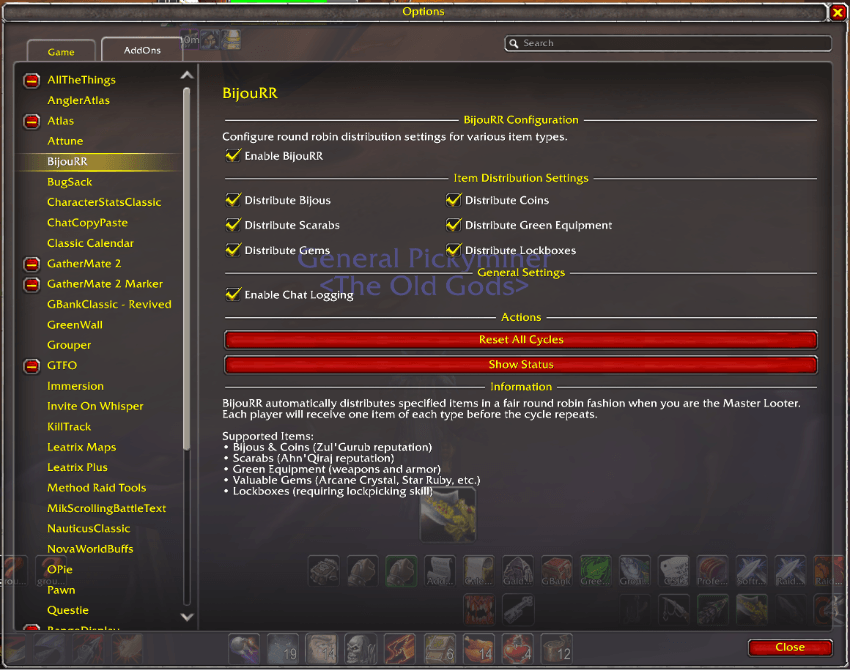
BijouRR Config Panel.png
Description
BijouRR - Automated Round-Robin Loot Distribution for Classic Era
Tired of manually distributing ZG coins and bijous one by one to 40 raid members? BijouRR handles it all automatically.
BijouRR is a raid loot utility for WoW Classic Era that automates round-robin distribution of consumable loot (ZG coins, bijous, AQ scarabs, gems, lockboxes, and green gear) while intelligently routing crafting materials directly to the Master Looter's bags—all without any manual intervention from the raid leader.
What's New
v1.2.12 (2026-10-04) - A Splash of Orange
Changed
- BijouRR's name now shows in orange in the in-game AddOns list, matching the rest of our addons.
Core Features
Round-Robin Distribution
- Fully Automatic: As the Master Looter, simply open the loot window — BijouRR distributes eligible items without any clicks
- Fair Rotation: Tracks who received what across the entire raid session; no one gets two of the same category until everyone has had one
- Session Guards: Per-loot-window duplicate protection prevents the same player receiving two bijous (or coins, etc.) from a single boss drop
- 1-Hour Reset: Rotation state resets automatically if the raid is offline for more than an hour — picks up seamlessly if you relog mid-session
- Supported Item Types: ZG Coins, ZG Bijous, AQ Scarabs, Gems, Lockboxes, Green Equipment, all Common (white) items such as Hourglass Sand and Runecloth, and all Junk (grey) items (Common and Junk are opt-in)
Master Looter Data Pack System
- Automatic Routing: Items in enabled data packs are sent directly to the Master Looter's bags instead of being rolled out
- Molten Core Pack: Fiery Core, Lava Core, and crafting mats — sent to ML for officer distribution
- Blackwing Lair Pack: Elementium Ore
- Zul'Gurub Pack: Bloodvine
- Ahn'Qiraj Pack: All Qiraji Idols from AQ20 and AQ40 — configurable per raid tier
- Connected-Realm Aware: Candidate matching on connected-realm clusters correctly handles
PlayerName-RealmNameformat
Exclusion System
- Various Pack: Items that should be left for manual distribution (e.g. Demonic Rune) — completely ignored by the addon while "Enable Various Exclusions" is ticked (off by default)
- Auto-Detection: Profession recipes (Recipe:, Pattern:, Plans:, Formula:, Schematic:, Design:) and class spell books (Book of, Tome of) are automatically excluded without any configuration
- Always Excluded: Onyxia Hide Backpack and the Sacks of Gems are always left in the loot window;
/brr excludedlists them
Configuration UI
- One-Stop Setup: Open with
/brrconfigor ESC → Interface → AddOns → BijouRR - Per-Category Toggles: Enable or disable each item type and each data pack independently
- Settings Persist: All configuration survives logout, reload, and game updates
How It Works
Distribution Priority (in order)
- Various Pack / Always Excluded: Item is completely ignored — left in loot window for manual handling (Various only while its checkbox is on)
- Master Looter Data Pack: Item is sent directly to the ML's bags (if corresponding pack is enabled)
- Recipes and Class Books: Left in the loot window for eligible players to roll on
- Round-Robin Category: Item is distributed to the next player in the rotation for that category
- Unrecognized: Item is left untouched for manual distribution
Setup (One-Time)
- Install BijouRR and enable it in your AddOns list
- Open configuration:
/brrconfig - Check the item categories you want to auto-distribute (Coins, Bijous, Scarabs, etc.)
- Check the data packs for items that should go to the Master Looter (MC Crafting, BWL, ZG, AQ)
- In your raid, set yourself as Master Looter
- Open the loot window — BijouRR handles the rest
Master Looter Setup
- BijouRR detects the current Master Looter automatically from the raid's loot settings
- Optionally run
/bijoumaster setmaster YourCharacterNameonce (saved permanently) as a fallback in case detection ever fails - Use
/bijoumaster statusto confirm the loot method, the Master Looter, and which items are designated
Commands
Main Commands (/brr)
/brr— Toggle addon on/off/brr status— Show current cycle status and loot history/brr history— Display full record of all loot distributed this session/brr reset— Reset all loot tracking counters/brr log— Toggle debug logging on/off/brr excluded— Show all manually excluded items/brr coin//brr bijou//brr scarab//brr green//brr gems//brr lockboxes//brr common//brr junk— Toggle individual categories (/brr commonand/brr junkalso lower the loot threshold to Common / Poor)/brr threshold poor//brr threshold common//brr threshold uncommon— Manually set the loot threshold/brrconfig— Open configuration window
Master Looter Commands (/bijoumaster)
/bijoumaster enable/disable— Enable or disable the ML designation system/bijoumaster status— Show loot method, master looter, and data pack state/bijoumaster setmaster <name>— Set fallback ML name for when auto-detection is unavailable/bijoumaster testitem <itemID>— Preview exactly how a specific item will be handled/bijoumaster help— Show all master looter commands
Testing Example
/bijoumaster testitem 12662   -- Demonic Rune → "COMPLETELY IGNORED" while Various exclusions are on
/bijoumaster testitem 17010   -- Fiery Core → "sent to MASTER LOOTER" while MC Auto-Designate is on
/bijoumaster testitem 19698   -- Zulian Coin → round-robin while Coins are on
Data Packs
Master Looter Packs (items sent to ML bags)
- Molten Core — Fiery Core (17010), Lava Core (17011), Essence of Fire (7078), Essence of Earth (7076), Core of Earth (7075), Blood of the Mountain (11382)
- Blackwing Lair — Elementium Ore (18562)
- Zul'Gurub — Bloodvine (19726)
- Ahn'Qiraj — All Qiraji Idols from AQ20 (20866–20868) and AQ40 (20869–20876), each tier with its own checkbox
Exclusion Pack (items left for manual looting)
- Various — Demonic Rune, Onyxia Hide Backpack, the Madness drops (Gri'lek's Blood, Hazza'rah's Dream Thread, Renataki's Tooth, Wushoolay's Mane), the colored Sacks of Gems, and the Qiraji Artifact, Armaments and Regalia; used while "Enable Various Exclusions" is ticked
Technical Details
- WoW Classic Era: Interface version 11508 — not compatible with Wrath, Cata, or retail
- Ace3 Framework: Built on AceAddon-3.0, AceConsole-3.0, AceConfig-3.0, AceConfigDialog-3.0, AceGUI-3.0 (loaded from the shared Ace3 addon — must be installed)
- Master Looter API: Uses
GetMasterLootCandidate/GiveMasterLoot— requires the player to be the Master Looter in the raid - SavedVariables: All settings and rotation state persist across sessions via WoW's SavedVariables system
- Required Addons: Ace3, VersionCheck-1.0 and LibAceGUIWidgets — CurseForge installs all three automatically; if you install by hand, install all three or BijouRR will not load
Frequently Asked Questions
Do I have to be Master Looter?
Yes. BijouRR uses the WoW Master Loot API to distribute items. You must be the Master Looter in your raid group.
Will it distribute epic gear?
No. BijouRR only distributes the item categories you explicitly enable (coins, bijous, scarabs, greens, gems, lockboxes, and the opt-in Common and Junk items). Boss epics and blues are left untouched for manual distribution.
What happens to items not in any data pack or category?
They are ignored entirely — left in the loot window for you to distribute manually.
I'm on a connected realm — will candidate detection work?
Yes. BijouRR v1.2.7+ includes realm-aware candidate matching. PlayerName-RealmName format from GetMasterLootCandidate is handled correctly.
How do I add an item to the Various (ignore) list?
There is no in-game command for it. Edit Data Packs\Various.lua, add the item ID to the list in that file, and reload your UI. Make sure "Enable Various Exclusions" is ticked in /brrconfig.
Can I see what happened to all the loot last raid?
Use /brr history to see the full distribution log for the current session.
Bug Reports & Feature Requests
Found a bug or have a suggestion?
If you have any questions, comments or anything else, please feel free to reach out on Discord!
Recent Updates
v1.2.12 (2026-10-04) — A Splash of Orange
Changed
- BijouRR's name now shows in orange in the in-game AddOns list, matching the rest of our addons
v1.2.11 (2026-09-24) — Installs Everything It Needs
Changed
- BijouRR now lists every addon it needs, so a CurseForge install brings in Ace3, VersionCheck-1.0 and LibAceGUIWidgets automatically
/bijoumaster testitempredicts what will happen using your current settings- This page and the included guide now match what the addon actually does
Fixed
- A fresh CurseForge install would not load because one required addon was not installed with it
/bijoumaster testitemno longer promises Master Looter routing for a raid whose Auto-Designate option is off, or ignoring for Various items while Various exclusions are off- More reliable Master Looter detection when the game does not report the loot method directly
v1.2.10 (2026-07-22) — Classic Era API Update Compatibility
Fixed
- BijouRR failed to load after the latest WoW Classic Era game update; it loads and runs normally again. Grab this version if the addon stopped working on patch day
v1.2.9 (2026-07-09) — Common Item Distribution, AQ Idol Split & Fixes
New
- "Distribute Common Items" — one toggle that round-robins all common (white) items (Hourglass Sand, Runecloth, white gear) to the raid and lowers the loot threshold to Common when you lead a raid. Off by default. While on, all white items route through the Master Looter, and a dropped stack goes to one player since the game cannot split a stack while looting. Coins, bijous, scarabs, gems, and lockboxes keep their own rotations
- "Distribute Junk Items" — the same one tier lower for grey/junk items, lowering the threshold to Poor. Enable both Common and Junk and the Master Looter hands out essentially everything the raid drops
- Separate AQ20 and AQ40 idol toggles — route Ruins of Ahn'Qiraj idols to the Master Looter independently of Temple of Ahn'Qiraj. If you had the old combined "AQ Items" option on, enable the new AQ20 toggle to keep routing AQ20 idols
Fixed
- Items added to a data pack in an update now apply automatically on your next login instead of being ignored until you toggled the pack off and on again
- "Completed X/Y" counts and the per-player status breakdown now display correct, properly formatted totals
- Corrected a mislabeled item in the exclusion list (Onyxia Hide Backpack); no change in play, just cleaner data
v1.2.8 (2026-04-02) — Core Bug Fixes
Changed
- Removed a built-in fallback Master Looter name. If BijouRR cannot detect the Master Looter, it now says so instead of guessing; set a fallback with
/bijoumaster setmaster <name>
Fixed
- The loot rotation started over on every login instead of carrying on through a raid night
- One player could receive two coins, bijous, scarabs, gems or lockboxes from the same loot window
- Items set to go to the Master Looter were not delivered on connected realms
- Master Looter routing could miss raid members in larger groups
Credits
Developed by:
- Kaytooben — Original Developer
- Pimptasty — BijouRR Revived Fork Developer
Special Thanks:
- The Old Gods guild community for testing and feedback
- Ace3 library maintainers for the excellent framework
- WoW Classic community for feedback and support
License
BijouRR is All Rights Reserved. It is a maintained fork of the original BijouRR by Kaytooben (All Rights Reserved); the original author retains full rights to the original work. See the LICENSE file for details.
Download BijouRR today and free your raid leader from distributing coins and bijous by hand!
BijouRR - Revived Team


Owner