BetterBags - EllesmereUI Theme
- By
A BetterBags theme that brings the dark, flat aesthetic of EllesmereUI into your bag window.
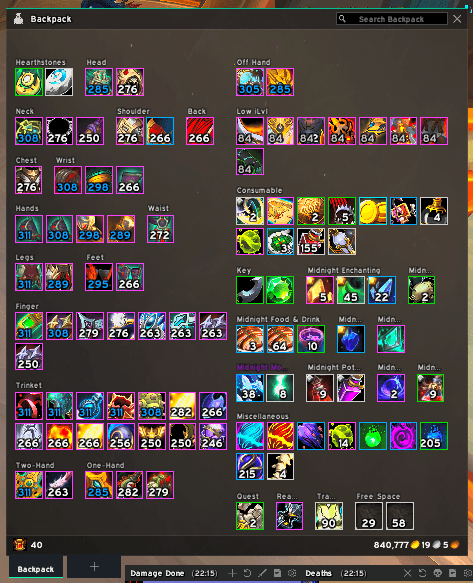
Screenshot 2026-08-30 102623.png
Description
BetterBags — EllesmereUI Theme
A BetterBags theme that brings the dark, flat aesthetic of EllesmereUI into your bag window.
What it does
Registers a custom theme for BetterBags that visually matches the EllesmereUI interface style, dark panels, accent highlights, flat tabs, and quality-colored item borders.
Requirements
[!WARNING] EllesmereUI must be installed and enabled for the theme to appear in BetterBags' theme list.
How to enable
- Install the addon alongside BetterBags and EllesmereUI
- Open your bag (
B) - Left click the bag icon and click on Open Options Screen
- Click on the Theme tab
- Select EllesmereUI from the theme list
Recommended setting
Set the BetterBags background opacity to 100%. The theme uses a full background image that is designed to be fully opaque. Lower opacity values will make the window look washed out. You can adjust this in BetterBags settings under Backpack > Opacity.
Disclaimer
This addon is an independent community project and is not affiliated with, endorsed by, or made by the EllesmereUI development team. All EllesmereUI trademarks and assets belong to their respective owners.
BetterBags - EllesmereUI Theme Team