Better LFG filters (Forever)
- By
Less scrolling, better groups. Native-first role, class, and level filters that fit naturally into WoW Forever’s LFG interface.
Pc4JFLs.png
Description
Better LFG: Less scrolling, better groups
Finding the right group in WoW Forever shouldn’t mean opening listing after listing and checking every role by hand. Better LFG adds role, class, and level filters directly to the familiar Group Finder, helping you get to the listings that fit and get back to playing.
Find groups that need your role
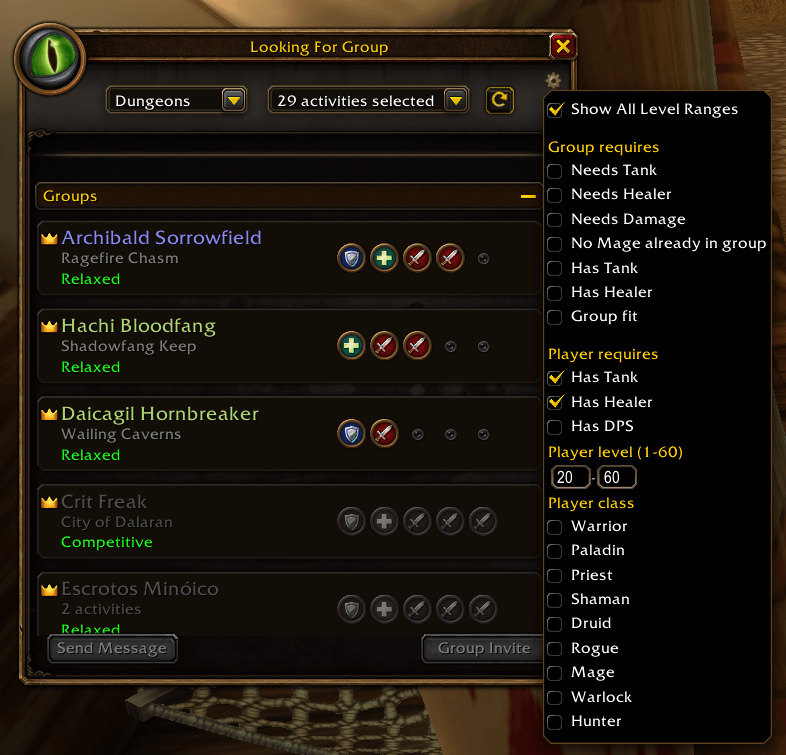
Use the group filters to look for listings that need a tank, healer, or damage dealer. You can also require that a group already has a tank or healer, or hide groups that already include someone of your class.
Group Fit helps when you’re searching as a party. It checks whether a listing has room for your current group. If your party composition is invalid for the check, the option is disabled with a short explanation instead of showing misleading results.
Find the players you need
Player listings have their own filters, separate from group filters. Choose tank, healer, or DPS roles; set a minimum and maximum level from 1 to 60; and select the classes you’re looking for. Leave a role or class selection empty to include all options in that category. Combine role, class, and level filters to narrow the list.
At home in WoW Forever
Better LFG takes a native-first approach: its options live in the existing Group Finder interface, rather than a separate window that replaces it. Group filters stay with group listings, player filters stay with player listings, and the familiar LFG experience remains familiar.
Better LFG filters (Forever) Team