BestToolTipEver
Premium WoW Forever tooltip replacement with live health, quest objectives, player/NPC details, themes, scaling, fonts, linger controls, compact layouts, and smart addon compatibility.
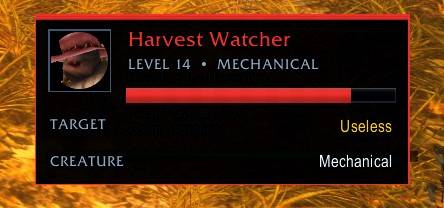
bte enemy.jpg
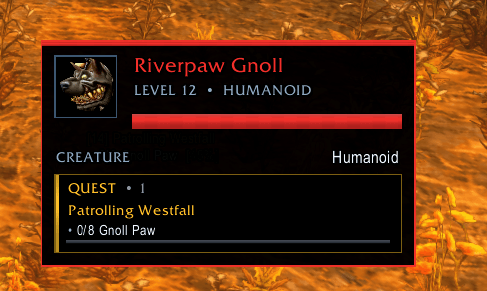
quest.png
Description
# Best Tooltip Ever
**Version 1.0.1 • WoW Forever • Interface 16001**
Best Tooltip Ever (BTE) is a premium unit-tooltip replacement built for WoW Forever. It keeps the information you expect from the game, then adds live unit data, quest awareness, clean visual themes, positioning controls, compact layouts, and conflict handling for other tooltip addons.
BTE is designed around one rule: **unit tooltips should be fast to read and should never get in the way of item, spell, map, Questie, or other third-party tooltips.**
## Highlights
- Live player, NPC, pet, and enemy unit tooltips
- Health bar and optional health text with frequent live refresh
- Power bar and optional power values
- Full player names, level, race/class, guild/rank, faction, role, and status when available
- NPC creature type/family, classification, optional NPC ID, and GUID
- Current target with optional target health
- Portraits and raid markers
- Quest objectives and progress bars on relevant units
- Compact and Standard unit layouts
- Compact and Standard quest layouts
- Seven built-in themes with custom BTE textures
- Independent unit-tooltip and item/native-tooltip sizing
- Fixed or cursor-following positioning
- Configurable tooltip linger before fade
- Tooltip-addon conflict detection and ownership modes
- Persistent settings and a live unit preview
## Installation
1. Extract the archive.
2. Copy the **BestTooltipEver** folder into your WoW Forever `Interface/AddOns` directory.
3. Start or reload the game.
4. Type `/bte` or click the BTE minimap icon.
The installed folder should look like:
```text
Interface/
└─ AddOns/
└─ BestTooltipEver/
├─ BestTooltipEver.toc
├─ Core.lua
├─ Style.lua
└─ ...
```
Do not rename the addon folder.
## Opening the Control Center
You can open BTE in several ways:
- Left-click the BTE minimap button
- Type `/bte`
- Type `/besttooltip`
- Type `/tooltip`
- Use the **Toggle Control Center** keybind
- Open the addon from WoW's AddOns settings page when that API is available on the client
Right-click the minimap button to rescan for tooltip-addon conflicts.
## Unit Tooltips
BTE replaces the visual unit tooltip with a single unified card. The native Blizzard/Forever tooltip remains underneath only as needed for the game's tooltip lifecycle and third-party compatibility.
Available unit information includes:
- Name and realm/display name
- Level
- Race and class
- Guild and rank
- Faction
- Group role
- AFK/DND/dead/offline status
- Creature type and family
- Rare/elite/world-boss classification
- Current target
- Health and power
- Raid marker
- Optional NPC ID and GUID
BTE automatically grows the card when needed so long names are not intentionally truncated just to make room for the health display.
## Quest Awareness
When a hovered unit is tied to an active quest, BTE can show a dedicated quest section with:
- Quest titles
- Objective text
- Current/required counts
- Completed-objective checks
- Progress bars
- Configurable maximum quest lines
BTE uses structured tooltip data when WoW Forever provides it and can fall back to matching active quest-log objectives against the hovered unit.
Questie, map pins, item tooltips, spell tooltips, and other non-unit tooltip contexts are treated as separate tooltip sessions. BTE drops stale unit state when those contexts take over so the previous NPC/player card does not overwrite the information they provide.
## Appearance
BTE includes its own media and seven themes:
- Midnight
- Obsidian
- Arcane
- Alliance
- Horde
- Emerald
- Classic Gold
Appearance controls include:
- Unit-aware or theme accent colors
- Body and header fonts
- Font sizes and outline
- Background opacity
- Border opacity
- Minimum panel width
- Panel padding
- Standard or Compact unit density
- Standard or Compact quest density
- Optional styling for non-unit tooltips
The Control Center includes a **single-card live unit preview** that mirrors the current BTE unit layout. The preview is fit to the settings pane; the configured live unit and native/item scale percentages are shown above it.
## Scale and Position
Unit tooltips and native/item tooltips have independent sizing controls:
- **Unit tooltip scale** controls BTE player/NPC/enemy cards.
- **Item / native size** controls bag items, comparison tooltips, spells, map/native tooltips, and other non-unit `GameTooltip` content.
Unit cards can use:
- A draggable fixed anchor
- Cursor-following mode
- Automatic edge-aware cursor placement
- Eight explicit cursor directions
- X/Y cursor offsets
- Screen clamping
Use `/bte unlock` to move the fixed anchor.
## Linger and Fade
Unit tooltips can remain readable briefly after the pointer leaves the unit.
Under **Position → Combat & Hide Behavior** you can configure:
- **Linger before fade**
- **Linger duration** from 0.0 to 3.0 seconds
The default is 1.0 second. During that linger window, BTE keeps health (and visible power/target data) updating when the same unit is still available through a stable **target**, **focus**, or **nameplate** token. If the unit is no longer safely addressable, the card simply freezes at its last known values until it fades. New unit, item, spell, map, or Questie tooltip contexts still cancel the old linger immediately so stale unit cards do not cover new information.
## Tooltip Addon Compatibility
BTE scans for known tooltip modifiers and can also flag other loaded addons with tooltip-related names.
Ownership modes:
- **BTE Primary** — BTE owns unit presentation and its configured native tooltip styling.
- **Compatibility** — another addon can own the base tooltip while BTE keeps its unit intelligence card.
- **Other Only** — BTE becomes passive.
BTE never silently disables another addon.
If two addons are both trying to restyle or reposition `GameTooltip`, choose one primary owner in **Compatibility**.
## Presets
BTE includes four one-click starting points:
- **Explorer** — quest/world information first
- **Raider** — fast unit information with less quest clutter
- **Minimal** — compact and low-noise
- **Developer** — IDs and diagnostic information enabled
Presets only change their related settings; you can continue customizing afterward.
## Commands
```text
/bte Open the Control Center
/bte unlock Lock/unlock the fixed tooltip anchor
/bte conflicts Rescan loaded tooltip addons
/bte reset Restore BTE defaults
```
## Troubleshooting
If something looks wrong, the most useful report includes:
1. The exact Lua error, if one appeared
2. A screenshot of the tooltip
3. What you were hovering (world unit, player, pet, bag item, Questie/map objective, etc.)
4. Whether another tooltip/UI addon is enabled
5. The BTE version shown in the Control Center
If another tooltip addon is installed, first open **Compatibility** and use **Rescan Loaded Addons**.
For a clean reinstall, delete the existing `BestTooltipEver` addon folder, copy in the new folder, and `/reload`. Saved settings are stored separately in `BestTooltipEverDB`.
## Release
**1.0.1** is the current public build. It adds live health continuation during tooltip linger when the hovered unit remains safely available as your target, focus, or a nameplate. **1.0.0** was the first public release.
BestToolTipEver Team