greeting.png
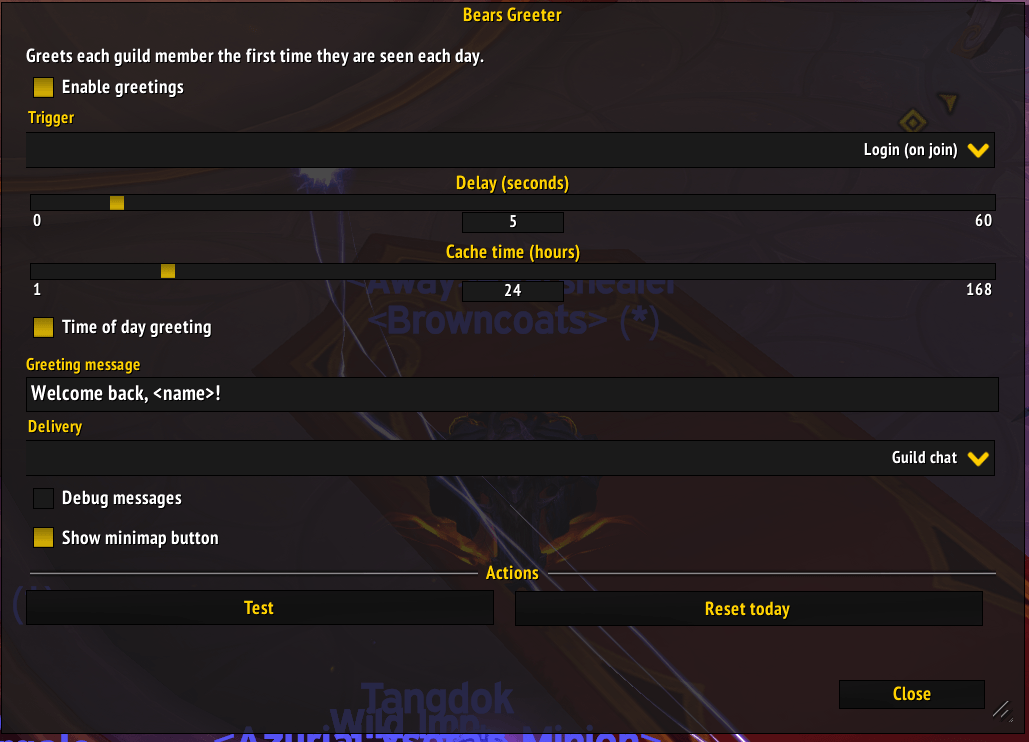
options panel.png
Description
Bears Greeter



Greets each guild member the first time they are seen in the cache window.
Bears Greeter is a small World of Warcraft addon for retail and Forever. It listens for guild chat, remembers who has already been greeted for the configured cache time, and sends one greeting per member per cache window. The list resets when the cache expires (by default, when the calendar day changes).
Status
The default behavior is:
- A guild member comes online (or speaks in guild chat, depending on the trigger setting).
- If the member has not been greeted within the cache window, wait the configured delay, then send the greeting.
- Remember the member for the configured cache time (24 hours means until the calendar day changes).
- Ignore the player themselves.
Requirements
- Retail World of Warcraft: Midnight, patch 12.1.5 or newer (primary target).
- Also supports World of Warcraft: Forever (1.60.1, interface 16001) as an optional, additional client. Neither client is required to be installed.
- Guild membership.
The TOC uses interface number 120105 (12.1.5). If your client reports a
different value, update the TOC:
/dump select(4, GetBuildInfo())Installation
The repository root is the addon folder, but the folder must be named
Bears_Greeter to match Bears_Greeter.toc. Junction or clone it into the
retail AddOns directory:
New-Item -ItemType Junction `
    -Path "C:\Gaming\World of Warcraft\_retail_\Interface\AddOns\Bears_Greeter" `
    -Target "E:\wow\Bears-Greeter"
Then run /reload in game.
For World of Warcraft: Forever, use the same junction under the _forever_ folder:
New-Item -ItemType Junction `
    -Path "C:\Gaming\World of Warcraft\_forever_\Interface\AddOns\Bears_Greeter" `
    -Target "E:\wow\Bears-Greeter"
Usage
Guild chat is monitored automatically. Open the options with /greeter, /bg,
or the addon entry in Options > AddOns > Bears Greeter.
The first time a guild member is seen in the cache window:
[Guild] Bearesquishy: Welcome back, Thrall!The player is never greeted. Members are tracked by short name, so the same character on the same realm is only greeted once per cache window.
Slash commands
| Command | Description |
|---|---|
/greeter (or /bg) |
Open the options panel. |
/greeter test |
Send a test greeting. |
/greeter reset |
Clear today's greeted list. |
/greeter toggle |
Turn greetings on or off. |
/greeter help |
Print command help. |
/bg is an alias for /greeter.
Options
| Option | Description |
|---|---|
| Enable greetings | Turn automatic greetings on or off. |
| Trigger | Greet on login (on join) or on first guild chat message. |
| Delay (seconds) | Seconds to wait after a member is seen before sending. Default 15. |
| Cache time (hours) | How long a member is remembered. Default 24 (until the calendar day changes). |
| Time of day greeting | Use a Good Morning/Afternoon/Evening greeting based on server time. |
| Greeting message | Template sent to chat. <name> is replaced with the member's name. |
| Delivery | Send to guild chat or whisper the member. |
| Debug messages | Print a local message after each greeting. |
| Test | Send a test greeting using the current settings. |
| Reset today | Clear the greeted list so members can be greeted again. |
Defaults are saved per Blizzard account in BearsGreeterDB.
How it works
In login trigger mode the addon watches GUILD_ROSTER_UPDATE for members coming
online; in guild chat mode it listens to CHAT_MSG_GUILD. Either way the member
is normalized with Ambiguate, checked against the cache, marked as greeted
before sending, and greeted after the configured delay. Greetings go out through
SendChatMessage to guild chat or as a whisper.
The cache key is either the calendar day (when cache time is 24 hours) or a
rolling time window of the configured number of hours. Expired entries are
pruned on load and on PLAYER_ENTERING_WORLD.
File layout
Bears_Greeter.toc          Addon manifest and load order
core.lua                   Addon lifecycle, guild chat handling, greeting logic, slash commands
options.lua                AceConfig options panel
Locales/                   AceLocale-3.0 localization files
Libs/                      Ace libraries; external dependencies fetched by the packager (local copies ignored by git)
.github/                   Labels, dependabot, release, and changelog workflows
.pkgmeta                   BigWigs packager configuration
README.md                  This file
CHANGELOG.md               Version history
AGENTS.md                  Project guidance for contributors and agents
Development
- The addon name, TOC filename, folder name, and SavedVariables prefix
(
BearsGreeterDB) must stay consistent. - Add any new runtime file to
Bears_Greeter.tocbeforeoptions.lua. - Add user-facing strings to
Locales/enUS.luafirst. Other locale files ship English templates that can be replaced with real translations. - Keep the code Lua 5.1 compatible.
Release automation
.github/workflows/release.yml runs BigWigsMods/packager when a tag is pushed.
It expects the repository secrets CF_API_KEY, WAGO_API_TOKEN, and the
automatic GITHUB_TOKEN. The TOC already includes
## X-Curse-Project-ID: 1783140; add ## X-Wago-ID if the addon is also
published through Wago.
.github/workflows/changelog.yml appends generated notes to an existing
release. .github/workflows/create-labels.yml syncs .github/labels.yml.
.github/workflows/auto-merge.yml enables dependabot auto-merge for minor
updates. .github/workflows/curseforge-stats.yml refreshes download stats in
stats/ daily and needs the CF_STUDIO_API_KEY secret.
Limitations
- The addon cannot know whether another addon already greeted someone.
- Changing the system clock can reset the daily list early or late.
CHAT_MSG_GUILDonly fires for messages the client can see.- Not affiliated with Blizzard Entertainment.
Bears Greeter Team

Owner