Beamlight Forever
- By
Make your current target easier to spot with a customizable, animated light beam that follows its visible nameplate.
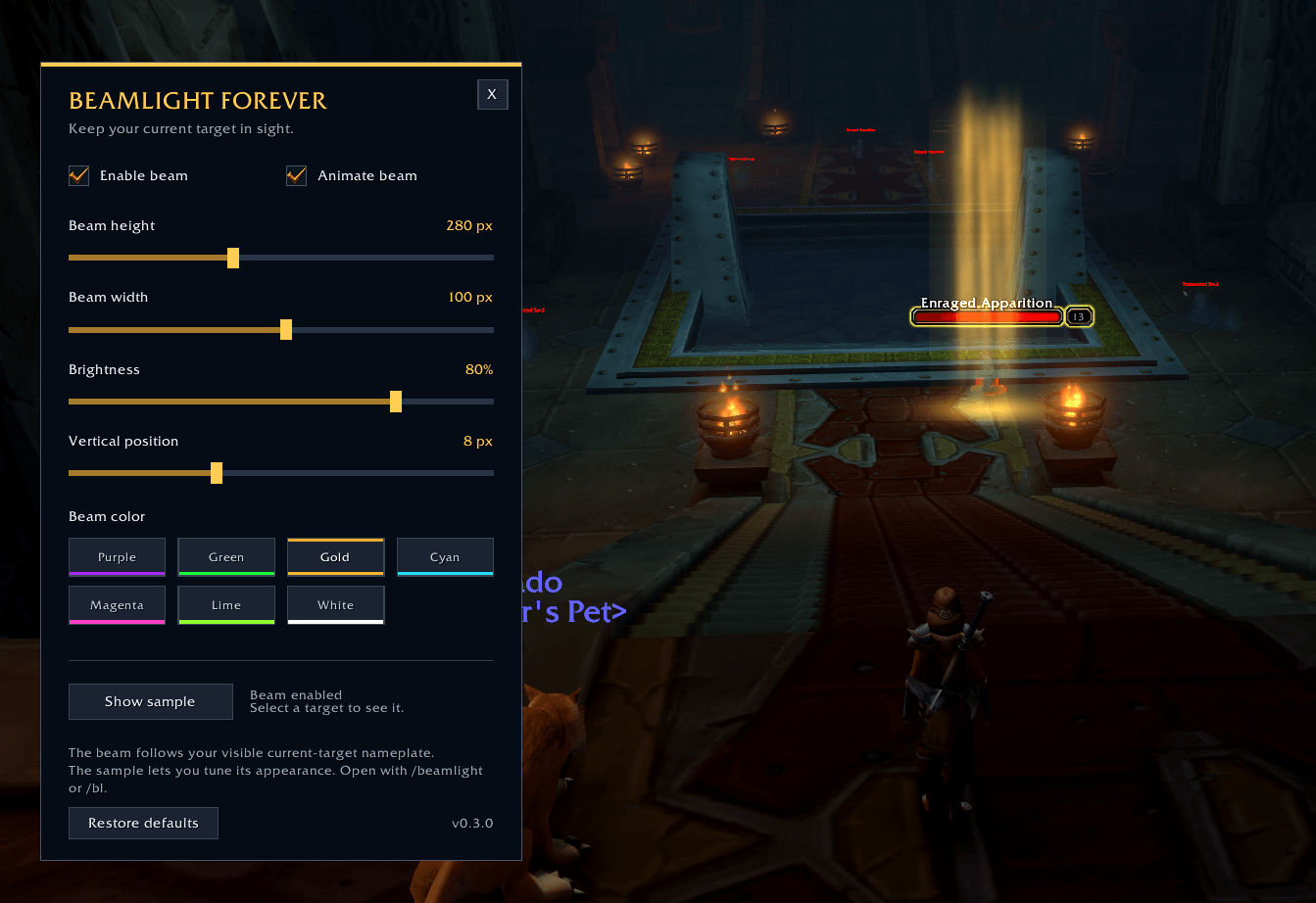
image.png
Description
Beamlight Forever
**Make your current target easier to spot.** Beamlight Forever places a broad,
soft light shaft around your selected target's visible nameplate. Switch targets
and the beam follows; clear your target and it disappears. It stays visible
while that target has an accessible nameplate.
Built for **WoW Forever 1.60.1, interface 16001**. Standalone, with no required
libraries or other addons.
## Make the beam your own
- Choose gold, purple, green, cyan, magenta, lime or white.
- Adjust height, width, brightness and **Base below nameplate** independently.
- Enjoy gently pulsing light, shimmering streaks and a breathing base glow, or
turn off **Animate beam** for a still beam.
- Use **Show sample** to tune the appearance, then turn it off and select a real
target to calibrate the base position.
- Open settings from the minimap button. Left click opens settings, right click
toggles the beam, and dragging moves the button around the minimap.
- Show or hide the minimap button independently with **Show minimap button**.
- Keep your appearance settings separately for each character.
The beam ignores mouse input, so it does not intercept your world clicks. New
installations start with an animated gold beam, 100 UI pixels wide and 420 tall,
at 80% brightness, with **Base below nameplate** set to 240 UI pixels. Existing
saved height and other appearance preferences are retained.
Increase **Base below nameplate** to move the base farther down from the bottom
of the native nameplate, or use `/bl base 400`. Changing beam height extends it
upward from the base without moving the base. The sample previews appearance
only: turn it off and select a real target before adjusting placement.
Type **`/beamlight`** or **`/bl`** to open settings. A brief startup tip also
reminds you about `/bl`, even if the beam or minimap button is off. It appears
once per UI session after loading, offers Settings and close buttons, and hides
after 12 seconds.
## Install
1. Download the **Forever 1.60.1** file.
2. Extract the ZIP and copy its `BeamlightForever` folder into the Forever
installation's `Interface/AddOns/` folder.
3. Check that the resulting path is
`Interface/AddOns/BeamlightForever/BeamlightForever.toc`.
4. Enable **Beamlight Forever** in the AddOns list, enter the game, turn on enemy
nameplates in WoW's settings, and select a nearby enemy.
## Quick commands
Both `/beamlight` and `/bl` accept these commands:
| Command | What it does |
| --- | --- |
| `/bl` | Open or close settings outside combat |
| `/bl on` / `/bl off` | Enable or disable the beam |
| `/bl animate on` / `/bl animate off` | Turn animation on or off |
| `/bl minimap on` / `/bl minimap off` | Show or hide the minimap button |
| `/bl preview` | Show or hide the labeled sample outside combat |
| `/bl color purple` | Change the beam color |
| `/bl height 420` | Set height, from 80–1200 UI pixels; keep the base in place |
| `/bl base 400` | Set base distance below the nameplate, from 0–900 UI pixels |
| `/bl width 120` | Set width, from 16–180 UI pixels |
| `/bl alpha 0.8` | Set brightness, from 0.1–1 |
| `/bl offset 8` | Fine vertical correction, from -40–100 UI pixels; higher moves up |
| `/bl reset` | Restore default settings and enable the beam |
| `/bl status` | Show the addon version and display status |
Entering combat ends the sample automatically. Settings open outside combat.
## Nameplates are required
Beamlight follows an accessible **current-target nameplate**. It cannot reliably
follow a target with nameplates disabled. It respects your nameplate preferences;
hidden, off-screen, distant or restricted nameplates may have no beam. Friendly
nameplates inside instances can be restricted.
This is a **2D visual overlay**, with the base glow at the bottom of the beam.
Base placement is manual alignment, not an exact feet anchor. Camera zoom,
distance, creature size and nameplate stacking can change the alignment.
The beam does not test depth against the game world. Nearer characters, creatures
and walls may still be overlaid. It cannot project a ground light or provide
true 3D occlusion.
If the beam is missing, use `/bl status`, check that enemy nameplates are enabled,
and try a nearby visible enemy. Status reports the enemy-nameplate preference
when the client makes it available.
## Upgrading
From **0.3.x**, replace the `BeamlightForever` addon folder with this release.
Existing character settings remain in the same saved-data file. The new base
distance starts at 240 UI pixels, while saved height and offset values remain
unchanged. Calibrate the base on an actual target after upgrading.
From **0.2.1 or earlier**, remove or disable the old `BeaconForever` addon to avoid
two beams. The renamed addon does not automatically load the old settings. To
keep them, close WoW and copy `BeaconForever.lua` to `BeamlightForever.lua` in
`WTF/Account/<account>/<realm>/<character>/SavedVariables/`, leaving the original
as a backup. Repeat for each character you want to migrate, then start the game.
## Beta status
Version **0.4.0** is a beta build. Live verification of its manual base alignment,
rendering, animation and combat anchoring remains pending. When reporting
an issue, include `/bl status`, your Forever client build and what you were doing.
Released under the **MIT License**.
Beamlight Forever 0.3.1 — Settings reminder and minimap visibility
- Add a startup tip that reminds you to type /bl to open settings. It appears
once per UI session after loading, with Settings and close buttons, and hides
after 12 seconds. It remains available when the beam or minimap button is off.
- Wait until loading finishes before showing the tip. Combat delays it until
safe; entering combat or another loading screen hides an already shown tip.
Changing zones does not repeatedly show it during the same UI session.
- Add Show minimap button in settings, alongside the existing /bl minimap on
and /bl minimap off commands.
- Retain the animated beam, seven colors, height/width/brightness/position
controls, sample preview and draggable minimap button.
- Keep the 0.3.0 BeamlightForever folder and saved-data name, and its beam/sample
placement 24 UI pixels lower than 0.2.1. Existing 0.3.0 preferences are retained.
Target: WoW Forever 1.60.1 / interface 16001.
Requires an accessible current-target nameplate. Nameplates-off tracking is not
reliably supported. Commands are /beamlight and /bl.
Beta: live 0.3.1 rendering, animation, combat anchoring, minimap and startup-tip
acceptance remain pending. No CurseForge approval or publication is claimed.
Beamlight Forever Team