Barkskin Armor Swapper
An equipment manager addon that allows easy swapping of armor sets.
An exceedingly simple equipment manager/wardrobe add-on that allows you to switch between different gear-sets. This add-on is intended for older versions of the game (like Classic, TBC Classic, etc), that do not have this functionality built in. It is created to be easily managed through different API changes.
Basics
On your character panel, there will now be a new button that will allow you to open the armor set manager.
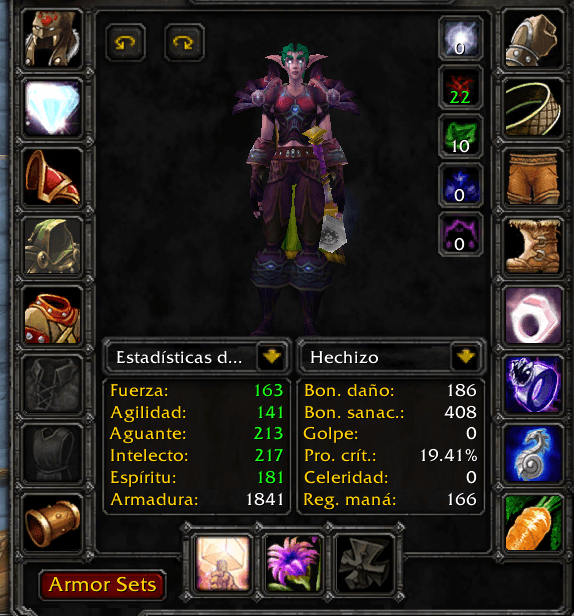
It is located in the bottom left side of your character pane, and will vanish if you swap to other tabs (such as PvP, abilities, etc). Once you click on it, it will pull up the armor set manager, which attaches itself to the right side of your character pane, as shown below.
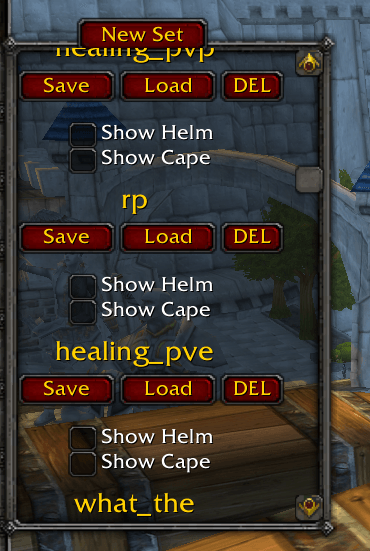
From here, you can create a new set or delete/edit an existing one. The add-on also allows you to show or hide capes/helms by using the checkbox. Items that are currently in your set will have an additional tool-text-tip appended to them.
Macro-Usage and Slash Functions
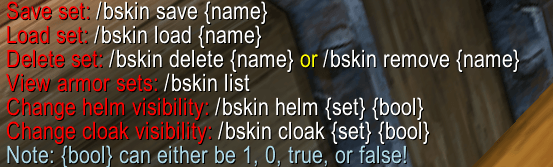
This add-on is compatible with macros. Everything that is doable with the UI is also doable with built in slash commands. In order to use slash commands, type /bskin to see all of the commands. The result of the /bskin command is shown below.
Barkskin Armor Swapper Team