BambyTrace
- By
A lightweight Lua error monitor with a minimap status light, copyable details, and a 24-hour history in one compact addon.
CF1.png
CF2.png

CF3.png
Description
ENGLISH
BambyTrace, Keep track of Lua errors and warnings
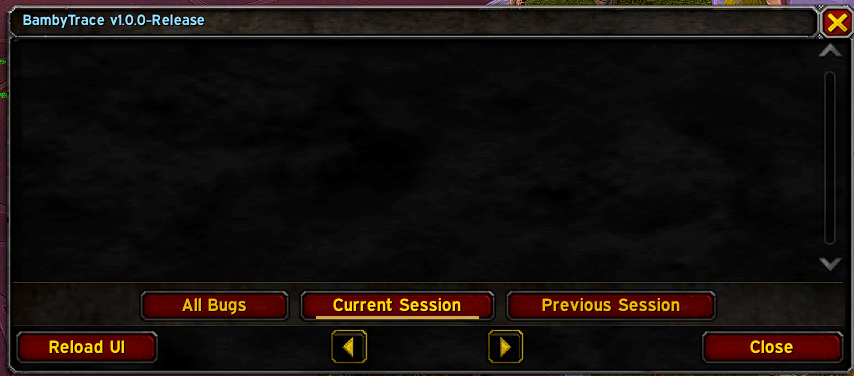
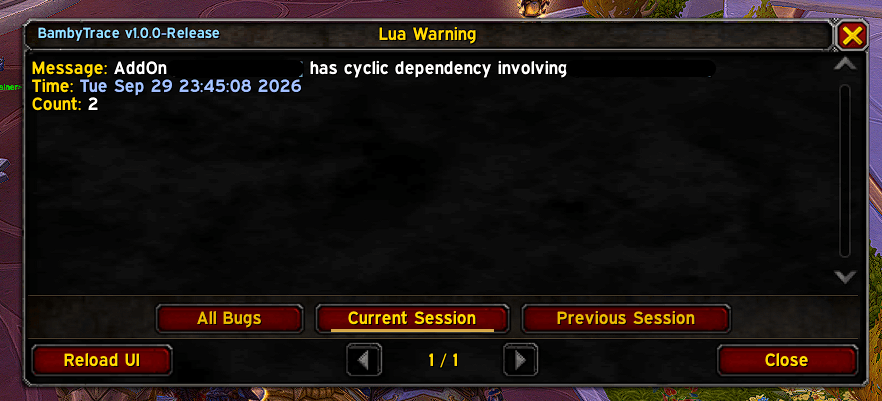
BambyTrace combines World of Warcraft’s Lua error window, a minimap status indicator, and a short history. The icon stays green while your current session is clear and turns red when a Lua error or warning is recorded. Click it to open Blizzard’s error window, where you can read and copy the details.
When the client allows it, BambyTrace suppresses automatic error popups so you can keep playing and open the message later.
Features
- Error messages, timestamps, repeat counts, stack traces, and local variables where the client provides them.
- Color highlights for addon names and timestamps to make reports easier to read.
- Current Session, Previous Session, and All Bugs views.
- Optional local history of up to 48 readable entries for up to 24 hours. Long details are visibly shortened.
- Delete History clears saved entries and reloads the interface to clear the current error list.
- A movable minimap icon, three font sizes, and optional chat and sound alerts.
Use /btrace or /bambytrace to open the error window. Use /btrace options or right-click the minimap icon to open settings.
BambyTrace uses Blizzard’s error capture. Readable history data stays on your computer. Protected or unreadable error details are skipped.
Compatibility
BambyTrace 1.0.6 targets World of Warcraft: Midnight (Retail, interfaces 120100 and 120105) and World of Warcraft: Forever (1.60.1, interface 16001). Both targets have been checked locally. Full in-game validation for Forever is still pending.
=====================================================================
DEUTSCH
BambyTrace, Lua-Fehler und Warnungen im Blick
BambyTrace bringt die Lua-Fehleranzeige von World of Warcraft, eine Statusanzeige an der Minikarte und einen kurzen Verlauf zusammen. Das Symbol bleibt grün, solange die aktuelle Sitzung fehlerfrei ist. Sobald ein Lua-Fehler oder eine Warnung erfasst wird, wechselt es auf Rot. Ein Klick öffnet Blizzards Fehlerfenster, in dem du die Details ansehen und kopieren kannst.
Wenn der Client es erlaubt, unterdrückt BambyTrace das automatische Fehlerfenster. So kannst du weiterspielen und die Meldung später öffnen.
Funktionen
- Fehlertext, Zeitstempel, Wiederholungszähler, Aufrufliste und lokale Variablen, soweit der Client diese Daten bereitstellt.
- Farbige Hervorhebung von Addon-Namen und Zeitstempeln für besser lesbare Meldungen.
- Ansichten für die aktuelle Sitzung, die vorherige Sitzung und alle gespeicherten Meldungen.
- Optionaler lokaler Verlauf mit bis zu 48 lesbaren Einträgen für maximal 24 Stunden. Lange Details werden sichtbar gekürzt.
- „Verlauf löschen“ entfernt gespeicherte Einträge und lädt das Interface neu, um auch die aktuelle Fehlerliste zu leeren.
- Verschiebbares Minikartensymbol, drei Schriftgrößen und optionale Hinweise per Chat und Ton.
Mit /btrace oder /bambytrace öffnest du die Fehleranzeige. Mit /btrace options oder einem Rechtsklick auf das Minikartensymbol öffnest du die Einstellungen.
BambyTrace verwendet Blizzards Fehlererfassung. Lesbare Verlaufsdaten bleiben lokal. Geschützte oder unlesbare Fehlerdetails werden übersprungen.
Kompatibilität
BambyTrace 1.0.6 ist für World of Warcraft: Midnight (Retail, Interface 120100 und 120105) sowie World of Warcraft: Forever (1.60.1, Interface 16001) ausgelegt. Beide Varianten wurden lokal geprüft. Die vollständige Prüfung im Spiel steht für Forever noch aus.
BambyTrace Team