BagTweak
- By
Bigger bags you can put anywhere: scale the default bags and drag them as one group.
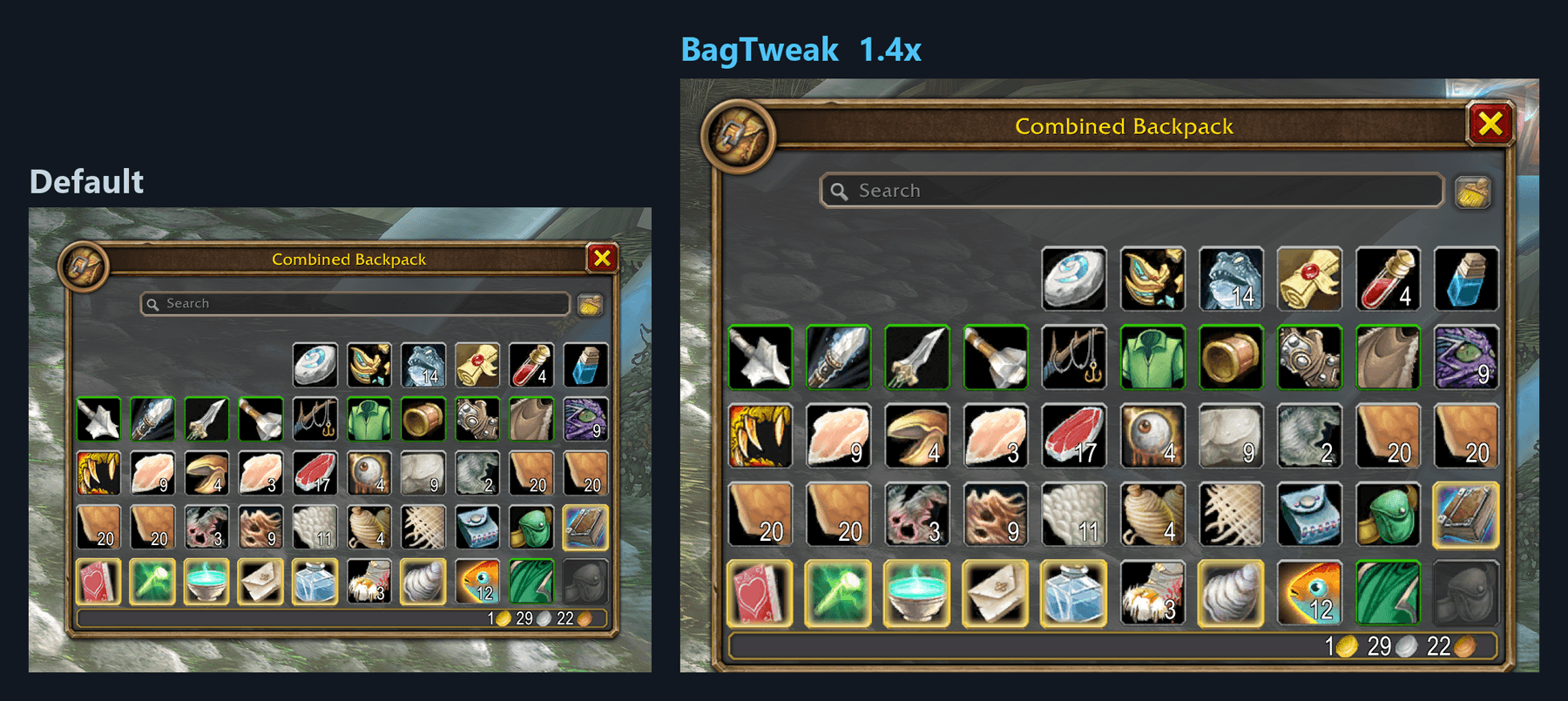
BagTweak-1-before-after.png
Description
Bigger bags you can put anywhere. BagTweak scales the default bag frames and lets you drag them as one group.
The default bags always open in the bottom right corner at a fixed size. BagTweak keeps the Blizzard bags and their normal column layout, but you choose how big they are and where they sit. Your setting is saved per account and applied every time you open a bag.
Features
- Drag any open bag and all bags move together
- Ctrl + mouse wheel over a bag changes the size (0.5x to 2x)
- Size and position are remembered between sessions
- Lock option, so nothing moves by accident
- Works with the default bags, so no new bag frames and no item handling changes
- Lightweight, with no dependencies
How to use
- Move: hold the left mouse button on the border or title of a bag and drag.
- Resize: hold Ctrl and turn the mouse wheel over a bag, or type
/bags scale 1.3.
Commands (/bags or /bagtweak)
| Command | Effect |
|---|---|
/bags |
Show the current size and a short help |
/bags scale 1.3 |
Set the size (0.5 to 2) |
/bags lock |
Lock or unlock moving and resizing |
/bags reset |
Back to the default size and position |
Notes
- The game still decides how the bags are arranged in columns. BagTweak only moves and scales that layout as a whole.
- With a large size and many open bags the top column can reach the edge of the screen. Drag the bags lower or pick a smaller size.
License: GPL-3.0-or-later
BagTweak Team