Bagnon Item Groups
- By
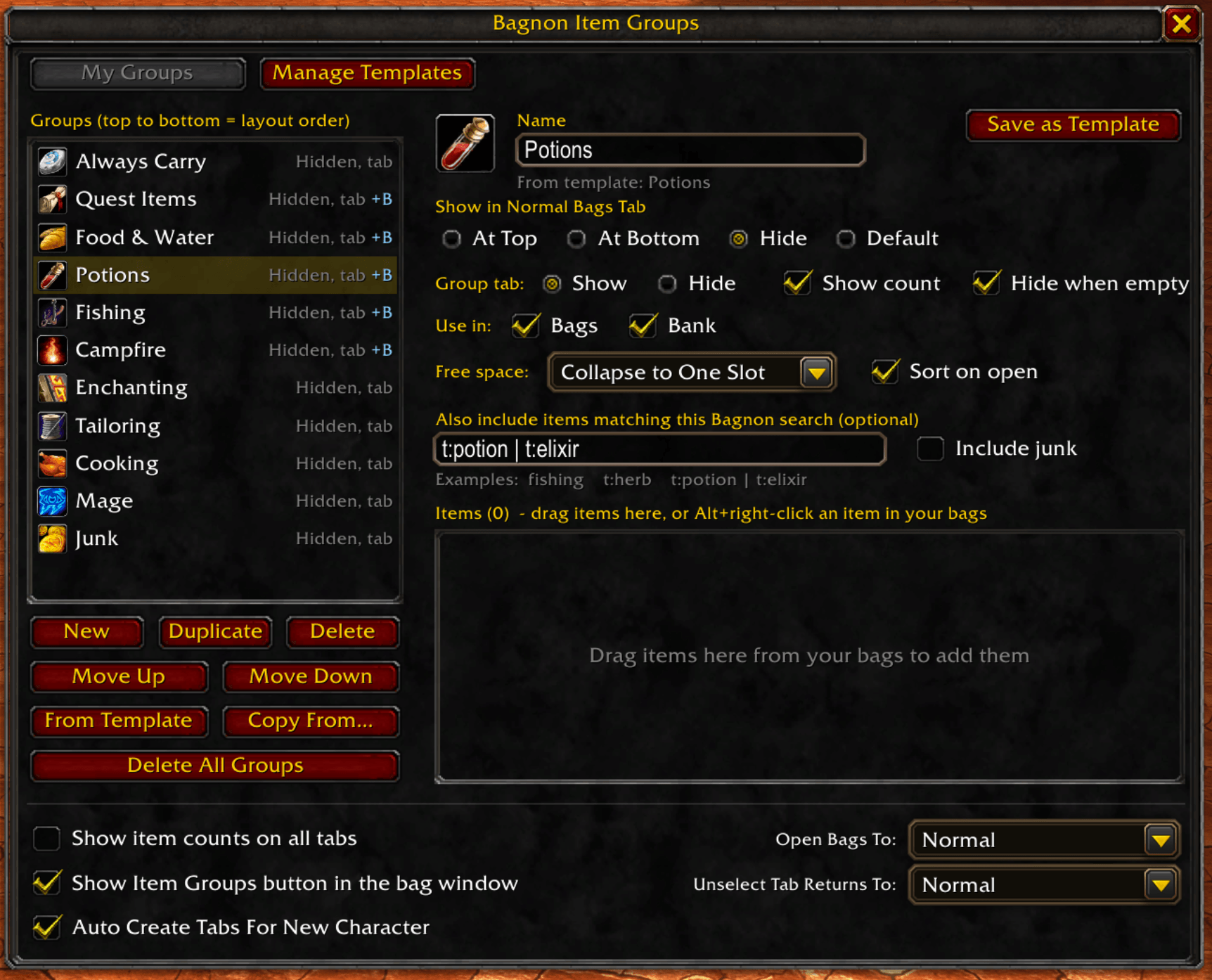
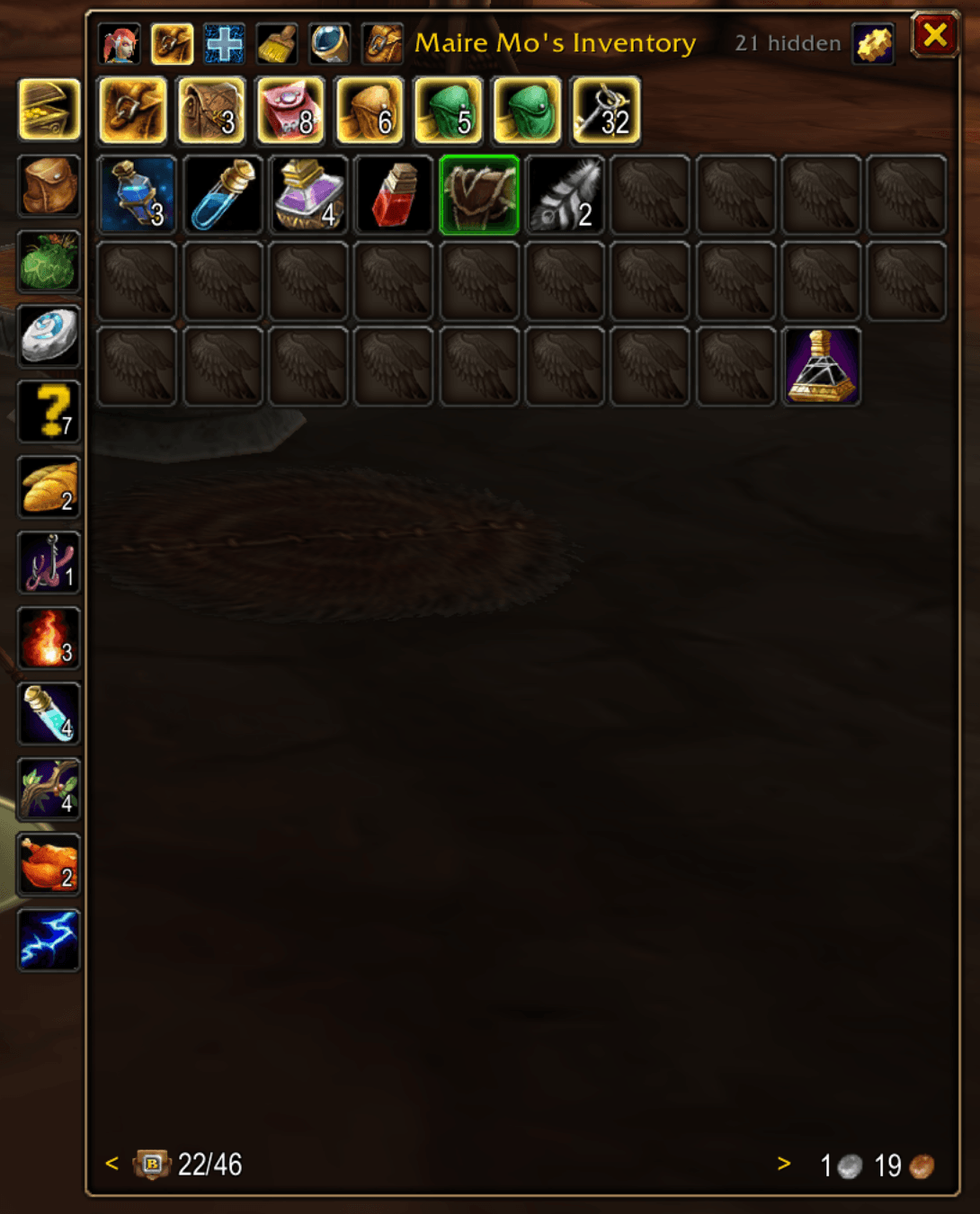
Organize Bagnon into named item groups: place items at the top or bottom of your bags, give groups their own tabs, hide clutter and spot junk.
2026-10-15_12-02-19.png
2026-10-13_23-34-11.png
Description
Bagnon Item Groups
Organize your Bagnon bags and bank into named groups. Give your hearthstone and tools their own tab, keep herbs and potions together, hide the quest items you never look at, and collapse empty slots into one tidy count.
Requires Bagnon. This is a plugin; it does not replace Bagnon.
Features
Item groups
- Named groups, per character. Make a group, add items, and choose where they go.
- Bags and bank. Use each group in your bags, your bank, or both. Both windows share the same group list and order.
- Search-based groups. Besides picking items, a group can include everything that matches a Bagnon search, such as
t:herbort:potion | t:elixir. - Junk group. Gray items that sell to a vendor (the same rule the game's Sell All Junk button uses), with quest items always left out.
- Group order matters. The order of your groups decides which one sits closest to the top or bottom, and which one wins when an item belongs to more than one.
Placement in Normal Bags
- At Top / At Bottom: the group's items go in the first or last slots when you sort, with free space kept between your other items and a bottom group.
- Hide: keeps the items out of Bagnon's Normal Bags tab. The All tab always shows everything, and a small "N hidden" note lets you peek from Normal Bags.
- Default: Bagnon's usual sort order.
Group tabs
- Each group can have its own tab, with an optional item count, and can hide itself while it is empty.
- Group tabs live in their own column on the left of the window (right of your bags while Bagnon's Side Filters are on), so Bagnon's own tabs stay where they are.
- Click a group tab to show only that group. Click it again to return to Normal, All, or your last filter (your choice).
- If Bagnon's sidebar is off, the column adds its own All and Normal tabs at the top.
Free bag space, per tab
- Leave empty slots where they are, put them after your items, or collapse them into one slot that shows how many are free.
- Set it for each group, and for Bagnon's All and Normal tabs from their right-click menu.
- With Bagnon's bag breaks on, each section gets its own.
Templates, shared by all your characters
- Built-in templates: Always Carry, Quest Items, Food & Water, Potions, Junk, Campfire.
- Professions: Alchemy, Blacksmithing, Enchanting, Engineering, Herbalism, Leatherworking, Mining, Skinning, Tailoring, Cooking, Fishing.
- Classes: one per class, with that class's reagents and tools. Mage includes the WoW Forever Comprehension and Study scrolls.
- Template items can be limited to certain classes or professions, so one template works for every character.
- Update from Template pulls a template's latest contents into a group made from it.
- Edit the built-ins or make your own.
New characters set themselves up
The first time a character logs in with no groups, it gets the everyday templates plus groups for its learned professions and its class. You can turn this off, or click Auto Create From Templates any time.
Fast editing
- Alt+right-click any item in your bags to add it to a group.
- Drag an item onto a group's tab to add it.
- Right-click a group tab for quick settings: placement, bags or bank, free space, and more.
Sorting that respects your groups
Uses Bagnon's own sort when a group is set to At Top or At Bottom, since Blizzard's server sort cannot place groups.
Getting started
- Log in. A character with no groups gets its groups created from templates automatically.
- Open the Item Groups window with the button in Bagnon's top button row, the button on top of the group tab column, or
/big. - Alt+right-click items in your bags to add them to groups, or click New to make your own group.
Slash commands
| Command | What it does |
|---|---|
/big |
Open the Item Groups window |
/big new <name> |
Create a group |
/big add <group> <item> |
Add an item (link or ID) to a group |
/big remove <group> <item> |
Remove an item from a group |
/big sort |
Sort your bags now |
/big list |
List your groups |
/big info <item> |
Show an item's type, subtype and groups (handy for writing searches) |
/big icon |
Choose the Item Groups button icon (/big icon reset restores the default) |
Compatibility
Developed and tested on WoW Forever. Other game versions are untested. This addon hooks into Bagnon, so a future Bagnon update could change how it behaves. If that happens, the affected feature turns itself off with a chat message instead of throwing errors.
Feedback
Bug reports and ideas are welcome in the comments or the issue tracker.
Bagnon Item Groups Team