Bagly
- By
All your bags and bank in one classic-looking window – with equip, sell or auction advice for every item and Pawn-style quest reward markers.
bag sorted.png
settings.png
Bag.png
Screenshot 2026-11-25 205635.png
Description
Bagly
English
All your bags in one window – and Bagly tells you what to do with every piece of gear.
Bagly replaces the default bags and bank with a clean window in the classic World of Warcraft look. Every armor piece and weapon you find gets a clear verdict: equip it, sell it, or put it on the auction house.
Features
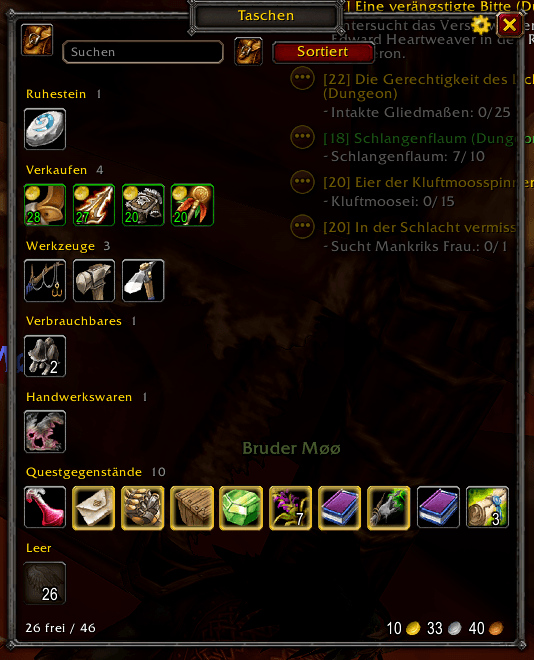
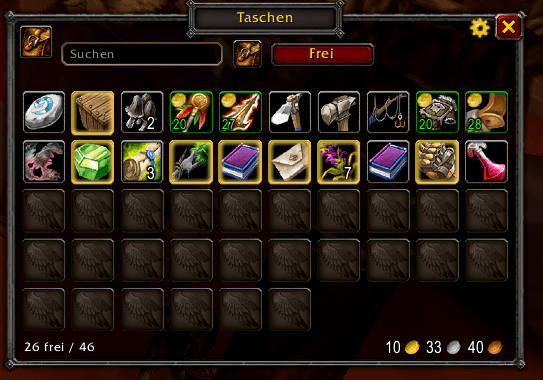
- One bag or sorted – keep every item where you put it (Free), or let Bagly sort into categories (Sorted). One click switches.
- Bank window in the same style, including buying bank bag slots.
- Only one bag button – the other bag slots disappear from your action bar. Show them in the bag window whenever you want to swap bags.
- Gear advice – green arrow = upgrade, gold coin = sell, auctioneer icon = worth more on the auction house (with Auctionator).
- Smart comparison – class, talent tree, armor type (no leather for paladins!), two-handers vs. one-hander + off-hand, dual wielding, rings and trinkets.
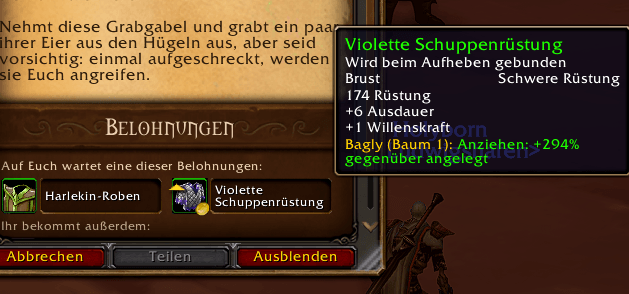
- Quest rewards like Pawn – the best upgrade and the reward worth the most gold are marked right in the quest window.
- Tooltip line on every item: "Bagly (Retribution): Equip +12% over equipped".
- Tools & Hearthstone – Blacksmith Hammer, Mining Pick, fishing poles and more are never scored and get their own category, as does your Hearthstone.
- New items glow until you look at them.
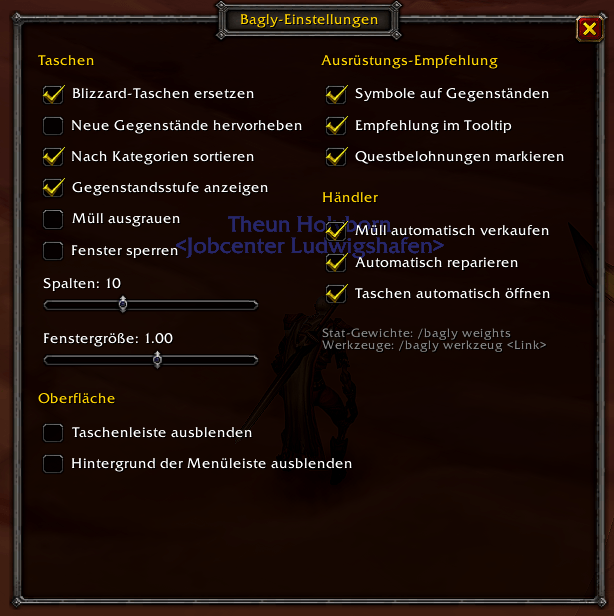
- Settings panel – turn every feature on or off: item level, gray out junk, auto-sell junk, auto-repair, hide bag bar, hide micro menu background, lock windows, columns, size …
- German & English, based on your client language.
How does Bagly score items?
Stats are read straight from the game – no outdated database. Each stat is weighted for your class and talent tree and compared to what you're wearing. The default weights are leveling values; change them with /bagly weight STR 1.2.
Commands
| Command | What it does |
|---|---|
/bagly |
Open/close bags |
/bagly config |
Settings |
/bagly categories |
Switch Free / Sorted |
/bagly weights |
Show your stat weights |
/bagly weight <stat> <value> |
Change a weight |
/bagly spec 1\|2\|3\|auto |
Choose talent tree |
/bagly keep <item link> |
Never suggest selling an item |
/bagly tool <item link> |
Treat an item as a tool |
/bagly stats |
Raw stats of the last hovered item |
Optional
- Auctionator – for auction house prices.
Found a bug or have an idea? Leave a comment!
Deutsch
Alle Taschen in einem Fenster – und Bagly sagt dir, was du mit jeder Ausrüstung machen sollst.
Bagly ersetzt die Standard-Taschen und die Bank durch ein aufgeräumtes Fenster im klassischen World-of-Warcraft-Look. Jede gefundene Rüstung und Waffe bekommt eine klare Empfehlung: anziehen, verkaufen oder ins Auktionshaus.
Funktionen
- Eine Tasche oder sortiert – alles bleibt, wo du es hinlegst (Frei), oder Bagly sortiert in Kategorien (Sortiert). Ein Klick schaltet um.
- Bankfenster im gleichen Stil, inkl. Bank-Taschenplätze kaufen.
- Nur noch ein Taschen-Button – die anderen Taschenplätze verschwinden von der Leiste. Im Taschenfenster kannst du sie jederzeit einblenden, um Taschen zu tauschen.
- Ausrüstungs-Empfehlung – grüner Pfeil = Upgrade, Goldmünze = verkaufen, Auktionator-Symbol = bringt im Auktionshaus mehr (mit Auctionator).
- Schlauer Vergleich – Klasse, Talentbaum, Rüstungstyp (kein Leder für Paladine!), Zweihänder gegen Einhand + Nebenhand, Beidhändigkeit, Ringe und Schmuckstücke.
- Questbelohnungen wie bei Pawn – bestes Upgrade und die Belohnung mit dem meisten Gold werden direkt im Questfenster markiert.
- Tooltip-Zeile an jedem Gegenstand: „Bagly (Vergeltung): Anziehen +12 % gegenüber angelegt“.
- Werkzeuge & Ruhestein – Schmiedehammer, Spitzhacke, Angeln usw. werden nie bewertet und haben eine eigene Kategorie, ebenso dein Ruhestein.
- Neue Gegenstände leuchten, bis du sie dir ansiehst.
- Einstellungsfenster – jede Funktion einzeln ein-/ausschaltbar: Gegenstandsstufe, Müll ausgrauen, Müll automatisch verkaufen, automatisch reparieren, Taschenleiste ausblenden, Menüleisten-Hintergrund ausblenden, Fenster sperren, Spalten, Größe …
- Deutsch & Englisch, je nach Client-Sprache.
Wie bewertet Bagly?
Die Werte kommen direkt aus dem Spiel – keine veraltete Datenbank. Jeder Wert wird für deine Klasse und deinen Talentbaum gewichtet und mit deiner angelegten Ausrüstung verglichen. Die Standard-Gewichte sind Leveling-Werte; ändern mit /bagly weight STR 1.2.
Befehle
| Befehl | Funktion |
|---|---|
/bagly |
Taschen öffnen/schließen |
/bagly einstellungen |
Einstellungen |
/bagly kategorien |
Frei / Sortiert umschalten |
/bagly weights |
Stat-Gewichte anzeigen |
/bagly weight <Stat> <Wert> |
Gewicht ändern |
/bagly spec 1\|2\|3\|auto |
Talentbaum wählen |
/bagly keep <Itemlink> |
Gegenstand nie zum Verkauf vorschlagen |
/bagly werkzeug <Itemlink> |
Gegenstand als Werkzeug behandeln |
/bagly stats |
Rohwerte des zuletzt angesehenen Gegenstands |
Optional
- Auctionator – für Auktionshaus-Preise.
Fehler gefunden oder eine Idee? Schreib einen Kommentar!
Bagly Team