Bag Book
- By
Bags, bank and mailbox of all your characters in one searchable window – combined or per character. Made for WoW: Forever.
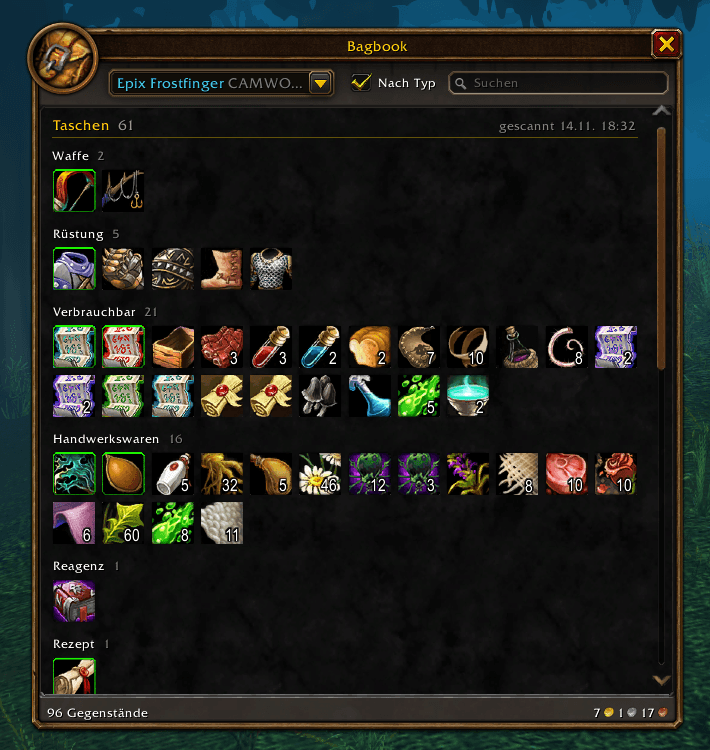
1-window-by-type.png
Description
Bagbook
Where did I put that again? Bagbook remembers the bags, bank and mailbox of every character you play and shows them in one searchable window. You can see everything combined or check one character at a time.
Built for World of Warcraft: Forever and also runs on Retail.
Features
- One window for all your characters. Pick All characters or a single character from the dropdown.
- Search as you type. Find that one stack of ore across all your alts in a second.
- Looks like a bag. Item icons with quality borders and stack counts, with identical items merged.
- Know who has what. Hover over an item to see its normal tooltip, followed by how many each character has in their bags, bank and mail.
- Bags, bank and mailbox each get their own section per character, with the time of the last scan.
- Optional grouping by type: weapons, armor, consumables, trade goods, quest items and more. Turn it on with one click.
- Mail expiry warning. The mailbox section shows when the first attachment expires and turns red when it's less than 5 days away.
- Mail to your alts shows up right away. Send something to one of your own characters and it's listed in their mailbox immediately, no need to log over first.
- Gold per character and in total.
- Works with bank tabs, the classic bank with bank bags, the reagent bank and the Warband bank.
- Characters are stored by their unique ID, so characters with the same first name (hello, Forever surnames) never mix up their items.
- Minimap button, addon compartment entry and
/bb. - English and German, following your game client's language.
How to use
- Log in with each character once. Bagbook scans their bags right away.
- Visit the bank and the mailbox once with each character so those get scanned too.
- Click the bag icon on your minimap (or type
/bb) and look around.
From then on everything stays up to date automatically whenever your bags, bank or mail change.
Commands
| Command | What it does |
|---|---|
/bb or /bagbook |
Open or close the window |
/bb minimap |
Hide or show the minimap button |
/bb debug |
List the saved data per character |
/bb help |
Show the commands |
Shift-click an item in the window to link it in chat. To remove a deleted character, use Delete character data in the dropdown.
Good to know
- The game only shows the first 50 letters in your mailbox. If there are more, Bagbook tells you how many are hidden.
- Bagbook only knows what it has seen. A character's bank stays at the state of their last bank visit.
Deutsch
Wo hatte ich das nochmal? Bagbook merkt sich Taschen, Bank und Briefkasten aller deiner Charaktere und zeigt sie in einem durchsuchbaren Fenster, alles zusammen oder Char für Char.
- Ein Fenster für alle Chars, Auswahl per Dropdown, Suche beim Tippen.
- Item-Raster wie in einer Tasche, Tooltip zeigt, welcher Char wie viele in Taschen, Bank und Post hat.
- Optional nach Typ gruppiert: Waffen, Rüstung, Verbrauchbares, Handwerkswaren, Quest …
- Briefkasten mit Ablaufwarnung. Post an eigene Twinks taucht sofort bei ihnen auf.
- Bank-Tabs, alte Bank, Materiallager und Accountbank.
- Chars mit gleichem Vornamen kommen sich nicht in die Quere.
- Minimap-Knopf, AddOn-Menü und
/bb. Deutsch und Englisch.
Jeden Char einmal einloggen und einmal Bank und Briefkasten öffnen, danach bleibt alles von selbst aktuell.
Bag Book Team