AzerothianRelic - NetherUI Plugin
- By
A complete theme for NetherUI: ancient bronze reliquary, navy obsidian and polished lapis. Painted unit frames and nameplates for NetherBars, with the Triad Crown over your target. One switch on, one switch off. Requires NetherUI.
AzerothianRelic Banner
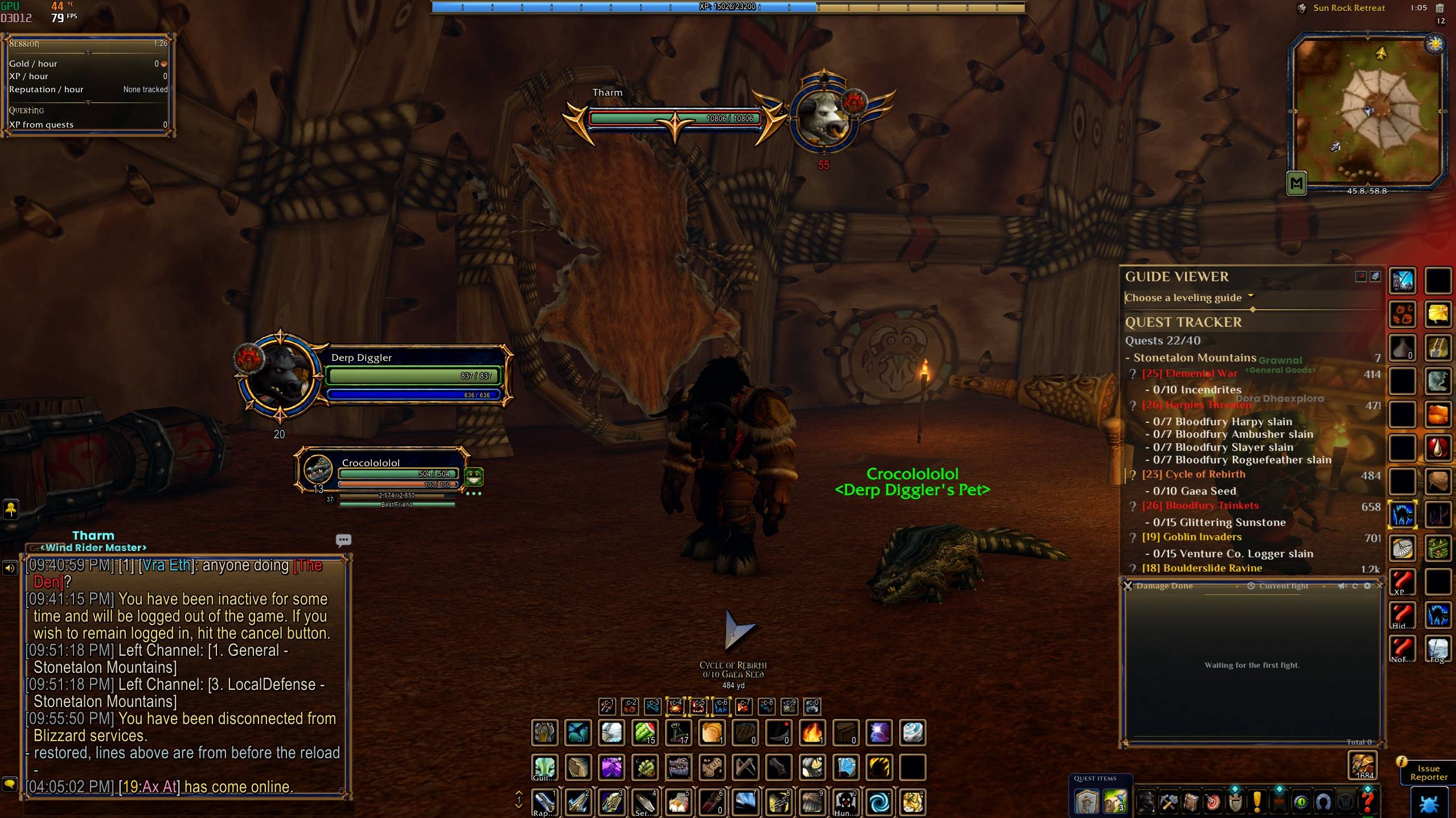
Azerothian Relic
Description
AZEROTHIAN RELIC
Ancient bronze. Polished lapis. Your whole UI, reforged as a relic.
A complete theme for NetherUI. Every frame, border, bar and button is recast as one ancient reliquary: bronze rails, navy obsidian panels and polished lapis set in gold.
━━━━━━━━━━━━━━━━━━━━━━━━━━━━━━━━━━━━━━━━
ONE RELIC, HEAD TO TOE
Azerothian Relic is not a recolour. It replaces NetherUI's artwork with its own hand-built pieces and brings its own colour palette.
- Frames: panels, borders, window frames, title plates, tabs and dividers in bronze and obsidian
- Buttons and widgets: buttons, check boxes, sliders, scroll bars and edit boxes
- Bars: the Relic's own bar textures
- Portraits and icons: Relic portrait rings, crests, icons and NetherUI's Light
- Minimap: the Relic minimap border, with the square border sized to frame the map exactly
- Tooltips: a thick bronze border, with the text kept clear of it on every side
- Quest and dialogue windows: the big Relic corners never cover Accept, Decline or Complete
176 NetherUI textures replaced, plus 37 extra Relic pieces.
━━━━━━━━━━━━━━━━━━━━━━━━━━━━━━━━━━━━━━━━
PAINTED PLATES FOR NETHERBARS
With NetherBars installed, the Relic dresses your unit frames and nameplates too.
- Unit frames: your own ring plate, the same plate facing you for your target, and their own plates for focus, pet and target of target. Bars sit inside the rims, with numbers at the right and your level under the portrait.
- Elite, boss, rare and rare-elite targets wear the horned elite bar, and the chevron around the portrait tells them apart.
- Nameplates: painted Relic plates for normal, elite and rare enemies.
- The Triad Crown, three lapis gems in bronze, floats over your current target.
- Friendly players show their name, and their plate while they are in combat.
━━━━━━━━━━━━━━━━━━━━━━━━━━━━━━━━━━━━━━━━
ALL OR NONE
The Relic is one complete look. While it is NetherUI's theme, NetherBars uses it everywhere too. Pick any other NetherUI theme and nothing uses the Relic.
Turning it off gives NetherUI and NetherBars back exactly what they had before, your own NetherBars choices included. None of NetherUI's or NetherBars' files are changed.
━━━━━━━━━━━━━━━━━━━━━━━━━━━━━━━━━━━━━━━━
GET STARTED
1. Install NetherUI. The CurseForge app installs it for you as a required dependency.
2. Optional: install NetherBars for the painted unit frames and nameplates.
3. Install Azerothian Relic and restart the game.
4. At your first login the Relic asks whether it may handle all UI, nameplates and unit frames. Choose Azerothian Relic to put it on, or No to keep everything as it is.
Change your mind any time: Options > AddOns > Azerothian Relic, /relic on and /relic off, or pick a theme in NetherUI's gallery. /relic shows the version and whether it is on.
━━━━━━━━━━━━━━━━━━━━━━━━━━━━━━━━━━━━━━━━
WHAT IT NEEDS
- NetherUI 2.0.0 or newer: required. The Relic is a theme for NetherUI and does nothing on its own.
- NetherUI 2.0.29 or newer: for the tooltip padding around the bronze border.
- NetherBars 3.0.26 or newer: optional, for the painted unit frames and nameplates.
Part of the Nether addon family. All Rights Reserved.
AzerothianRelic - NetherUI Plugin Team