AvocadoUI
- By
Clean, lightweight unit frames for TBC Classic and Classic Era/SoD. Sensible defaults, drag-anywhere edit mode, full in-game configuration.

Screenshot 2026-08-22 161853.png
Screenshot 2026-08-22 161917.png
Description
AvocadoUI
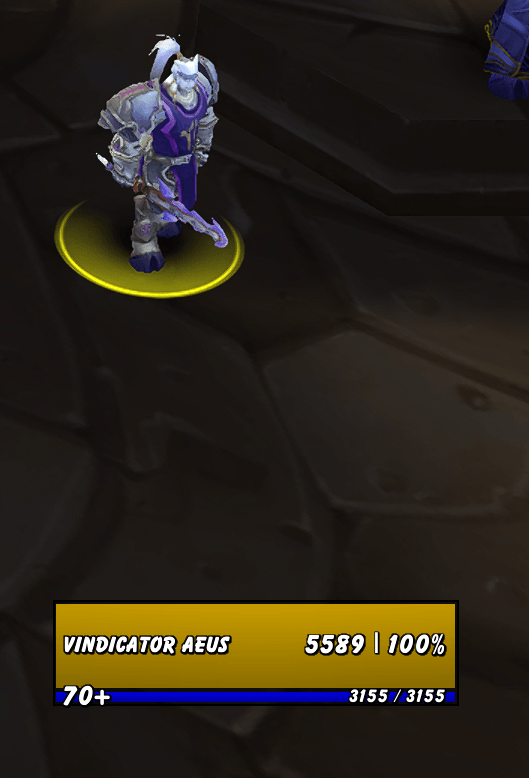
Lean, opinionated unit frames for Classic — Player, Target, Pet, Target-of-Target, and Focus, with castbars, aura filters, a drag-anywhere edit mode, and a clean in-game configuration window.
AvocadoUI replaces the default unit frames and nothing else. No bag mods, no minimap buttons, no 400 checkboxes — sensible defaults out of the box, and focused options where they matter.
Frames
- Player, Target, Pet, Target-of-Target, and Focus (Focus on TBC; Classic Era has no focus unit)
- Health and power bars with class, reaction, or custom colors
- Name, health, power, and level texts — editable content (tags), size, color, and position offsets
- Combat feedback text, incoming-heal prediction, and status indicators (combat, resting, leader, master looter, raid roles, ready check, resurrection)
- Castbars on Target and Focus, with cast time and configurable height
Buffs & Debuffs
- Aura icons on Player and Target, with cooldown spirals and stack counts
- Your own debuffs are highlighted with a colored border
- Per-frame spell filters: show all, whitelist, or blacklist by spell ID — separate for buffs and debuffs
- Layout options per frame: icons per row and maximum shown
Edit mode
Type /aui unlock (or use the button in the options window):
- Drag any frame anywhere, with live coordinates
- Snap-to-grid, red alignment guides, and arrow-key nudging
/aui lockwhen you're done
Configuration
Type /aui config for the options window:
- Global settings — bar texture and font (via LibSharedMedia — your SharedMedia packs just work), colors, text sizes and contents
- Per-frame overrides — any frame can detach from Global and use its own look
- Per-frame geometry: frame width, bar heights, aura layout
- Everything applies live — no
/reload
Supported clients
- Burning Crusade Classic (2.5.6)
- Classic Era / Season of Discovery (1.15.x)
One install works on both.
What AvocadoUI deliberately does NOT do
Bags, minimap, action bars, and raid frames are left to Blizzard (or your addon of choice). AvocadoUI does one thing — unit frames — and stays out of the way.
Slash commands
| Command | Effect |
|---|---|
/aui config |
Open the options window |
/aui unlock |
Unlock frames for dragging (edit mode) |
/aui lock |
Lock frames |
AvocadoUI Team