Auto Invite Block
- By
Block unwanted group invites, mute invite sounds, and auto-ignore repeat inviters. Customize spam thresholds and manage ignored players with a searchable list and quick Unignore buttons.
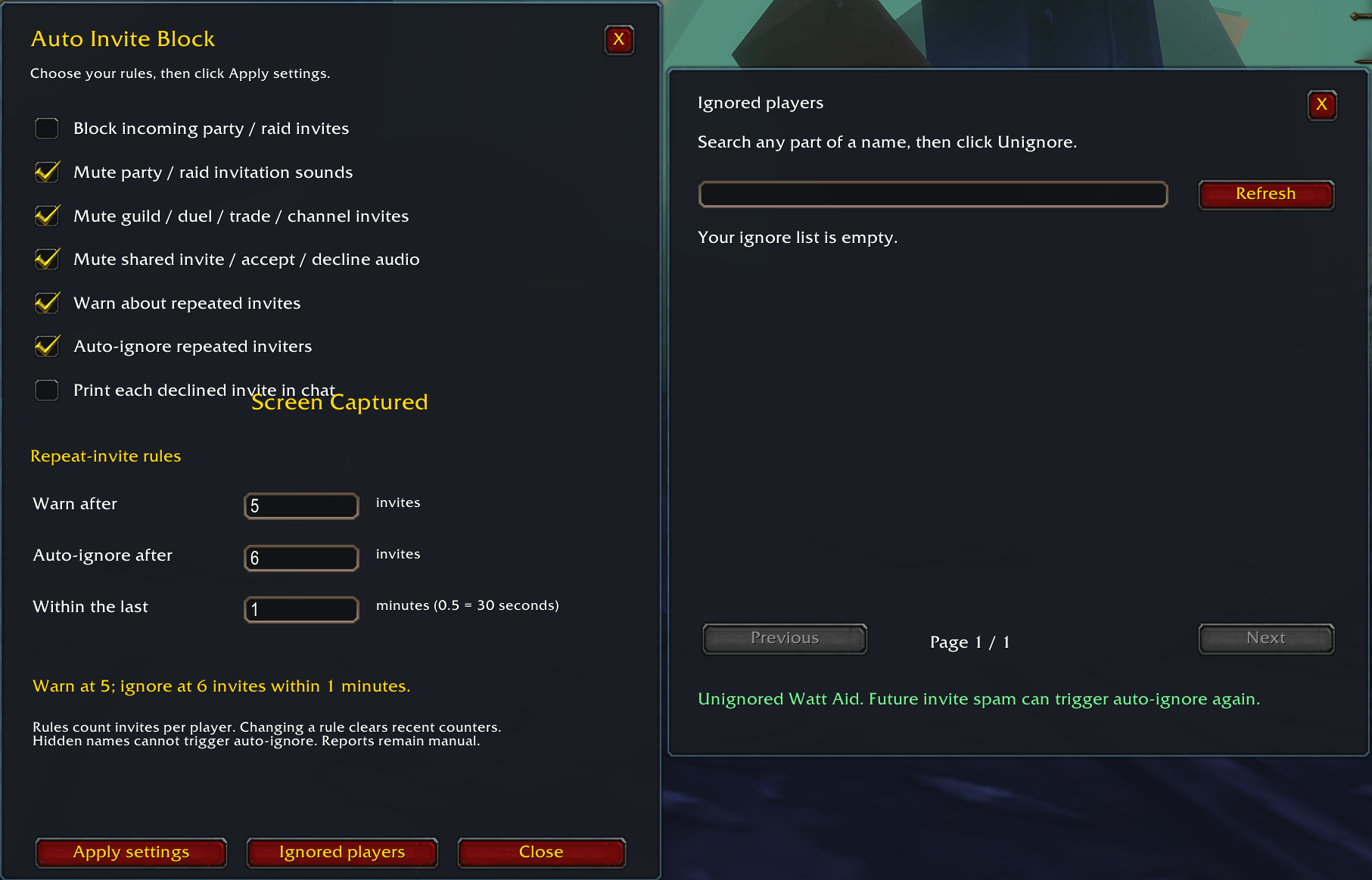
Screenshot 2026-10-05 143048.png
Description
AutoInviteBlock — Invite Blocking and Ignore Management for WoW Forever
AutoInviteBlock helps reduce unwanted party and raid invitations with automatic declining, configurable repeat-invite warnings, optional auto-ignore, and invitation sound controls.
Open /aib or click the launcher icon to configure your settings.
A round, gold-bordered launcher provides quick access to the addon:
-
Left-click: Open or close settings.
-
Right-click: Open the searchable ignored-player list.
-
Left-button drag: Move the icon anywhere on screen.
-
Mouse wheel: Resize the icon while unlocked.
-
Custom size: Choose a size between 20 and 128 pixels.
-
Lock, hide, and reset: Control the launcher with chat commands.
The icon starts near the minimap. Its position, size, visibility, and lock state save separately for each character.
Features
-
Automatic group-invite blocking: Declines incoming direct party and raid invitations while enabled.
-
Repeat-invite warnings: Tracks invitations per player and warns when your chosen threshold is reached.
-
Optional auto-ignore: Attempts to ignore repeat inviters after a configurable number of invitations.
-
Custom rules: Independently adjust the warning count, ignore count, and rolling time window.
-
Sound controls: Separate toggles for party/raid popup sounds, other invitation popup sounds, and shared invite/accept/decline audio files.
-
Searchable ignore list: Search by partial character name or realm and click Unignore beside a player.
-
Movable settings windows: Edit your options and click Apply settings.
-
Saved preferences: Settings are stored separately for each character.
-
Optional chat notifications: Display a message whenever an invitation is declined.
Default Settings
Blocking, repeat warnings, auto-ignore, and sound muting are enabled by default. Warnings trigger at 3 invitations, and auto-ignore is attempted at 5 invitations, from the same readable player name within 5 minutes.
Per-invite chat notifications are disabled. The launcher is visible, unlocked, and 36 pixels in size.
Chat Commands
| Command | Function |
|---|---|
/aib |
Open or close settings. |
/aib ui or /aib options |
Open or close settings. |
/aib on |
Enable group-invite blocking. |
/aib off |
Allow group invitations. |
/aib toggle |
Toggle blocking. |
/aib status |
Show settings and the session decline count. |
/aib warn N |
Set the repeat-warning threshold. |
/aib limit N |
Set the auto-ignore threshold. |
/aib window N |
Set the rolling time window in minutes. |
/aib alerts on or /aib alerts off |
Enable or disable repeat warnings. |
/aib ignore on or /aib ignore off |
Enable or disable auto-ignore. |
/aib mute on or /aib mute off |
Toggle party/raid invitation popup muting. |
/aib othermute on or /aib othermute off |
Toggle guild, duel, trade, and chat-channel invitation popup muting. |
/aib filemute on or /aib filemute off |
Toggle shared invite/accept/decline audio-file muting. |
/aib notify on or /aib notify off |
Toggle per-invite chat notifications. |
/aib ignored |
Open the searchable ignored-player list. |
/aib unignore or /aib list |
Open the same ignored-player list. |
/aib repeats |
Show recent invitation counts per player. |
/aib reset |
Clear session counters and recent invite tracking. |
/aib size 48 |
Set the launcher size to 48 pixels; accepts 20–128. |
/aib icon size 48 |
Alternative launcher-size command. |
/aib icon hide |
Hide the launcher. |
/aib icon show |
Show the launcher. |
/aib icon lock |
Disable dragging and wheel resizing; clicking still works. |
/aib icon unlock |
Enable dragging and wheel resizing. |
/aib icon reset |
Restore the default launcher position, size, visibility, and unlocked state. |
/aib help |
Display command help. |
/autoinviteblock supports the same commands as /aib.
Example Custom Rule
Enter /aib warn 2, /aib limit 8, and /aib window 10 to warn after 2 invitations and attempt auto-ignore after 8 invitations within 10 minutes.
Counts accept positive whole numbers. The time window accepts positive decimals; 0.5 means 30 seconds. Changing a rule clears recent invite counters.
Behavior and Compatibility
Blocking applies to all direct group invitations, including friends and guildmates. Use /aib off when you want to receive an invitation. Sound controls work independently of blocking.
Other invitation types are muted where supported; they are not automatically declined. Shared audio-file muting also silences other prompts that reuse those files.
Disabling auto-ignore or resetting counters does not remove existing ignores. Use the searchable list to unignore individual players. Future repeated invitations can trigger auto-ignore again.
The ignore list manages character ignores, not Battle.net account blocks or voice mutes. Hidden or protected inviter names cannot trigger per-player warnings or auto-ignore. Reporting remains manual.
Auto Invite Block Team