Auction Flip
- By
Scans the auction house, logs prices and finds money makers: flips, crafts, disenchants, vendor flips and snipes
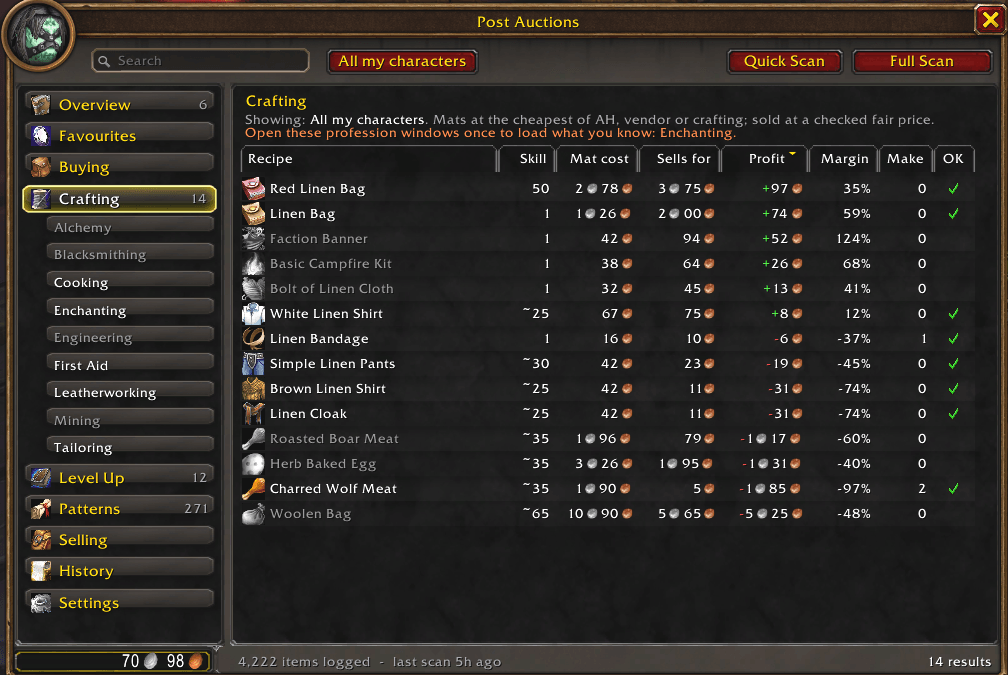
image1.png
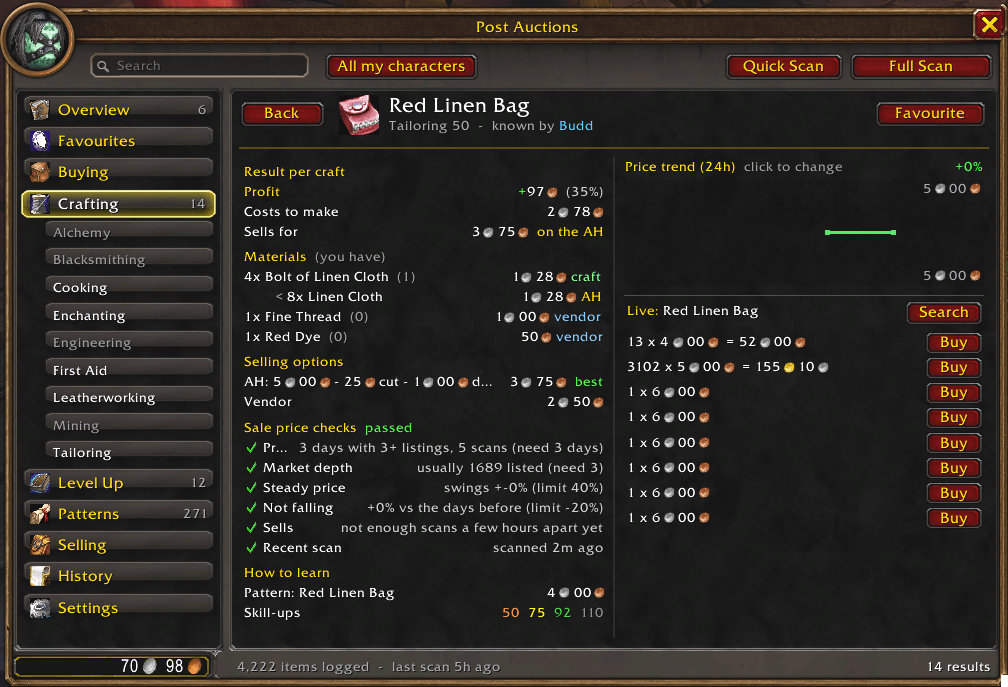
image2.png
image3.png
Description
AuctionFlip
Scan smarter. Trade better. Make more gold.
AuctionFlip is an auction house trading and gold-making addon built for WoW Forever.
Scan the auction house, track market prices, discover profitable opportunities and manage your auctions — all from a dedicated tab directly inside the Auction House window.
Whether you're flipping underpriced items, crafting for profit, disenchanting gear or simply looking to make more gold from your inventory, AuctionFlip gives you the information you need to make smarter trading decisions.
Features
Auction House Scanning
AuctionFlip offers two scanning modes to suit your needs.
Quick Scan
- Scans only the items relevant to you.
- Prioritises favourites, crafting materials and items in your bags.
- Ideal for checking prices without scanning the entire auction house.
Full Scan
- Scans the entire auction house for market opportunities.
- Records historical pricing data.
- Displays price trends to help identify market movements.
- Builds a more detailed picture of your realm's economy over time.
Profitable Deals
- Discover items listed significantly below their usual market value.
- Compare current auction prices against recorded price history.
- Identify potentially profitable buying and reselling opportunities.
Vendor Flips
- Find auction house items listed below their vendor sell price.
- Buy from the Auction House and sell directly to an NPC vendor for profit.
- Identify opportunities without needing to find another player to purchase the item.
Disenchanting Opportunities
- Identify equipment potentially worth more when disenchanted.
- Compare auction prices against the estimated value of enchanting materials.
- Find profitable opportunities for characters with Enchanting.
Crafting Profit Calculator
- Select a crafting recipe to calculate its potential profitability.
- Compare auction house and vendor prices for required materials.
- Account for auction house cuts and listing deposits.
- View estimated crafting costs and potential profit.
- Sort recipes by profitability.
- Filter recipes to those your character can currently craft.
Example: Select a recipe such as Linen Bag to compare material costs against its expected auction house sale value.
Profitable Patterns & Recipes
- Discover patterns and recipes worth purchasing.
- Identify recipes relevant to your character's professions.
- Compare potential crafting opportunities against market prices.
Market Reset Opportunities
- Identify markets with a limited number of underpriced listings.
- Evaluate opportunities to purchase cheaper auctions and relist at a higher price.
- Find potential market resets based on current auction house supply.
Smart Buy List
- Discover recommended purchases ranked by estimated profit and confidence.
- Set a spending budget to keep opportunities within your available gold.
- Compare potential purchases before committing your gold.
- Prioritise promising opportunities based on available market data.
Selling & Auction Management
Sell Bags
- Analyse items currently held in your bags.
- Compare whether an item is better sold on the Auction House, vendored or disenchanted.
- View suggested selling strategies for individual items.
- See the historically best day of the week to sell, based on recorded pricing data.
My Auctions
- Monitor your active auction house listings.
- Identify auctions that have been undercut by competing sellers.
- Make informed decisions about your current listings.
Profit Tracking
- Record items purchased, crafted and sold.
- Track trading performance over time.
- Review estimated profits and losses from your activities.
- Understand which gold-making strategies are performing best.
Snipe Watch
- Set target prices for items you're interested in purchasing.
- Receive alerts when watched items appear below your specified price.
- Monitor favourite items for potential bargains.
Favourites & Price Information
- Save frequently traded items as favourites.
- View additional pricing information through item tooltips.
- Maintain profession information separately for each character.
- Easily identify characters using class-coloured names.
Settings & Customisation
AuctionFlip provides configurable settings to suit your trading preferences.
- Default Listing Duration: Set your preferred auction duration (default: 2 hours).
- Undercut Rules: Configure your preferred selling and undercutting behaviour.
- Auction House Fees: Adjust auction house cuts and deposit settings.
- Scan Preferences: Customise scanning behaviour and options.
- Additional Preferences: Manage other addon settings from one location.
Access settings using /af settings or the gear icon on the AuctionFlip tab.
Slash Commands
| Command | Description |
|---|---|
/af |
Open AuctionFlip |
/af scan |
Start a Quick Scan |
/af full |
Start a Full Scan |
/af settings |
Open addon settings |
/af buy |
Open the Buy List |
/af profit |
View your profit tracker |
/af snipe [item] [gold] |
Set a price alert for an item |
Getting Started
- Install AuctionFlip and log in to your character.
- Visit any Auction House and open the AuctionFlip tab.
- Run a Quick Scan to check items relevant to your character, or a Full Scan to begin building market price history.
- Explore Deals, Vendor Flips, Disenchanting, Crafting and other gold-making opportunities.
- Use the Buy List to find potential purchases within your available budget.
- Track your auctions, sales and profits as you trade.
Tip: Regular scanning improves the amount of historical pricing information available to AuctionFlip, helping you evaluate market trends and trading opportunities more effectively.
Important Information
AuctionFlip uses available auction house information and locally recorded price history to identify potential opportunities.
- Market prices can change at any time.
- Estimated profits are not guaranteed.
- An item being listed below its historical price does not guarantee it will resell.
- Crafting and disenchanting profitability depends on material costs, market conditions and actual sale prices.
- Market data becomes more useful as additional scans are recorded.
Always review an opportunity before spending your gold.
Find the deals. Master the market. Build your fortune with AuctionFlip.
❤️ Support My Addon Development
All my addons are developed independently and made available completely free for the WoW Forever community.
If you enjoy using my addons and would like to support their continued development, bug fixes and future features, you can make an optional donation.
❤️ Support Development — Donate Here
Every contribution is genuinely appreciated and helps me continue creating and improving addons for the community.
Thank you for your support!
Auction Flip Team