


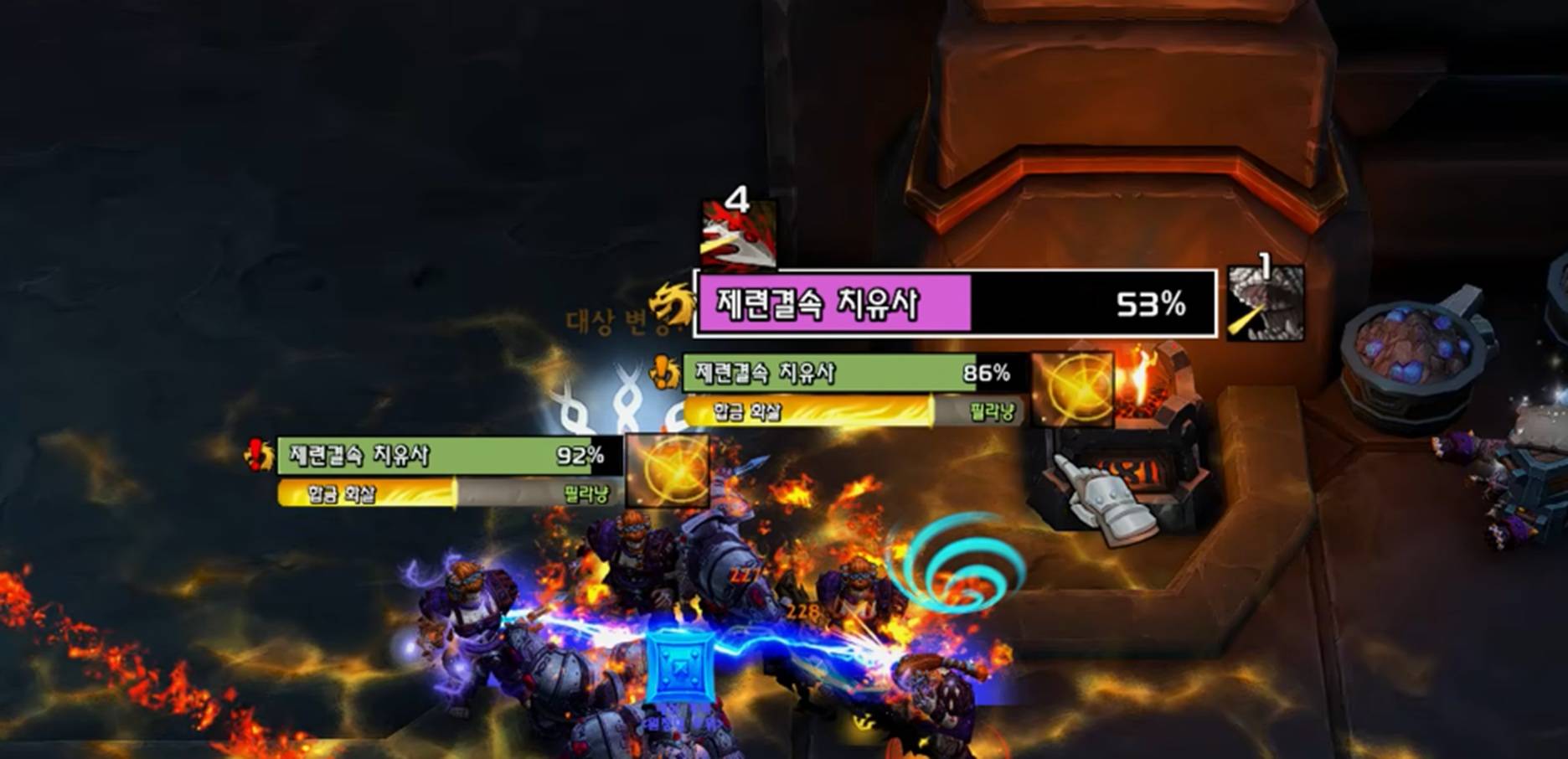
asNamePlates_MN.jpg
Description
asNamePlates (Midnight)
Nameplate enhancement addon
Note: Friendly nameplates are not modified.
Nameplate Color Customization
Colors are displayed based on the following priority:
- Purple: High Threat Level (DPS/Healer)
- Light Red: Low Threat Level (Tank)
- Light Green: Casting an interruptible spell
- Gray: Casting a non-interruptible spell
- Pink: Your debuff is present
- Sky Blue: Normal Threat Level (Default off, Need to turn on
[Feature] Show combat colors) - Green: Boss (Inside dungeons, high-level or ?? level mobs)
- Ocher: Caster mobs (Inside dungeons) or Quest mobs (World)
Other Features
Displays enemy power under the health bar for targeted units (Only when the resource is not mana,
[Feature] Show Power below)Displays spell icons while casting (Only when the resource is not mana,
[Feature] Show cast icon)Adjusts buff/debuff duration and stack counts position, and adds borders (
[Feature] Change Debuff Icon)Modifies nameplate textures and borders (
[Feature] Change Texture): Displays a white border for your current target, a green border for your focus target, and changes the health bar to a square shape.Displays a blue border on mouseover targets (
[Feature] Change Texture)Targeted Highlights (
[Feature] Alert Targeted)**: Displays a flashing exclamation mark on the left when you are targeted by an enemy; for tanks, this triggers only when an enemy is casting a spell at you.Important Spell Highlights (
[Feature] Alert Important Spell Casting): The health bar flashes red when an enemy casts an important spell (See screenshot below).
Nameplate Vertical Stacking Interval (
Nameplate vertical alignment): Set to 1.1 by default (WoW default is 1.3).Nameplate Selected Scale (
Nameplate target scale): Set to 1.3 by default (WoW default is 1.2).- Note: If you uninstall the addon, you need to reset it using the following command:
/run SetCVar ("nameplateSelectedScale", 1.2)
- Note: If you uninstall the addon, you need to reset it using the following command:
Nameplate Mouse Click Hitbox Settings (
Click Hit Inset): See video below (Default: 0, Wow default : 0).Changes the health bar background color for low health targets (
Display Low Health Background Color)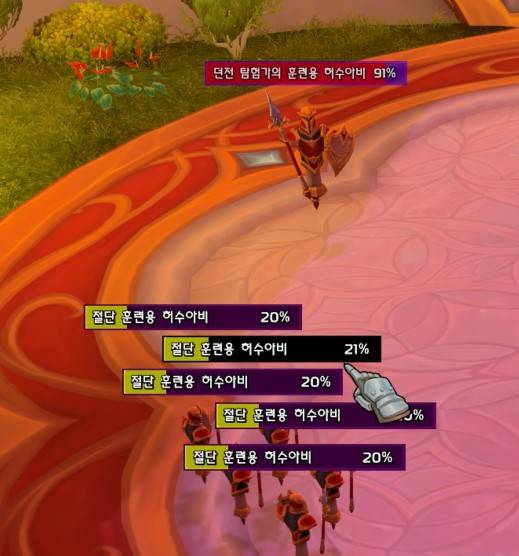
Class Low Health (Dark Purple) High Health (Dark Blue) Hunter 20% for Kill Shot (Black Arrow) 80% for Black Arrow Warrior 20% for Execute (35% with talent) Mage 30% for Scorch/Scald 90% for Firestarter Priest 20% for Shadow Word: Death Death Knight 35% for Soul Reaper Destruction Warlock 20% for Shadowburn
Configuration
ESC > Options > AddOns > asNamePlates- You can toggle color-changing features and customize colors here.
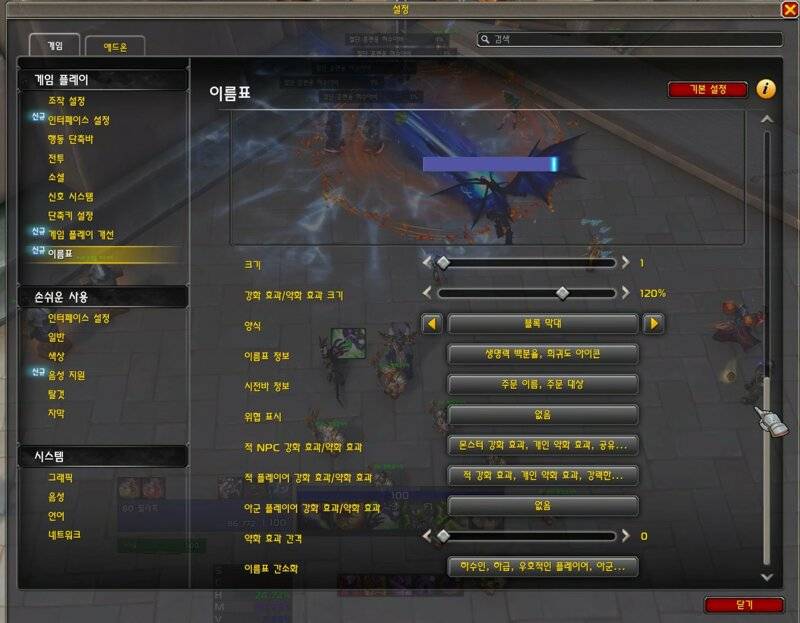
Recommended Nameplate Settings
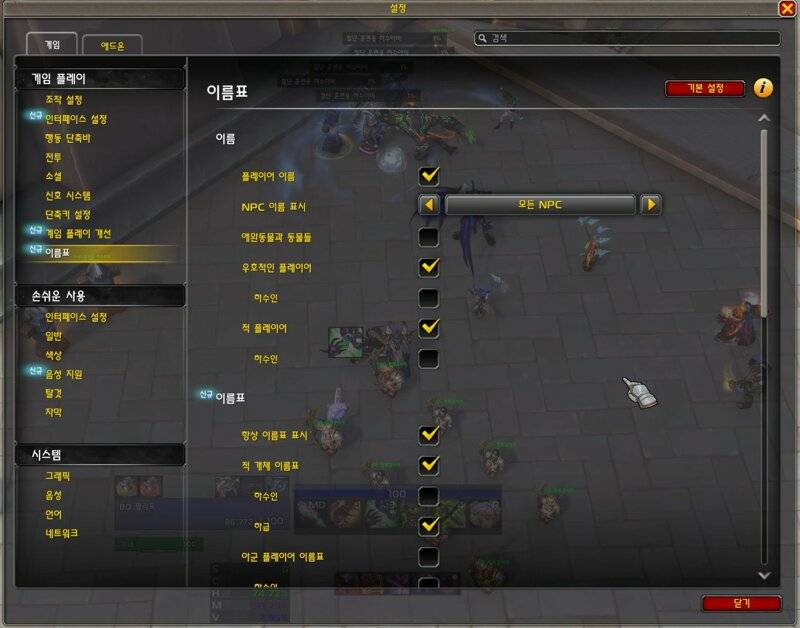
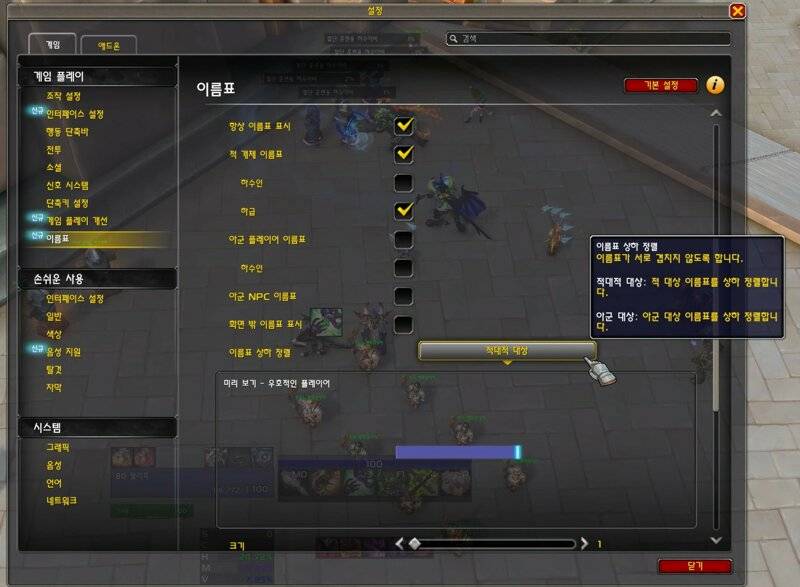
Contact Information
- Korean Users: Visit the Inven asMOD Forum.
- English Users: Visit the asMOD YouTube Channel or GitHub.
asNamePlates (한밤)
이름표 강화 애드온
참고: 우호적인 대상의 이름표는 수정하지 않습니다.
이름표 색상 변경 기능
다음의 우선 순위로 표시 됨
- 보라색: 높은 위협 수준 (딜러/힐러)
- 밝은빨간색: 낮은 위협 수준 (탱커)
- 연녹색: 차단 가능한 주문을 시전
- 회색: 차단 불가 주문을 시전
- 핑크: 내 디버프가 있음
- 하늘색: 일반 위협 수준 (기본 off, '[기능] 전투중 색상 표시` On 필요)
- 녹색: 보스몹 (던전인 경우, 레벨에 높거(예 91렙)나 ?? 레벨몹)
- 황토색: 케스터 몹 (던전인 경우), 퀘스트 몹 (필드).
기타 기능
대상의 경우 몹의 기력을 체력바 아래 표시 (마나가 아닐 경우,
[기능] 하단에 기력 표시)시전중일 경우 스킬 아이콘 표시 (마나가 아닐 경우,
[기능] 시전 Icon 표시)버프/디버프 시간/중첩 위치 조정 및 테두리 추가 (
[기능] Debuff Icon 변경)이름표 Texture 및 테두리 변경 (
[기능] 이름표 모양 변경) : 대상의 경우 흰색 테두리, 주시의 경우 녹색 테두리 표시, 생명력바를 사각형 모양으로 변경마우스오버 대상 파란색 테두리 표시 (
[기능] 이름표 모양 변경)Targeted 강조 (
[기능] Targeted 강조) : 나를 대상으로 하는 경우 좌측에 깜빡이는 느낌표 표시, 탱커의 경우 나를 대상으로 케스팅 하는 경우만중요 스킬 강조 (
[기능] 중요 스킬 시전 강조) : 중요 스킬 시전시 생명력이 빨간색으로 깜빡임 (아래 스샷 참고)이름표 세로 정렬 간격 설정(
이름표 상하 정렬 정도) : 1.1을 기본으로 설정 (와우 기본 설정은 1.3)이름표 주대상 크기 정도(
이름표 주대상 크기 정도) : 1.3을 기본으로 설정 (와우 기본 설정은 1.2)- 참고: 애드온 삭제시 다음 명령어로 초기화 필요
/run SetCVar ("nameplateSelectedScale", 1.2)
- 참고: 애드온 삭제시 다음 명령어로 초기화 필요
이름표 마우스 클릭 범위 설정 (
클릭 Hit Inset) : 아래영상 참고 (기본 0, 와우 기본 설정 0)낮은 체력 대상 체력바 배경 색상 변경 (
낮은체력 배경 색상 표시)직업 낮은 체력 (어두운 보라색) 높은 체력 (어두운 파란색) 사냥꾼 마무리 사격(어둠 화살) 20% 어둠 화살 80% 전사 마무리 일격 20% (특성시 35%) 마법사 불태우기/가열 30% 방화광 90% 사제 죽음 20% 죽기 영혼 수확자 35% 파흑 어둠의 연소 20%
설정
Esc > 옵션 > 애드온 > asNamePlates- 색상 변경 및 색상 변경 기능 On/Off 가능
이름표 추천 설정
문의처
한글 유저:인벤 asMOD 포럼방문 (https://www.inven.co.kr/board/wow/5288)영문 유저:Youtube asMOD 채널방문 (https://www.youtube.com/@asmod-wow),Github방문 (https://github.com/aspilla/asMOD/)
asNamePlates Team


Owner


