íë©´ ìº¡ì² 2026-08-02 123015.jpg

ì¤í¬ë¦°ì· 2026-08-04 185700.png
ì¤í¬ë¦°ì· 2026-09-22 222428.png
Description
asPowerBar (Midnight)
Primary Resource / Class Resource Display
Balance Druid Eclipse (Lunar, Solar)
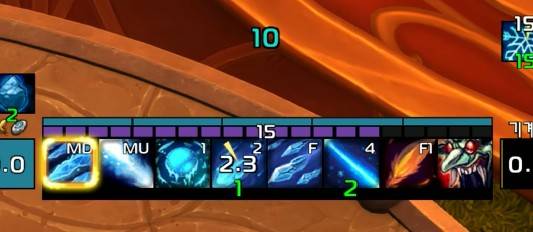
Frost Mage Target's Winter's Chill debuff stacks, Icicle stacks
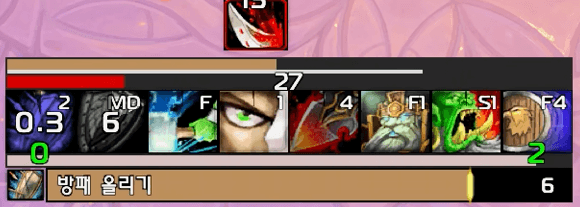
Protection Warrior Ignore Pain stack and duration
Features
- Primary Resource Bar: Displays primary resources such as Mana, Rage, Energy, Runic Power, and Focus. (Includes resource cost prediction during spell casting)
- Class Resource: Displays class-specific secondary resources like Combo Points, Holy Power, Soul Shards, Arcane Charges, Chi, Runes, and major skill cooldowns in a segmented block format.
Class & Specialization Features
- Evoker: Essence, [Augmentation] Ebon Might
- Paladin: Holy Power, [Protection] Shield of Rightness
- Mage: [Arcane] Arcane Charges, [Fire] Fire Blast cooldown, Combustion, Hyperthermia, [Frost] Target's Winter's Chill debuff stacks, Icicle stacks
- Warlock: Soul Shards, [Destruction] Soul Shard Fragments, [Demonology] Demonic Core stacks
- Druid: Combo Points (Includes [Feral] Overflowing Power tracker), [Balance] Eclipse (Lunar, Solar), [Guardian] ironfur
- Monk: [Brewmaster] Stagger, [Mistweaver] Renewing Mist cooldown, [Windwalker] Chi
- Rogue: Combo Points, Animacharged Combo Points
- Shaman: [Enhancement] Maelstrom Weapon, [Elemental] Lava Burst cooldown, [Restoration] Riptide cooldown
- Death Knight: Runes
- Priest: [Discipline] Power Word: Radiance cooldown, [Holy] Holy Word: Serenity cooldownn
- Warrior: [Arms] Overpower cooldown, [Fury] Whirlwind buff tracking, [Protection] Ignore Pain stack and duration
- Demon Hunter: [Havoc] Fel Rush cooldown, [Vengeance] Soul Fragment buff, [Devourer] Soul Fragment buff
- Hunter: [Beast Mastery] Barbed Shot cooldown, [Marksmanship] Aimed Shot cooldown, [Survival] Tip of the Spear buff
Configuration
Adjustable via
ESC>Options>AddOns>asPowerBar- Display Class/Specialization Resources (Skills, etc.): Default: On
- Out of Combat Alpha : Default: On
- Bar Width: Default: 238
- Primary Resource Bar Height: Default: 8
- Secondary Resource Bar Height: Default: 5
- Font Size: Default: 12
- Smooth Bar Animation: Default: On
- Changing bar sizes requires a
/reloadcommand in the chat window to reinitialize the addon.
Move Anchor Positions: Type
/asConfigin the chat window.Reset Anchor Positions: Type
/asClearin the chat window to restore default settings.
Support & Feedback
Korean Users: Visit theInven asMOD Forum(https://www.inven.co.kr/board/wow/5288)English Users: Visit theasMOD YouTube Channel(https://www.youtube.com/@asmod-wow) orGitHub(https://github.com/aspilla/asMOD/)
asPowerBar (한밤)
주 자원/직업 자원 표시
조화 드루이드 일월식
냉법 빙결 디버프
방어전사 고통 감내 중첩 및 지속시간
주요 기능 (Features)
- 주 자원 바: 마나, 분노, 기력, 룬 마력, 집중 등의 주 자원을 표시. (시전 시 자원 소모 예측 기능 포함)
- 직업 자원: 연계 점수, 신성한 힘, 영혼의 조각, 비전 충전물, 기, 마력의 룬, 주요 스킬 등 직업별 보조 자원을 칸 형태로 표시.
직업 전문화 특성
- 기원사 : 정수, [증강] 칠흑의 힘
- 성기사 : 신성한 힘, [보호] 정의의 방패
- 마법사 : [비전] 비전 충전물, [화염] 화염작열 쿨다운, 발화, 이상 고열, [냉기] 대상 빙결 디버프 중첩, 고드름 중첩
- 흑마법사 : 영혼의 조각, [파괴] 영혼의 조각 파편, [악마] 악마의 핵 중첩
- 드루이드 : 연계 점수 ([야성]넘쳐흐르는 힘 표시), [조화] 일월식 (달, 태양), [수호] 무쇠 가죽
- 수도사 : [양조] 시간차, [운무] 소생의 안개 쿨다운 [풍운] 기
- 도적 : 연계 점수, 초자력 충전
- 주술사 : [고양] 소용돌이치는 무기, [정기] 용암 폭발 쿨다운, [복원] 성난 해일 쿨다운
- 죽음의 기사 : 룬
- 사제 : [수양] 광휘 쿨다운, [신성] 평온 쿨다운
- 전사 : [무기] 제압 쿨다운, [분노] 소용돌이 버프, [방어] 고통 감내 중첩 및 지속 시간
- 악마사냥꾼 : [파멸] 지옥 돌진 쿨다운, [복수] 영혼 파편 버프, [포식] 영혼 파편 버프
- 사냥꾼 : [야수] 날카로운 사격 쿨다운, [사격] 조준 사격 쿨다운, [생존] 창끝 버프
설정 (Configuration)
ESC>설정>애드온>asPowerBar에서 설정 가능- 직업 전문화 자원(스킬등) 표시 : 기본 On
- 비전투시 투명도 변경 : 기본 On
- 바 넓이 : 기본 238
- 주 자원바 높이 : 기본 8
- 보조 자원바 높이 : 기본 5
- 글꼴 크기 : 기본 12
- 부드러운 바 애니메이션 : 기본 On
바 크기 변경 후
/reload명령어로 다시 Addon 초기화 필요위치 이동 :
/asConfig명령어 채팅창에 입력위치 초기화 :
/asClear명령어 채팅창에 입력, 기본 설정으로 초기화
문의처
한글 유저:인벤 asMOD 포럼방문 (https://www.inven.co.kr/board/wow/5288)영문 유저:Youtube asMOD 채널방문 (https://www.youtube.com/@asmod-wow),Github방문 (https://github.com/aspilla/asMOD/)
asPowerBar Team

Owner