


asFixChat.jpg
asFixChatTab.jpg
Description
asFixChat (Midnight)
Switch chat channels using Tab, support URL copy.
Key Features
Switch Chat Channels with Tab
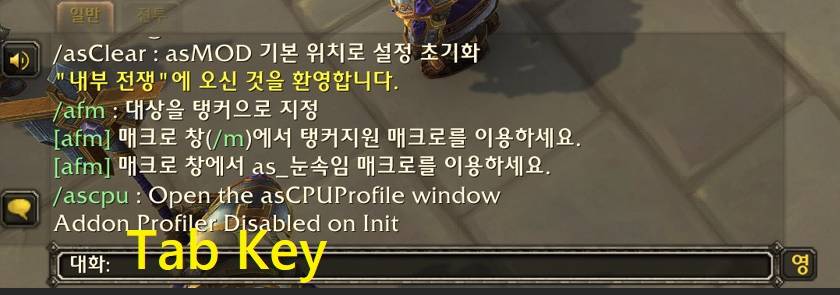
- Pressing the Tab key while the chat input is active switches channels in the following order. For example, pressing Tab in
Saywill switch toParty.- Say
- Party: When in a party (and not in a raid).
- Raid: When in a raid group.
- Battleground: When in a battleground or PvP area.
- Instance: When in a dungeon or instance group (and not in a raid/battleground).
- Guild: When in a guild and none of the above conditions apply.
URL Copy
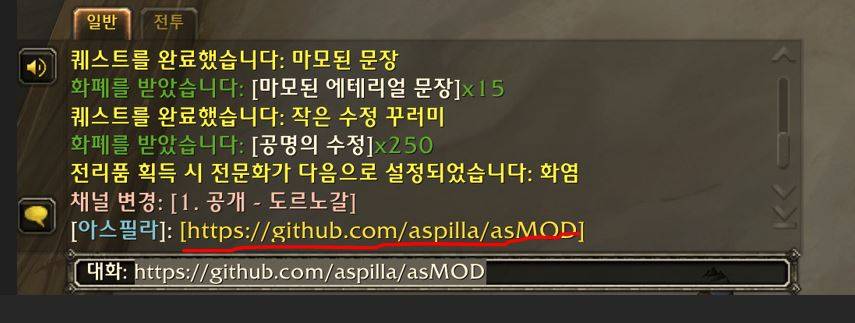
- Automatic URL Highlighting: Detects URL-like text patterns (e.g.,
www.example.com,http://example.com) in incoming chat messages. - Clickable URL Links: Converts detected URLs into yellow hyperlinks that can be clicked directly within the chat window.
- Easy URL Copying: Clicking a highlighted URL will:
- Automatically place the URL into the chat input box.
- Highlight the text within the input box.
- Allow for easy copying to the clipboard (using Ctrl+C or Cmd+C).
- Does not affect whisper messages
Configuration
No configuration options.
Contact Information
- Korean Users: Visit the Inven asMOD Forum.
- English Users: Visit the asMOD YouTube Channel or GitHub.
asFixChat (한밤)
Tab 채팅 채널 전환, URL 복사 지원
주요 기능
Tab으로 채팅 채널 전환
- 채팅 입력 상황에서 Tab 키를 누를경우 다음의 순서로 채널을 전환,
일반 대화에서 Tab을 누르면파티로 전환 되는 방식- 일반 대화
- 파티: 파티에 속해 있는 경우 (공격대가 아닌 경우).
- 공격대: 공격대 그룹에 속해 있는 경우.
- 전장: 전장 또는 PvP 지역에 있는 경우.
- 인스턴스 대화: 던전 또는 인스턴스 그룹에 있는 경우 (공격대/전장이 아닌 경우).
- 길드: 위의 상황에 해당하지 않고 길드에 속해 있는 경우.
URL Copy
- 자동 URL 강조: 들어오는 채팅 메시지에서 URL과 유사한 텍스트 패턴(예:
www.example.com,http://example.com)을 감지 - 클릭 가능한 URL 링크: 감지된 URL을 채팅 창 내에서 직접 클릭 가능한 노란색 하이퍼링크로 변환
- 간편한 URL 복사: 강조 표시된 URL 중 하나를 클릭하면:
- URL이 자동으로 채팅 입력창에 배치됨.
- 입력창의 텍스트가 강조 표시됨.
- URL을 클립보드에 쉽게 복사(Ctrl+C 또는 Cmd+C 사용) 가능.
- 귓속말은 변경 안함
설정
설정 없음
문의처
한글 유저:인벤 asMOD 포럼방문 (https://www.inven.co.kr/board/wow/5288)영문 유저:Youtube asMOD 채널방문 (https://www.youtube.com/@asmod-wow),Github방문 (https://github.com/aspilla/asMOD/)
asFixChat Team


Owner


