


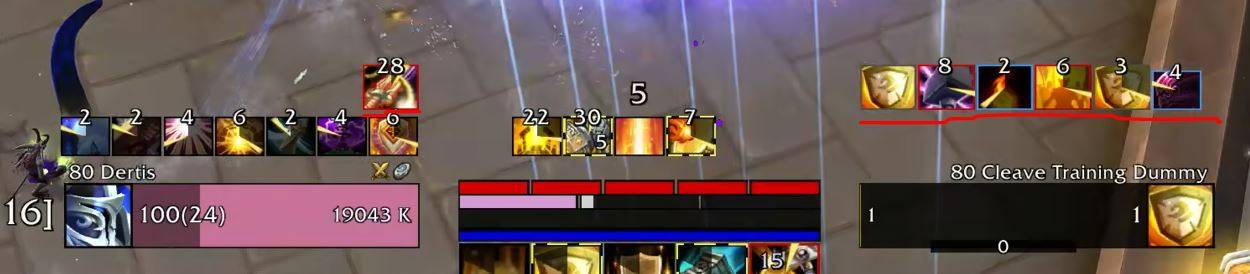
asDebuffFilter.jpg
Description
asDebuffFilter (Midnight)
Displays player and target debuffs.
Key Features
Displays debuffs & private aura for the Player (up to 6 on the left) and the Target (up to 6 on the right).
Configuration
Adjust settings via
ESC>Options>Addons>asDebuffFilter.Set the size scale of player debuffs (Default: 1.3x).
Change transparency when out of combat (Default: On).
The time threshold at which the remaining cooldown begins displaying in 0.1-second increments (Default: 3 seconds).
Show player's debuffs (Default: On).
Show taget's debuffs (Default: On).
Show player's private aura (Default: On).
Hide bloodlust debuffs (Default: On).
Move Position: Enter the
/asConfigcommand in the chat.Reset Position: Enter the
/asClearcommand in the chat to restore default settings.
Contact Information
- Korean Users: Visit the Inven asMOD Forum.
- English Users: Visit the asMOD YouTube Channel or GitHub.
asDebuffFilter (한밤)
플레이어 및 대상 디버프 표시
주요 기능
플레이어(좌측 6개), 대상 (우측 6개) 표시 Private Aura(좌측 6개)
설정
ESC>설정>애드온>asDebuffFilter에서 설정 가능플레이어 디버프 크기 설정 (기본 1.3배)
비전투시 투명도 변경 (기본 On)
남은 쿨을 0.1초 단위로 보여줄 최소 시간 (기본 3초)
대상의 디버프를 표시 (기본 On)
플레이어의 디버프를 표시 (기본 On)
플레이어의 Private Aura를 표시 (기본 On)
블러드 디버프는 숨김 (기본 On)
위치 이동 :
/asConfig명령어 채팅창에 입력위치 초기화 :
/asClear명령어 채팅창에 입력, 기본 설정으로 초기화
문의처
한글 유저:인벤 asMOD 포럼방문 (https://www.inven.co.kr/board/wow/5288)영문 유저:Youtube asMOD 채널방문 (https://www.youtube.com/@asmod-wow),Github방문 (https://github.com/aspilla/asMOD/)
asDebuffFilter Team

Owner


