


asDBMTimer.jpg
Description
asDBMTimer (Midnight)
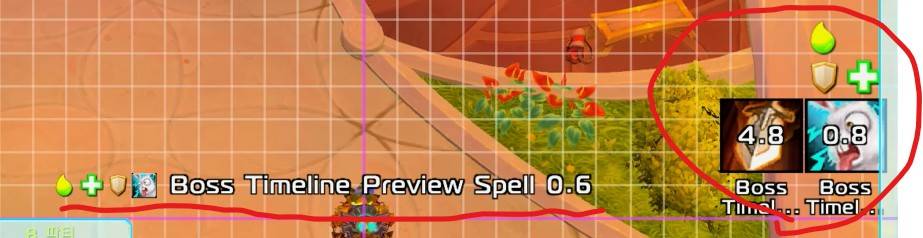
Enhanced Boss Timeline
Note: This addon is not associated with DBM (Deadly Boss Mods).
Key Features
- Large Icon Display: Adjustable size (default Off).
- Skill Name Display: Can be hidden.
- 5-Second Countdown Notification: Adjustable timing.
- Skill Name (Remaining Time) in Center: Can be disabled in settings.
- Show Role Icons (ex. Tank) : Can be disabled in settings.
Configuration
Settings can be adjusted via ESC > Options > AddOns > asDBMTimer.
Minimum time to trigger the alert(Default: 5 seconds).[Button] Icon size(Default: 50).[Center] Text size(Default: 15).[Button] Display skill names(Default: On).[Button] Display the icon(Default: Off).[Center] Display text notifications in the center of the screen(Default: On).Whether to display role icons(Default: On).Move Position: Enter the
/asConfigcommand in the chat window.Reset Position: Enter the
/asClearcommand in the chat window to reset to default settings.
Contact
- Korean Users: Visit the Inven asMOD Forum
- English Users: Visit the asMOD YouTube Channel or GitHub
asDBMTimer (한밤)
보스 타임라인 강화
Note: 이 애드온은 DBM (Deadly Boss Mods)과 연관없음.
주요 기능
- 큰 아이콘 표시: 크기 조정 가능 (기본 Off)
- 스킬 명 표시: 숨기기 가능
- 5초전 표시: 시간 조정 가능
- 중앙에 스킬명 (남은시간) 표시: 설정에서 Off 가능
- 역할 임무 아이콘 표시(탱커 등) : 설정에서 Off 가능
설정
esc >> 설정 >> 애드온 >> asDBMTimer 에서 설정 가능
최소 표시 시간(기본 5초)[버튼] 아이콘 크기(기본 50)[중앙] 글자 크기(기본 15)[버튼] 스킬명 표시 여부(기본 On)[버튼] 아이콘 표시 여부(기본 Off)[중앙] 화면가운데 글씨 알림 여부(기본 On)임무 아이콘 표시 여부(기본 On)위치 이동 :
/asConfig명령어 채팅창에 입력위치 초기화 :
/asClear명령어 채팅창에 입력, 기본 설정으로 초기화
문의처
한글 유저:인벤 asMOD 포럼방문 (https://www.inven.co.kr/board/wow/5288)영문 유저:Youtube asMOD 채널방문 (https://www.youtube.com/@asmod-wow),Github방문 (https://github.com/aspilla/asMOD/)
asDBMTimer Team


Owner


