


íë©´ ìº¡ì² 2026-08-10 214543.jpg
Description
asCombatTimer (Midnight)
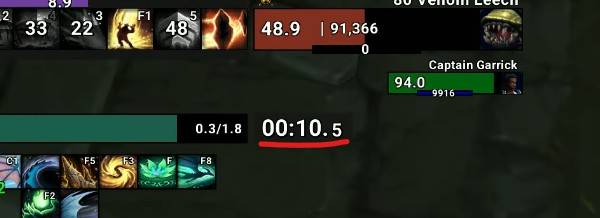
Displays the elapsed time after combat starts.
Key Features
- Combat Time Tracking: The timer starts automatically when combat begins, displaying the elapsed time in
MM:SSorMM:SS.T(tenths of a second) format.
Settings
You can change the options for
asCombatTimerin theESC>Settings>AddOnstab.- Specifies the font size. (Default: 20)
- Determines the font type. (Default: STANDARD_TEXT_FONT)
- Determines to show only combat. (Default: Checked)
- Determines whether to show combat time down to 0.1-second precision. (Default: Checked)
- Determines whether to show background (Default: Checked)
Move Position: Enter the
/asConfigcommand in the chat.Reset Position: Enter the
/asClearcommand in the chat to restore default settings.
Contact Information
- Korean Users: Visit the Inven asMOD Forum.
- English Users: Visit the asMOD YouTube Channel or GitHub.
asCombatTimer (한밤)
전투 시작 후 경과 시간을 표시
주요 기능
- 전투 시간 추적: 전투가 시작되면 타이머가 자동으로 작동하며, 경과 시간을
분:초또는분:초.소수점첫째자리형식으로 표시.
설정
ESC>설정>애드온>asCombatTimer옵션을 변경 가능.- 폰트 크기를 지정 합니다. (기본값: 20)
- 폰트 종류를 결정 합니다. (기본값 : STANDARD_TEXT_FONT)
- 전투 중 표시 (비전투시 숨김). (기본값 : 설정 )
- 0.1초 단위까지 세부적인 경과 시간을 표시합니다. (기본값 : 설정)
- 배경 표시 여부. (기본값: 설정)
위치 이동 :
/asConfig명령어 채팅창에 입력위치 초기화 :
/asClear명령어 채팅창에 입력, 기본 설정으로 초기화
문의처
한글 유저:인벤 asMOD 포럼방문 (https://www.inven.co.kr/board/wow/5288)영문 유저:Youtube asMOD 채널방문 (https://www.youtube.com/@asmod-wow),Github방문 (https://github.com/aspilla/asMOD/)
asCombatTimer Team


Owner


