


asCastBar.jpg
Description
asCastBar (Midnight)
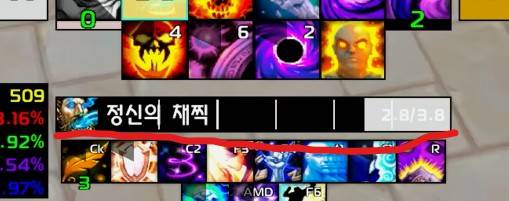
Simple Cast Bar
Simple Design Mode
- Apply Simple Design:
- Channeling Tick Display: Supports Mind Flay / Mind Flay: Insanity (Shadow Priest), Arcane Missiles (Mage), and Drain Soul (Warlock).
Normal Mode (Default)
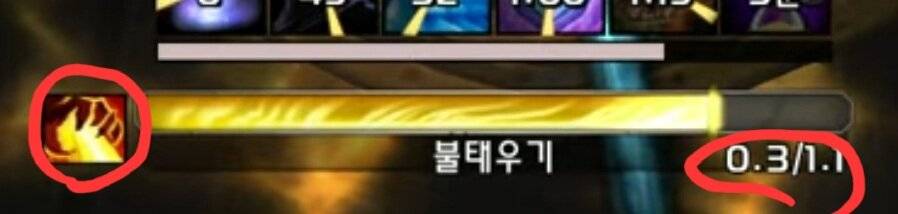
- Spell Icon Display
- Cast Timer:
Current_Cast_Time / Total_Cast_Time
Configuration
- Settings can be adjusted via ESC > Options > AddOns > asCastBar.
- Whether to apply Simple Design Mode (Default: On).
- Cast bar width (Default: 238).
- Cast bar height (Default: 20).
- Whether to display channel ticks, functions only in Simple Design Mode (Default: On).
- Update per every frame, comsume more CPU (Default: off, Recommended for high-end PCs).
- Refresh rate per second (Default: 20, only works when updating per every frame is disabled).
- Move Position: Enter the
/asConfigcommand in the chat window. - Reset Position: Enter the
/asClearcommand in the chat window to reset to default settings.
Contact
- Korean Users: Visit the Inven asMOD Forum
- English Users: Visit the asMOD YouTube Channel or GitHub
asCastBar (한밤)
간단한 시전바
Simple Design Mode
- Simple Design 적용
- 채널링 Tick 표시 : 정신 채찍/정신 채찍 광기(암사), 신비한 화살(마법사), 영혼흡수(흑마) 지원
Normal Mode, Default
- 주문 아이콘 표시:
- 시전 타이머:
현재_시전_시간 / 총_시전_시간
-
설정
ESC>설정>애드온>asCastBar에서 설정 가능- 심플 디자인 모드 사용 (기본 On)
- 시전바 넓이 (기본 238)
- 시전바 높이 (기본 20)
- 채널링 틱 표시, 심플 디자인 모드에서만 동작 (기본 On)
- 매 프레임마다 바를 변경, CPU 점유율 증가 (기본 Off, 고성능 PC에서 권장)
- 초당 업데이트 횟수 (기본 20, 매 프레임마다 바를 변경 옵션을 꺼야 동작)
- 위치 이동 :
/asConfig명령어 채팅창에 입력 - 위치 초기화 :
/asClear명령어 채팅창에 입력, 기본 설정으로 초기화
문의처
한글 유저:인벤 asMOD 포럼방문 (https://www.inven.co.kr/board/wow/5288)영문 유저:Youtube asMOD 채널방문 (https://www.youtube.com/@asmod-wow),Github방문 (https://github.com/aspilla/asMOD/)
asCastBar Team


Owner


