asActiveAlert.jpg
Description
asActiveAlert (Midnight)
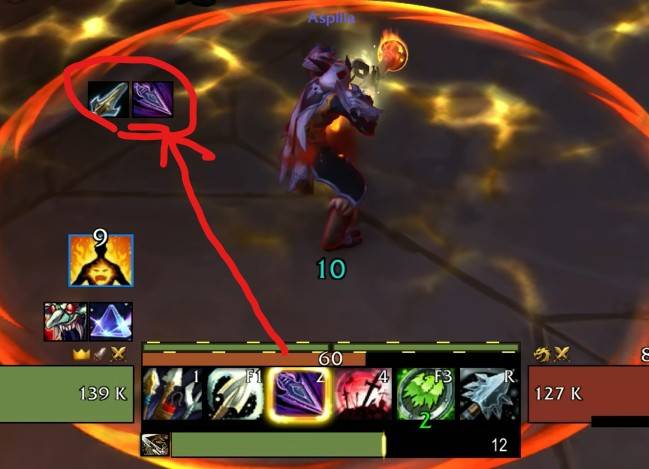
Displays highlighted spells to the left of the character.
Key Features
- Spell Activation Alerts:
- When a spell becomes available or is highlighted by a specific effect (the glowing border effect in the default UI), the spell icon is displayed to the left of the character.
- Manual editing of the spell list is not supported.
- Displays cooldown progress on the icons.
Configuration
Configure settings under Options -> AddOns -> asActiveAlert (supports icon size, icon alpha, font size, and milliseconds threshold settings).
- Positioning: Enter the
/asConfigcommand in the chat. - Reset Position: Enter the
/asClearcommand in the chat to restore default settings.
Contact Information
- Korean Users: Visit the Inven asMOD Forum.
- English Users: Visit the asMOD YouTube Channel or GitHub.
asActiveAlert (한밤)
테두리 강조 주문 케릭 좌측 표시
주요 기능
- 주문 발동 알림:
- 주문이 사용 가능해지거나 특정 효과로 인해 강조될 때 (게임 내에서 아이콘 테두리에 빛나는 효과가 나타나는 경우) 해당 주문의 아이콘을 케릭 좌측에 표시
- 주문 목록 편집은 불가
- 재사용 대기시간 표시
설정
게임 설정 내 설정 -> 애드온 -> asActiveAlert 메뉴에서 세부 설정이 가능합니다. (아이콘 크기, 아이콘 투명도, 글꼴 크기, 남은 쿨 소수점 최소 시간 토글 등)
- 위치 이동 :
/asConfig명령어 채팅창에 입력 - 위치 초기화 :
/asClear명령어 채팅창에 입력, 기본 설정으로 초기화
문의처
한글 유저:인벤 asMOD 포럼방문 (https://www.inven.co.kr/board/wow/5288)영문 유저:Youtube asMOD 채널방문 (https://www.youtube.com/@asmod-wow),Github방문 (https://github.com/aspilla/asMOD/)
The asActiveAlert Team


Owner