
Araucaria Master Repair Hammer
- By

amrh.png
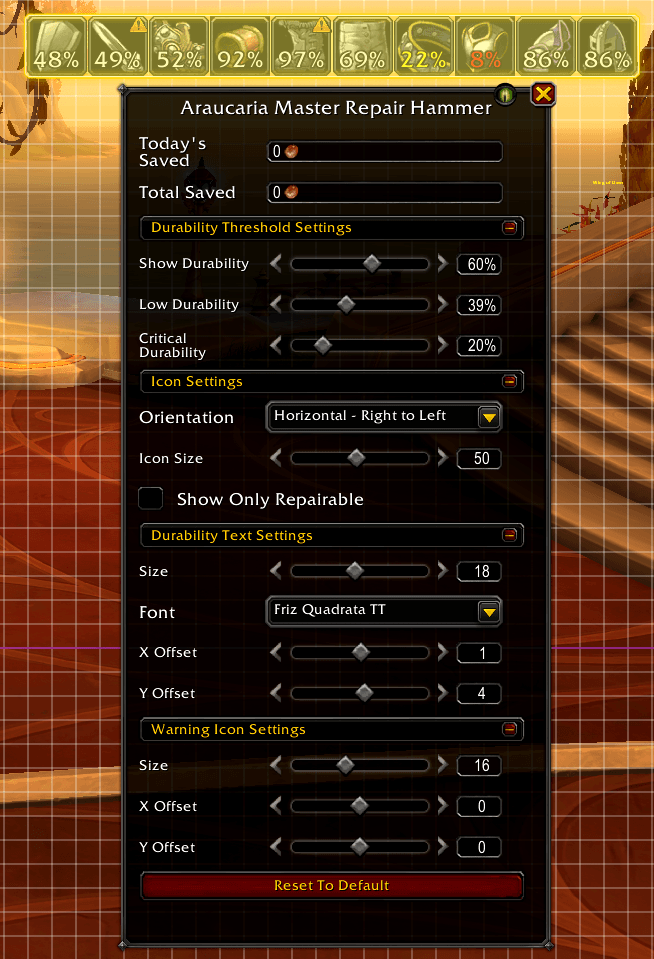
amrh_edit_mode.png
Description

A World of Warcraft addon for Blacksmiths who carry a Master Repair Hammer. It monitors the durability of your equipped gear and shows clickable icons for each piece that needs repair — clicking an icon uses the right hammer to repair that slot directly.
Only activates if your character has the Blacksmithing profession.
Features
- Displays an icon per damaged equipment slot (head, shoulders, chest, waist, legs, feet, wrist, hands, main hand, off hand)
- Each icon shows the current durability percentage
- Text color changes as durability drops: white → yellow → red
- Clicking an icon uses the correct Master Repair Hammer on that slot — the addon automatically picks between the Dragonflight, The War Within, or current-expansion hammer based on what you're actually specialized to repair
- A warning icon (and an optional "Show Only Repairable" filter) flags gear the hammer can't repair yet — for example, if you haven't specialized in that armor piece or weapon type
- Tracks how much gold you've saved by using the hammer instead of paying an NPC to repair — today and all-time, per character
- Fully integrated with WoW's Edit Mode for positioning and configuration
- Per-layout settings (each Edit Mode layout has its own position and thresholds)
Requirements
- Blacksmithing profession
- The Master Repair Hammer for your specialization tier in your bags (Thalassian Master Repair Hammer, Earthen Master's Hammer, or Master's Hammer)
- In order to repair a slot you, obviously, still need to master that equipment type (or weapon type) at the matching Armorsmith/Weaponsmith Blacksmithing specialization.
Configuration
Open Edit Mode and select the addon frame to access its settings panel.
Gold Saved
Read-only display of how much gold you've saved on repairs, today and all-time (per character).
Durability Threshold Settings
| Setting | Default | Description |
|---|---|---|
| Show Durability | 60% | Items at or below this durability will appear |
| Low Durability | 40% | Threshold for yellow text |
| Critical Durability | 20% | Threshold for red text |
Icon Settings
| Setting | Default | Description |
|---|---|---|
| Orientation | Horizontal - Centered | How icons are arranged (6 layout options) |
| Icon Size | 40 | Width and height of each icon in pixels |
| Show Only Repairable | Off | Hide slots the Master Repair Hammer can't actually repair, instead of showing them with a warning icon |
Orientation options: Horizontal Left to Right, Horizontal Right to Left, Horizontal Centered, Vertical Top to Bottom, Vertical Bottom to Top, Vertical Centered
Durability Text Settings
Font, size, and X/Y offset of the durability percentage label shown on each icon.
Warning Icon Settings
Size and X/Y offset of the warning icon shown on slots the hammer can't repair (when "Show Only Repairable" is off).
Slash Commands
| Command | Description |
|---|---|
/amrh |
Prints a quick summary of gold saved and repairs done, today and all-time |
/amrh reset char / /amrh reset account |
Resets the all-time gold/repair counter for this character or the whole account. The previous total is archived, not lost |
/amrh resettoday char / /amrh resettoday account |
Same as above, but only for today's counter |
Usage
- Have the appropriate Master Repair Hammer in your bag
- Icons will appear automatically when any gear falls below the Show Durability threshold
- Click an icon to repair that piece — you'll get a chat message showing how much gold you saved
- Drag the frame in Edit Mode to reposition it on your screen
- Run
/amrhanytime for a summary of your savings
The Araucaria Master Repair Hammer Team
