Anchor Anything
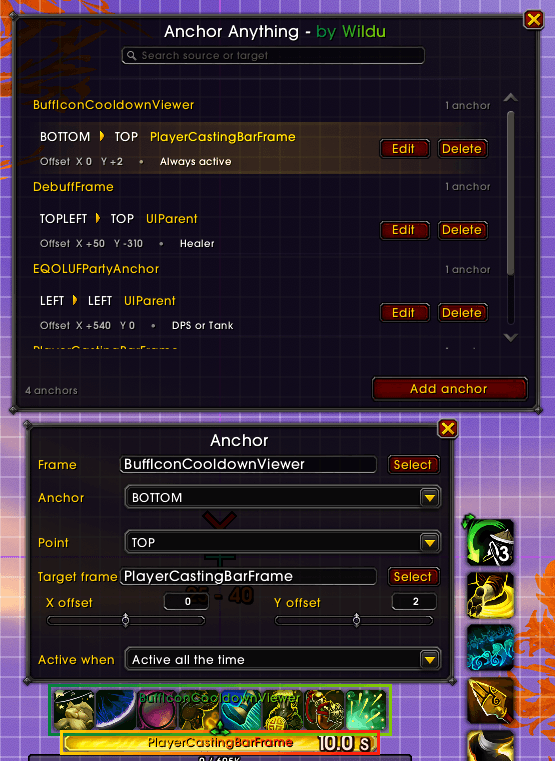
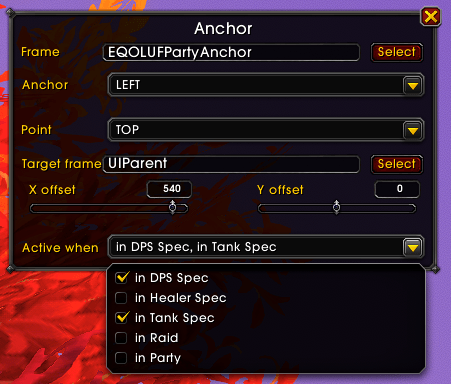
Anchor Anything lets you create custom anchors between frames. Pick a source frame, choose its anchor point, attach it to a target frame, and fine-tune the position with X&Y sliders.
It integrates with Blizzard Edit Mode and provides clear visual overlays, so you can immediately see which frame is being moved and what it is anchored to.
Features
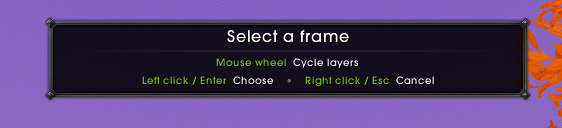
- Pick named UI frames directly with the mouse.
- Use the mouse wheel to cycle through overlapping frame layers.
- Choose source and target anchor points with precise X/Y offsets.
- Show click-through source and target overlays with frame names and anchor arrows.
- Create multiple relationships for the same source frame.
- Temporarily disable a saved anchor without deleting it.
- Enable anchors only for selected roles or group types.
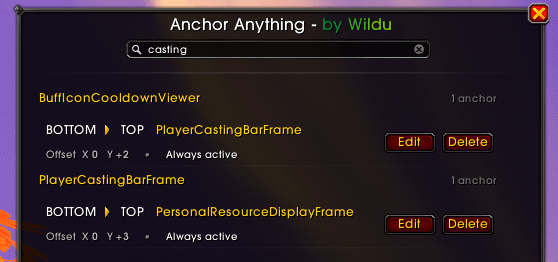
- Search, edit, and delete saved anchors from one compact window.
Quick start
- Open Edit Mode (or click Anchor Anything in the Addon Compartment, or use
/anchors). - Click Add anchor.
- Select the source frame manually or use the frame picker.
- Choose the source anchor point.
- Select the target frame and its relative anchor point.
- Adjust the X/Y offsets and optional activation conditions.
Changes are applied immediately and saved automatically.
Frame picker controls
- Mouse wheel: cycle through overlapping named frames.
- Left click / Enter: choose the highlighted frame.
- Right click / Escape: cancel selection.
Slash commands
/anchor/anchors/an
Notes
- Only named and accessible UI frames can be saved (not everything you see can be anchored).
- Protected frames cannot be repositioned during combat lockdown. Their anchors are refreshed after combat.
AddOn in heavy development, all feedback and suggestions welcomed
 _
_  _
_  _
_ 
The AnchorAnything Team


Owner

![Better Personal Resource Display - [BPRD] Better Class Bars project image](https://media.forgecdn.net/avatars/thumbnails/1898/932/256/256/639186817422521634.png)