AmbushAlert
- By
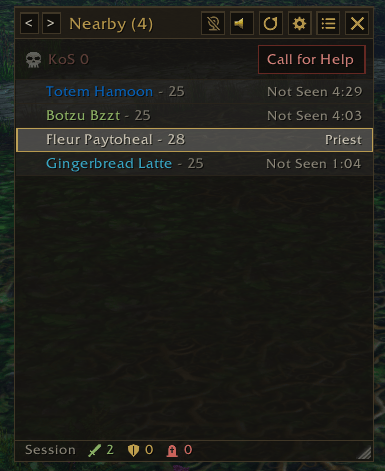
The AmbushAlert window lists enemies near you, coloured by class with their level. Anyone out of sight shows how long since they were seen. The arrows switch lists, Call for Help asks for backup and the footer shows this session’s kills and deaths.
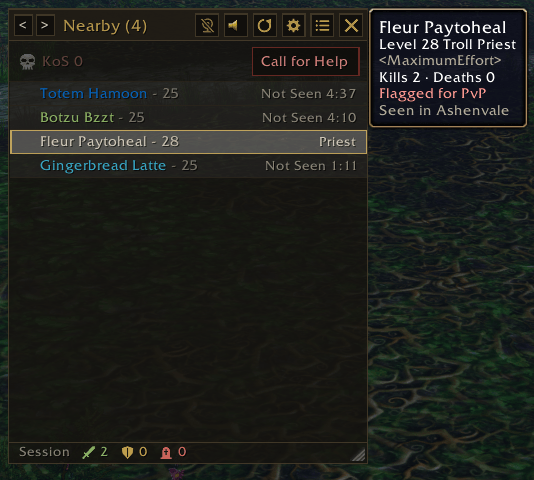
Hover over anyone in the AmbushAlert window to see their level, race, class and guild, your kills and deaths against them, whether they’re flagged for PvP and where they were seen.
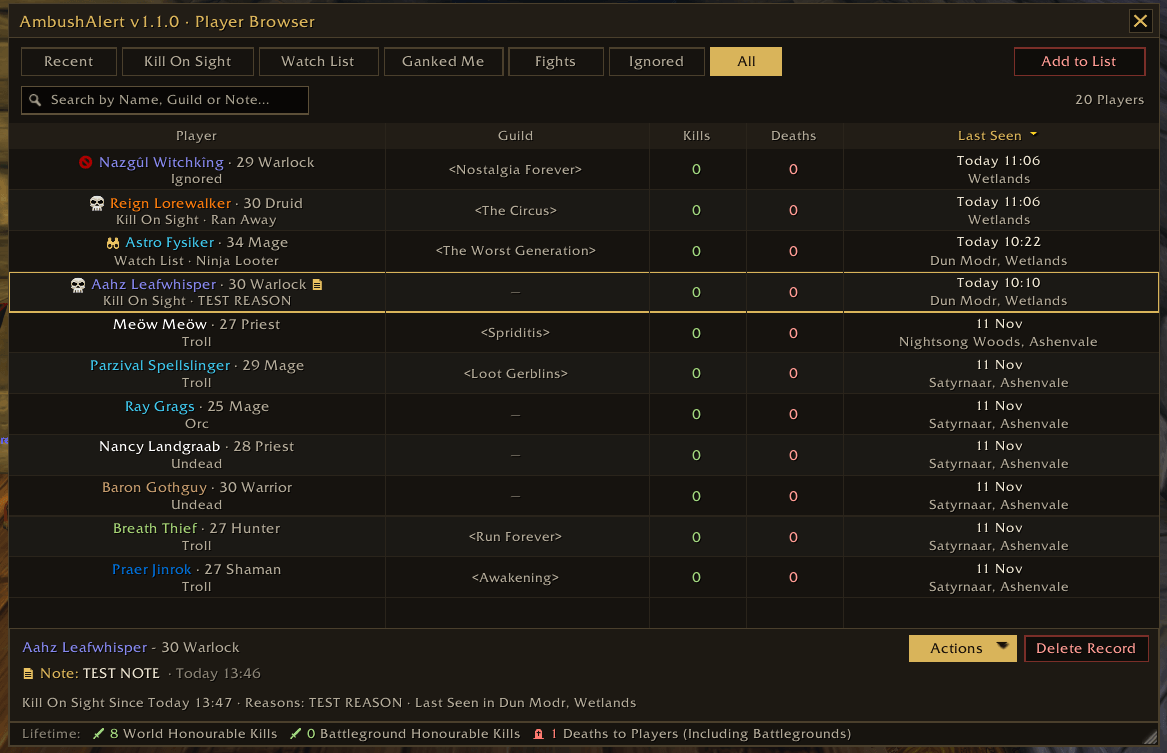
The Player Browser lists everyone you’ve seen. Icons show Kill On Sight (skull), Ignored (red circle), Watch List (binoculars) and players with notes (notepad). Select a player to see their details at the bottom.
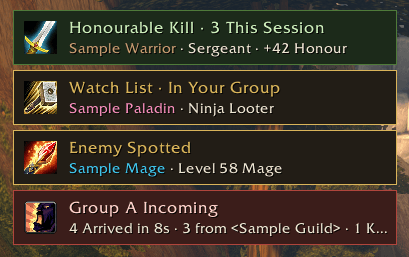
Pop-up alerts and sounds tell you the moment something happens: enemies spotted, Kill On Sight and Watch List players, groups arriving, stealthers, anyone targeting you and your honourable kills. Show them as boxes or as text at the top of the screen.
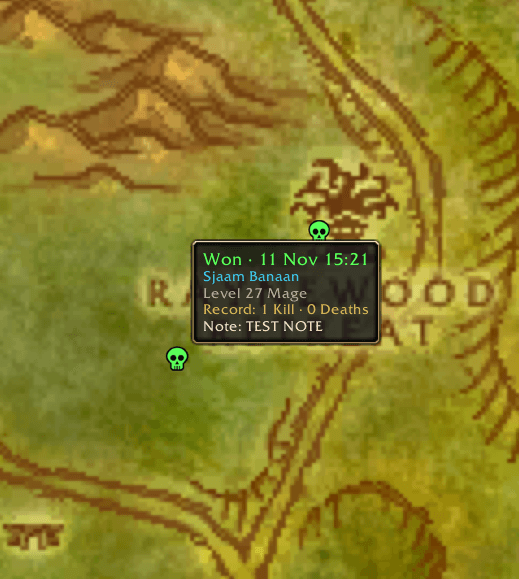
Fight markers on the world map and minimap show where you won or lost a fight. Right-click one to add, edit or remove a note, delete the marker, add the player who killed you (or who you killed) to a list or view them in the Player Browser.
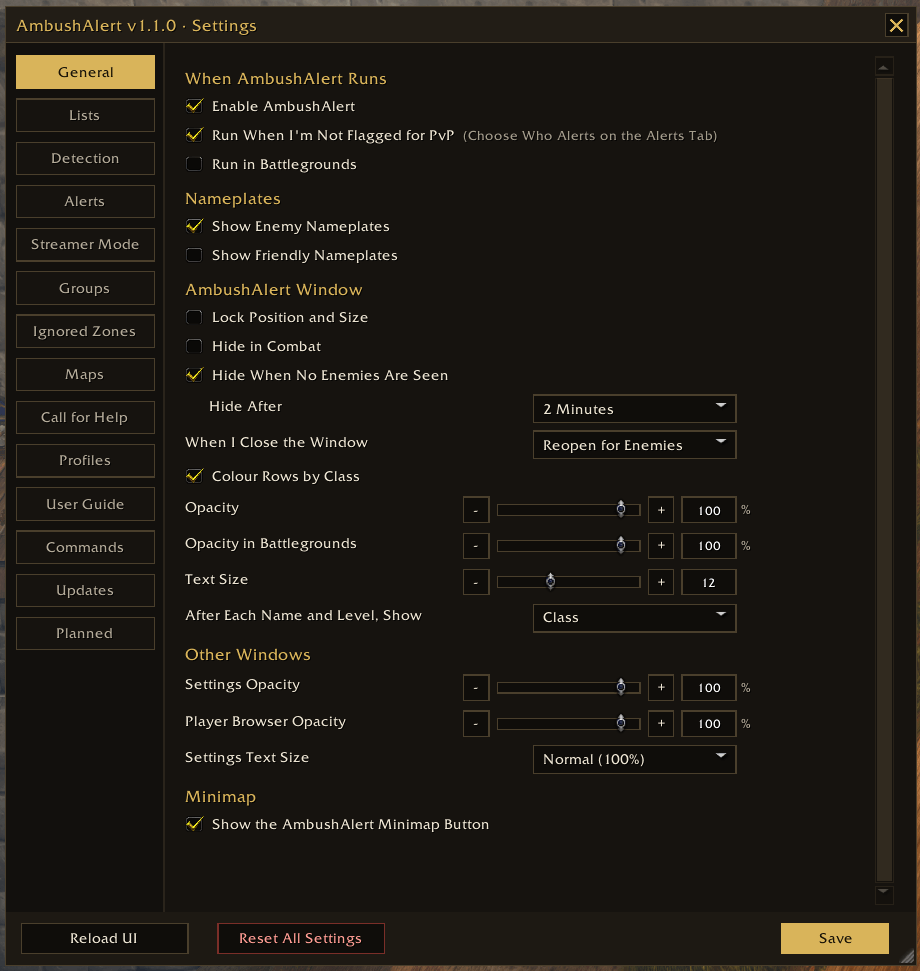
Settings let you choose how AmbushAlert works: what it detects, which alerts and sounds play, who triggers them, how the window looks and when it hides. Each tab explains its options, with Reset All Settings at the bottom.
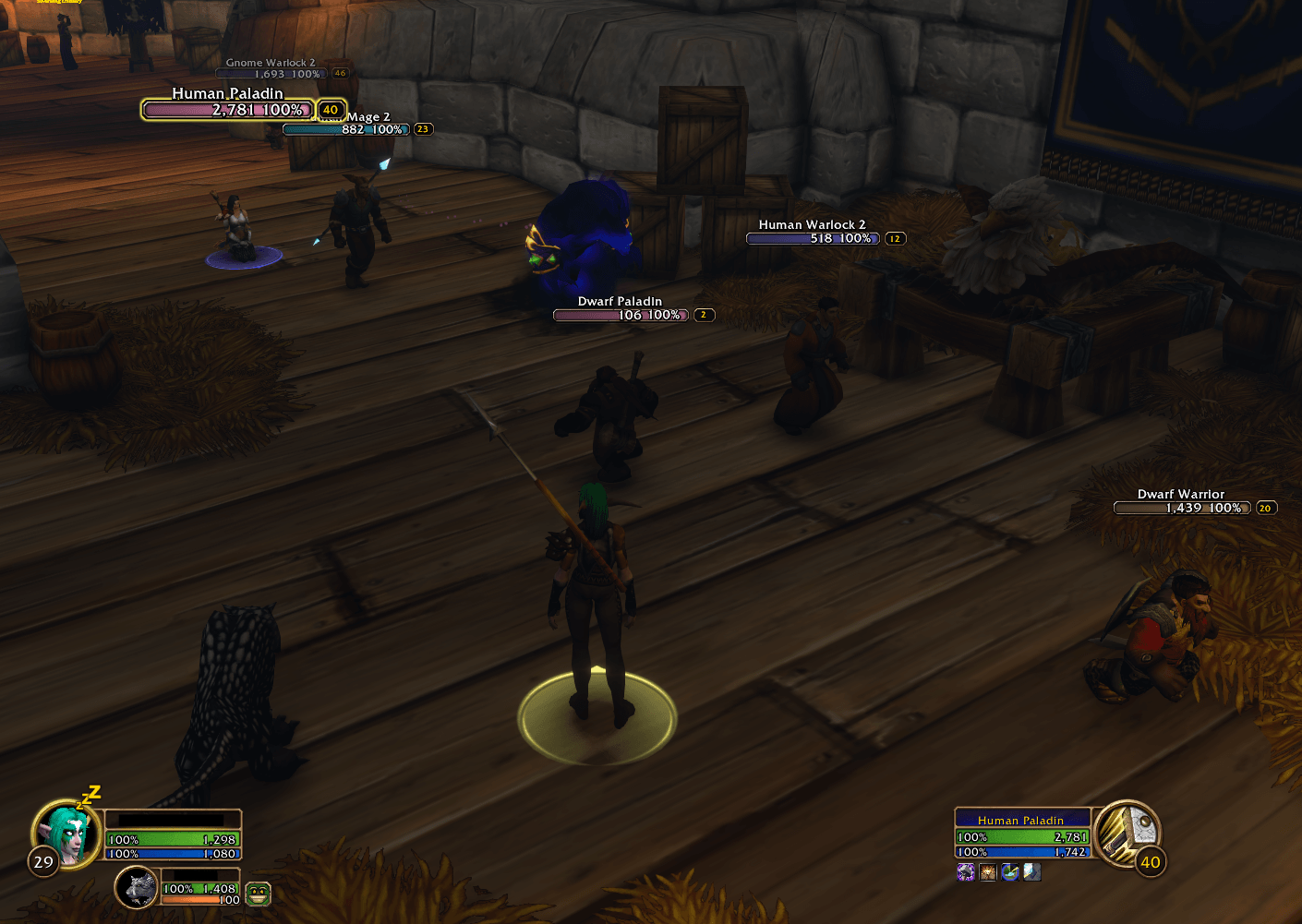
Streamer Mode hides player names so they stay off stream. Friendly and enemy players are shown by race and class instead, e.g. Human Warlock, Human Warlock 2. It covers AmbushAlert plus the game’s unit frames, tooltips and nameplates.
Description
AmbushAlert (WoW Forever)
Know who's around you in world PvP.
AmbushAlert spots nearby enemy players, warns you about stealthers and Kill On Sight players and keeps track of your kills, deaths and fights on the map. Built for World of Warcraft: Forever.
Before you start
Turn on enemy nameplates (V key), or tick Show Enemy Nameplates on the General tab in Settings. Forever doesn't give addons the combat log, so AmbushAlert sees enemies through their nameplates, your target, focus and mouseover.
Show Enemy Nameplates also turns on the game's Always Show Nameplates, so enemy nameplates show outside combat too. Without it AmbushAlert would miss most enemies until a fight starts. Prefer it another way? Type /aapvp alwaysshow on or /aapvp alwaysshow off (auto goes back to the default).
Features
The AmbushAlert window
- A compact list of enemy players near you, with level, class and guild
- A PvP shield after each name: red (Horde) or blue (Alliance) if they're flagged, grey with a slash if not
- Distance to each enemy after their name, coloured green (close) to red (far), with an option to sort the closest first. Or show class, race, race and class or guild instead.
- Your target and anyone targeting you sit near the top of the list
- Click to target, right-click for actions, Shift-click for Kill On Sight, Ctrl-click to ignore, Alt-click to focus
- An eye icon shows who has you targeted
- Players who arrive together are grouped (Group A, Group B)
- Stealthed players are tagged, with how long they've been stealthed
- Switch between Nearby, Last Hour, Kill On Sight and Ignored
- Hides itself when no enemies are around and comes back as soon as one appears (or when you target one), even in combat
- Keep it a set size or let it grow and shrink with the list
- This session's kills, assists and deaths in the footer (world PvP only)
Alerts
- Pop-ups and sounds for: Enemy Spotted, Kill On Sight Player, Group Arriving, Someone Stealthing, Spotted in Stealth, Stealthed Player Revealed, Seen Again, Enemy Targeting You, Watch List and Honourable Kill
- Stealth covers Stealth, Prowl, Vanish, Shadowmeld and invisibility potions. Choose how long the Stealth tag stays bright for all of them or give any spell its own time.
- Spotted in Stealth: an enemy who was already stealthed before you saw them is tagged as soon as you see the shimmer, mouse over them or click them
- Fitting game sounds by default, such as the stealth whoosh for someone stealthing and a Hunter's Flare when a stealther is revealed
- Choose the sound channel alerts play on: Master, Sound Effects, Music or Ambience
- When I'm Flagged and When I'm Unflagged: choose who alerts: all enemies, flagged enemies plus your lists, or just your lists
- Alerts show whether the enemy is Flagged or Unflagged
- Boxes on screen or text at the top of the screen, with Test, Move and Reset buttons
- Quiet on flight paths. Mute all sounds with one click.
Kill On Sight, Watch List and Ignore
- Kill On Sight with reasons (Camping, Started Combat, Stole Resources and more, or your own)
- Kill On Sight button on the target frame: the AmbushAlert logo, in full colour if they're Kill On Sight. Click it to add or remove them.
- Watch List for ninja looters, griefers and scammers, friend or foe. Alerts you when they're nearby, invite you or join your group. Guilds can go on it too.
- Mute any Kill On Sight or Watch List player or guild until you log out or for good
- Ignore for players you don't want alerts about
- Notes on any player, shown on their row and in alerts
Call for Help
- Sends your zone, coordinates and nearby enemies to party, raid, guild, whispers or your chat channels
- Send it from the AmbushAlert window, an on-screen button (shows even with the window closed), a key binding or
/aapvp sos - Can also tell others who killed you or when you get a killing blow, with your own messages
Your characters
- Lists are kept per server type (PvP, PvE, RP, RP-PvP or Hardcore) and faction
- Kill On Sight and the Watch List are shared by your characters there. Ignored, notes and mutes belong to each character. Change it per character on the Profiles tab.
- A light blue icon shows something only your other characters have. Hover to see which one, or copy their note across.
- Kills, deaths, fights and fight markers belong to each character
Player Browser
- Everyone you've seen, with tabs for Recent, Kill On Sight, Watch List, Ganked Me, Fights, Ignored and All
- Fights lists everyone you've killed or who has killed you, most recent first
- Search by name, guild or note, and sort by kills, deaths or last seen
- Add to List adds any player or guild by name, filled in from your target
- Edit Kills and Deaths to correct a player's record, with the option to reset it to what was recorded
- Your lifetime honourable kills and deaths to players, from the game's statistics
Fight markers
- A green skull on the minimap and world map where you won a fight and a red skull where you lost one
- Hover for who, when and your record against them
- Right-click to add a note to the fight, delete it or use the player's actions
- Choose how long they're kept, how many show (up to 200) and how big they are
Streamer Mode
- Shows race and class in place of player names (e.g. Undead Rogue 2), so names stay off stream
- Covers AmbushAlert, the game's unit frames, tooltips and nameplates
- Choose whose names to hide: yourself, friendly players and/or enemy players
Range Detector
- The distance to players above their nameplates, coloured green (close) to red (far)
- For players: Target Only (the default), All Enemy Players, All Friendly Players or All Players
- For NPCs too, for PvE: Target Only, Hostile NPCs or All NPCs (off by default)
- Pets and minions as an option
- Works everywhere, including dungeons and raids
Flight Timer
- A bar that counts down your flight, with your landing time by the game's clock
- Built-in times for most routes, so it counts down from your very first flight. Routes it doesn't know are learned the first time you fly them.
- Move it, resize it and lock it in place
- Landing warnings 30, 10 or 5 seconds before landing or when you land, so nobody catches you at the flight master
- Flight times show when you hover a destination on the flight map
And more
- Ignored Zones: AmbushAlert stays off in neutral towns like Booty Bay and Gadgetzan
- Minimap button
- Appearance tab for text size, opacity and window sizing
- Profiles per character (rename, copy or share them), plus export and import of your lists
- Delete Old Players Now, Reset All Edits and Reset Everything on the Lists tab, plus Reset All Settings at the bottom of Settings
- Change Log and Planned tabs showing what's new and what's coming next
Commands
| Command | What it does |
|---|---|
/aapvp |
Show or hide the window (/ambushalert also works) |
/aapvp help |
List all commands |
/aapvp settings |
Open Settings |
/aapvp players |
Open the Player Browser |
/aapvp resetsize |
Put the AmbushAlert window back to its default size |
/aapvp resetsize all |
Also reset the Settings window and Player Browser sizes |
/aapvp kos <name> |
Add or remove Kill On Sight (uses your target if no name) |
/aapvp watch <name> |
Add or remove the Watch List (uses your target if no name) |
/aapvp ignore <name> |
Add or remove Ignore (uses your target if no name) |
/aapvp reset |
Clear the Nearby list |
/aapvp mute |
Mute or unmute alert sounds |
/aapvp test |
Show sample alerts |
/aapvp sos |
Send a Call for Help |
/aapvp nameplates [enemy/friendly/both/off] |
Show enemy or friendly nameplates |
/aapvp alwaysshow [auto/on/off] |
Always Show Nameplates |
/aapvp streamer |
Turn Streamer Mode on or off |
/aapvp hk |
This session's kills, assists, deaths and honour |
/aapvp hktest |
Print how each kill is counted (type again to stop) |
/aapvp casts |
Print enemy casts and why any stealth was missed (type again to stop) |
/aapvp range |
Show how the Range Detector measures your target |
/aapvp profile <name> |
Switch this character to a profile |
/aapvp export |
Export your lists as text |
/aapvp import |
Import lists from text |
/aapvp debug |
Show what AmbushAlert can see (send this when reporting a problem) |
Problems and requests
Found a problem or have an idea for AmbushAlert? Leave a comment on this page and I'll take a look. If something isn't working, it helps if you include what happened and the text from /aapvp debug.
Credits
The Range Detector uses LibRangeCheck-3.0 by mitch0 and the WoWUIDev Community (MIT licence). Also includes LibStub (public domain).
Support AmbushAlert
AmbushAlert is free to use. If you'd like to support its development, you can buy me a coffee on Ko-fi. Every bit is appreciated. Thank you!
AmbushAlert Team