Almost There
Shows every XP, reputation, currency and profession gain in chat - with what's left to the next level and how many more gains it takes.
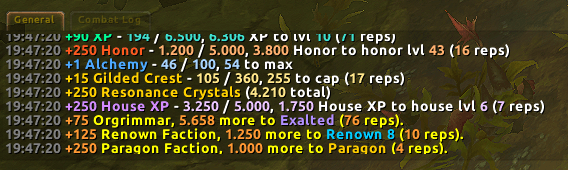
almost-there-chat-examples.png
Description
Almost There
How far is it to the next level – and how many more of these do I need?
Almost There prints a clean, colored line to your chat for every XP, reputation, honor, profession, currency and housing gain. Each line shows the amount you just gained, how much is left to the next level or cap, and how many more gains of the same size it takes to get there.
+90 XP - 194 / 6.500, 6.306 XP to lvl 10 (71 reps)
+75 Orgrimmar, 5.658 more to Exalted (76 reps).
+15 Gilded Crest - 105 / 360, 255 to cap (17 reps)
"reps" = how many more times you need the same gain to reach the next step (rounded up).
Features
- XP – gain, progress in the current level, XP left and reps to the next level. Level-ups are handled correctly.
- Reputation – every kind of faction:
- normal reputation (to the next standing, e.g. Exalted)
- friendship factions (to the next rank)
- Renown factions (to the next Renown level)
- Paragon (including a "Paragon reward ready!" hint)
- Honor – honor gained and honor left to the next honor level.
- Professions – skill-ups with the points left to the maximum.
- Currencies – gains with weekly or seasonal caps (e.g. crests) or your total amount.
- Hidden internal "tracker" currencies are skipped automatically.
- Profession knowledge currencies only show up once that profession can actually spend them (skill 25).
- Housing – house XP and the amount left to the next house level, including a hint when the next level is ready.
- Replaces Blizzard's messages – the default XP, reputation, honor, profession and currency messages are hidden by default (each can be turned back on), so you don't get everything twice.
- Ignore list – hide single factions, currencies or professions. The options window lists the most recently shown names with an Ignore button.
- Three window styles – Standard, EllesmereUI and ElvUI, switchable at any time.
- Secret-value safe – no chat parsing. Values are compared before and after, so it also works in combat and instances in Midnight; gains during combat are summed up afterwards.
- Choose the chat window for the output, respects your chat timestamp setting.
- No libraries, lightweight, no performance impact.
Options
Open the options with a click on the minimap button, via the addon compartment at the minimap, or with /almost.
Commands
| Command | Description |
|---|---|
/almost |
open/close the options |
/almost help |
list all commands |
/almost ignore <name> / unignore <name> |
ignore a faction, currency or profession / show it again |
/almost ignorelist |
print the ignore list |
/almost chat <n> |
send the output to chat window n |
/almost style [name] |
window style: Standard, EllesmereUI, ElvUI |
/almost minimap |
show/hide the minimap button |
/almost test |
print sample lines |
/almost scan |
rescan the faction list |
/almost reset |
reset all settings (the ignore list is kept) |
/almost xp / honor / rep / skill / currency / house / hidden |
toggle single line types |
/almost blizzardxp / blizzardhonor / blizzardrep / blizzardskill / blizzardcurrency |
toggle Blizzard's own messages |
Game versions
- Retail (Midnight) – fully supported.
- Mists of Pandaria Classic and WoW Forever – supported with the features these versions offer (no Renown, Paragon, honor levels or housing). Support is new – feedback is very welcome!
Notes
- All addon texts are in English. Faction, standing, currency and profession names come from your game client, so they appear in your client's language.
- Numbers use a dot as thousands separator (
6.306).
Feedback
Found a bug or have an idea? Please leave a comment or open an issue – screenshots of the chat line help a lot.
Almost There Team