Allemano AltBoard
- By
See all your characters side by side: gold, professions, currencies and reputation. Click a character for gear, stats, bags and bank, and search every bag and bank at once. For WoW Forever.
altboard-board.png
altboard-sheet.png
altboard-search.png
Description
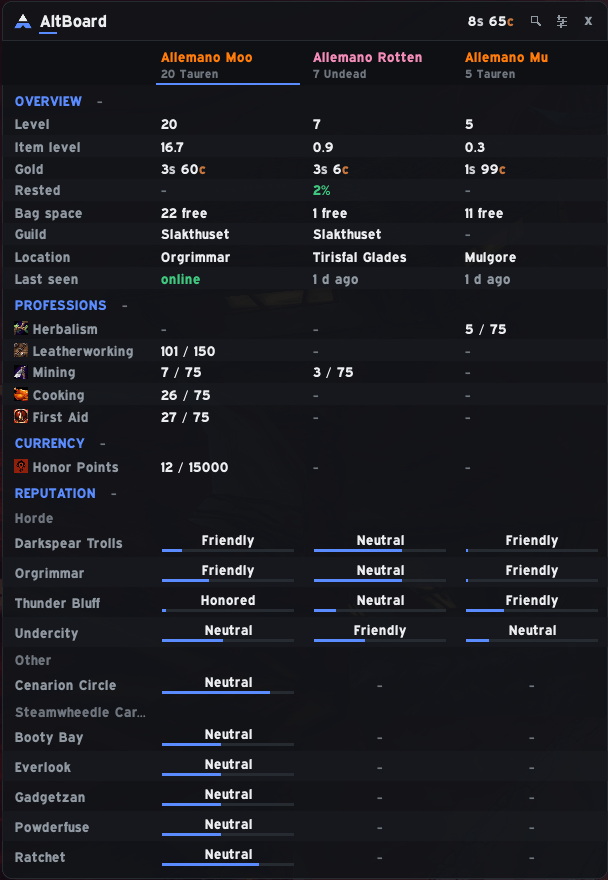
All your characters on one screen. AltBoard is an overview of every character you play on WoW Forever: gold, professions, currencies and reputation, with your characters as columns, so you can see who has what without logging in and out.
Alpha. AltBoard is new. Log in once on each character so it can read that character.
Open it with /ab (or /altboard) or the small launcher button. Each character is a column, and the rows are grouped into sections you can fold open or closed:
- Overview: level, item level, gold, rested XP, guild, location and when you last played the character, with your total gold in the title.
- Professions: every profession and its skill level per character.
- Currency: the currencies each character holds.
- Reputation: every faction any of your characters has met, grouped under its header, with the standing in its standing color, the percent and a thin progress bar. Hover for the exact values.
- Bag space: free bag slots per character.
Example: You wonder which alt has the most Cooking skill, or who still has room in their bags. Open the board and read across the row.
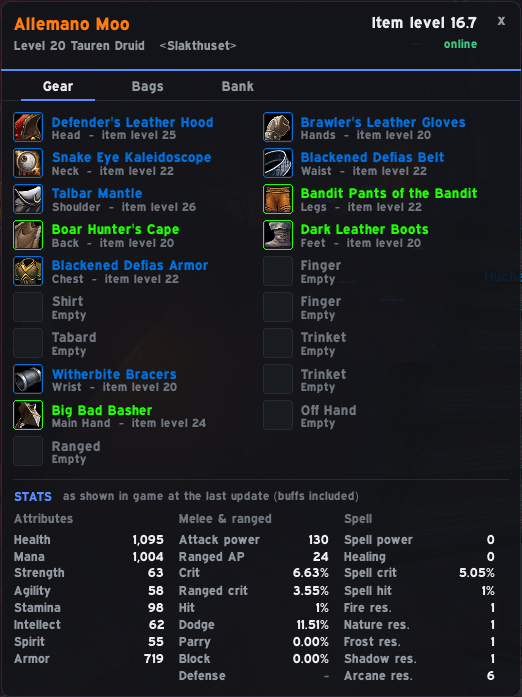
Left-click a name to open that character's sheet: Gear (icon, quality color and item level; hover for the real item tooltip, shift-click to link), Stats (attributes, melee, ranged, spell and resistances), and their Bags and Bank. The bank is remembered from the last time you opened it on that character, so you can check it from anywhere.
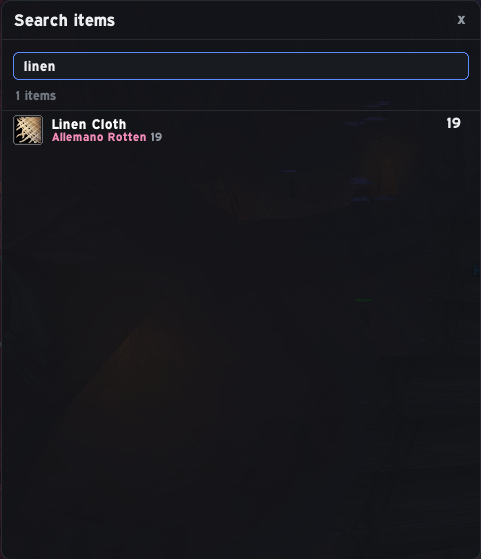
The magnifier button (or /ab find <name>) searches the bags, bank and equipped items of all your characters at once, and shows the total and who has it. Hover for the tooltip and the per-character split, or shift-click to link it.
Example: "Where did I leave the Thorium Bars?" Type "thorium" and see which alts hold them.
- Right-click a character name: move it left or right, hide it, or delete it.
- Right-click a row to hide it, and right-click a section heading to show hidden rows again.
- Characters that do not fit page with the mouse wheel; drag the board by its title bar; ESC closes it.
The gear button (or /ab settings): font (the game's fonts and any fonts other addons register), text size, accent color (AltBoard blue, follow Hush, your class color or a custom one), background opacity, window scale, column width, which sections to show and the launcher button.
- Standalone. No other addon is needed. If Hush is installed, AltBoard can follow its accent color, and nothing more.
- Data is saved per character from game events only. Nothing is sent to anyone.
- WoW Forever hides Lua errors, so AltBoard records them:
/ab errorslists the most recent ones.
/ab or /altboard opens the board · /ab find <name> searches all characters' items · /ab settings · /ab errors
AltBoard is made for WoW Forever (interface 16001). If the CurseForge app does not install it into the right folder, download the file from the Files tab and unzip it so that the folder is World of Warcraft\_classic_beta_\Interface\AddOns\AltBoard (the folder must be called AltBoard), then restart the game. Log in once on each character.
Part of Allemano Addons. Source code and issues: https://github.com/Allemano-Addons/AltBoard
Allemano AltBoard Team