AFK LFG
- By
An AFK button for your queues. Queue up, switch AFK mode on, and tab out: AFK LFG quiets the game while you wait, blasts your chosen alarm when the queue pops so you hear it out of window, then restores your exact sound settings.
Screenshot 2026-11-02 070600.png
Screenshot 2026-11-02 070500.png
Screenshot 2026-11-02 070531.png
Screenshot 2026-11-02 070413.png
Description
AFK LFG puts a small round AFK button next to the LFG queue eye by the minimap. Queue for a battleground or dungeon, click the button (or let Auto AFK do it), and go make tea: tab out, browse, watch something, or walk away from the window entirely. While you wait, the addon applies its Quiet Queue sound profile, and when your queue pops it plays a loud alarm you pick yourself, built to be heard while you are out of window or tabbed out, for up to 10 seconds or until you accept. When the queue ends, or you switch AFK mode off, it puts your sound settings back exactly as they were. Nothing is ever left changed behind your back: the profile is built from a snapshot of your own settings, taken fresh each time.
The button
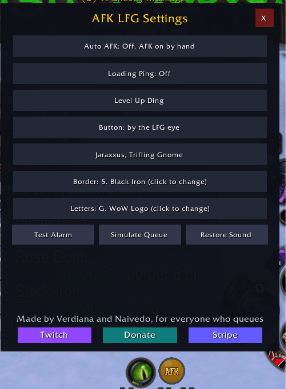
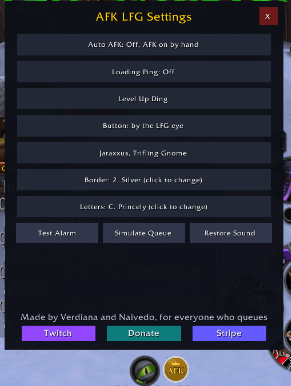
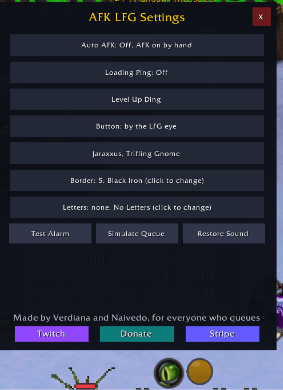
Grey when idle, green when AFK mode is on, gold while queued, red and reading AFK! when the queue pops. Left click toggles AFK mode, right click opens Settings. The button can anchor by the LFG queue eye or around the minimap rim, wears switchable border rings (Gold, Silver, White Gold, Rose Gold, Black Iron, and two-tone mixes), and carries baked-in AFK lettering in a dozen styles, or none.
Modes
Manual: click the button when you queue. Auto AFK (off by default, opt in): turns AFK mode on by itself for every queue, on every character, which is made for event farming across alts. Every setting saves account wide.
The queue alarm
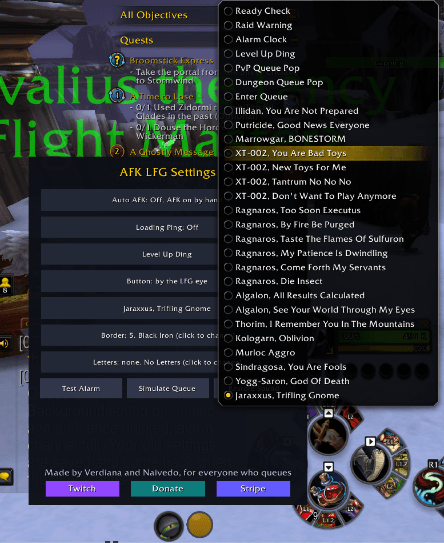
28 sounds, every one played straight out of WoW's own files, so the addon ships zero sound files: Ready Check, Raid Warning, Alarm Clock, the Level Up Ding, the PvP and Dungeon Queue Pops, Enter Queue, and boss and creature voices including Illidan, Putricide, Marrowgar, XT-002, Ragnaros, Algalon, Thorim, Kologarn, Sindragosa, Yogg-Saron, Jaraxxus, and the murloc aggro gurgle. Pick yours in Settings from a dropdown; picking plays a preview. The alarm stops when you accept, when you zone in, or at its 10 second cap.
Loading Ping (for alt farmers)
A one-shot ping for character loads. Arm it in Settings and the next character who finishes loading (or finishes a load back into the open world after an instance) dings once with a short sound you pick, loudly enough to hear from another tab or another room, then Loading Ping switches itself off until you arm it again. It borrows five sound settings for exactly 5 seconds and restores them, and it prints each step in chat so a silent ping can be diagnosed from the numbers. Test it any time with /afklfg pingtest.
Settings and commands
Right click the button or /afklfg config for the panel: mode toggle, Loading Ping toggle and its sound row, button anchor, alarm sound, border, and letters, plus Test Alarm, Simulate Queue, and Restore Sound. Slash commands: /afklfg on, off, auto on|off, ping on|off, pingtest, pingsound, sound, border, letter, anchor lfg|minimap, status, restore, test, sim, config.
Honest notes
AFK LFG never touches Master volume in its queue profile, never arms anything you did not switch on, and restores on logout and login if a session ends mid-queue. It is made by Verdiana and Naivedo.
AFK LFG Team