Advanced Highlighted Assist
- By
Advanced Highlighted Assist expands Blizzard’s Assisted Combat and Cooldown Manager with customizable spell and item priorities, utility lanes, conditional recommendations, keybinds, profiles, and shareable specialization setups.
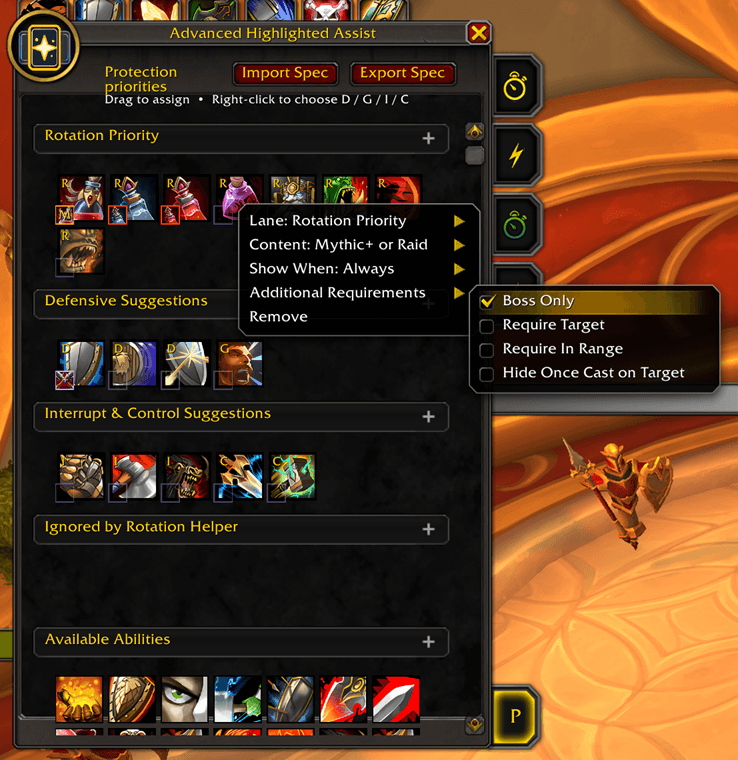
Item Settings.png
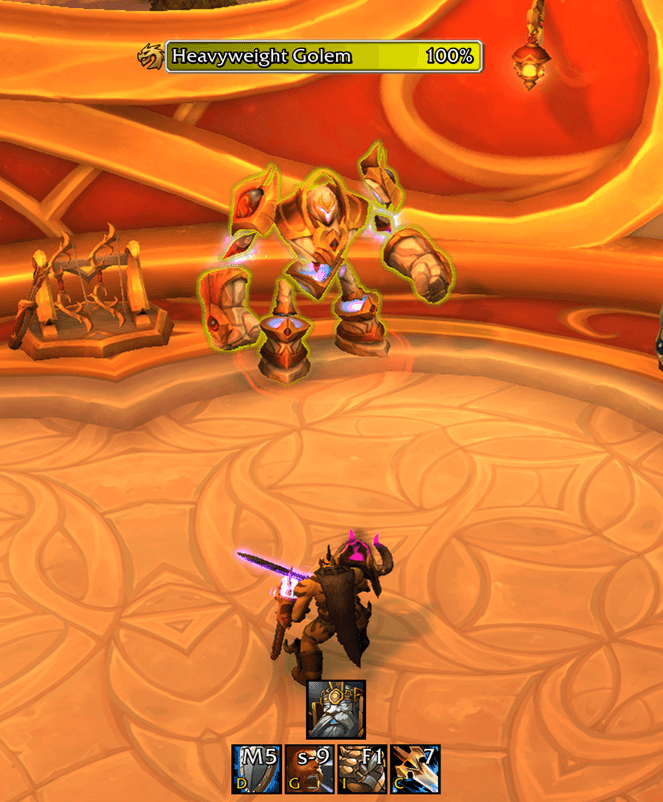
AHA Hero.png
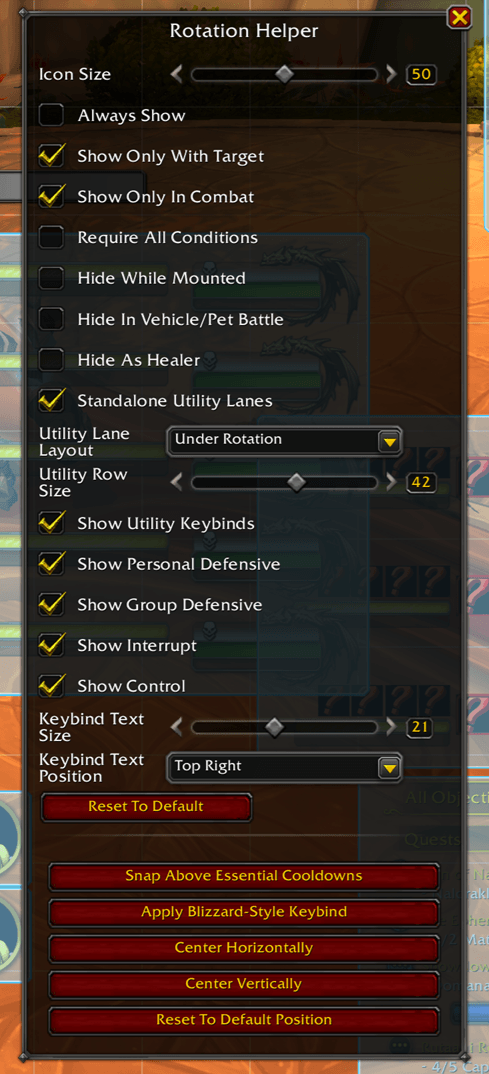
Edit Mode.png
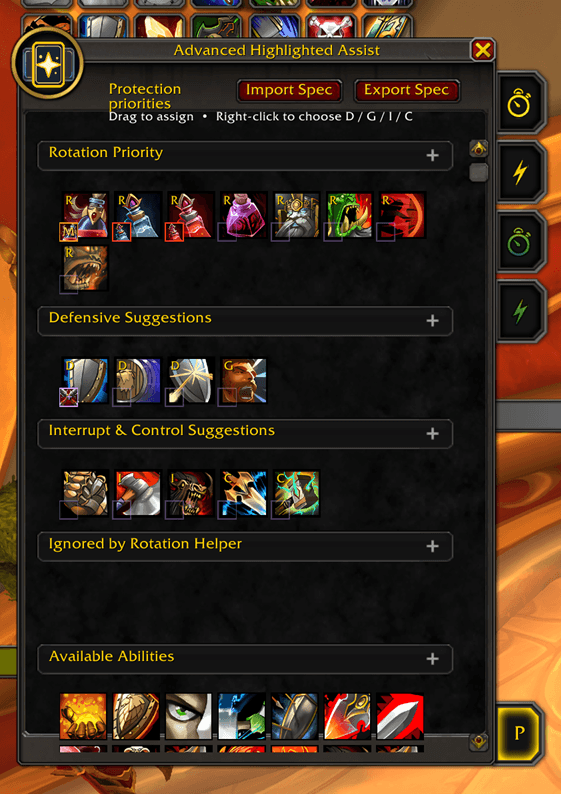
Prio Builder.png
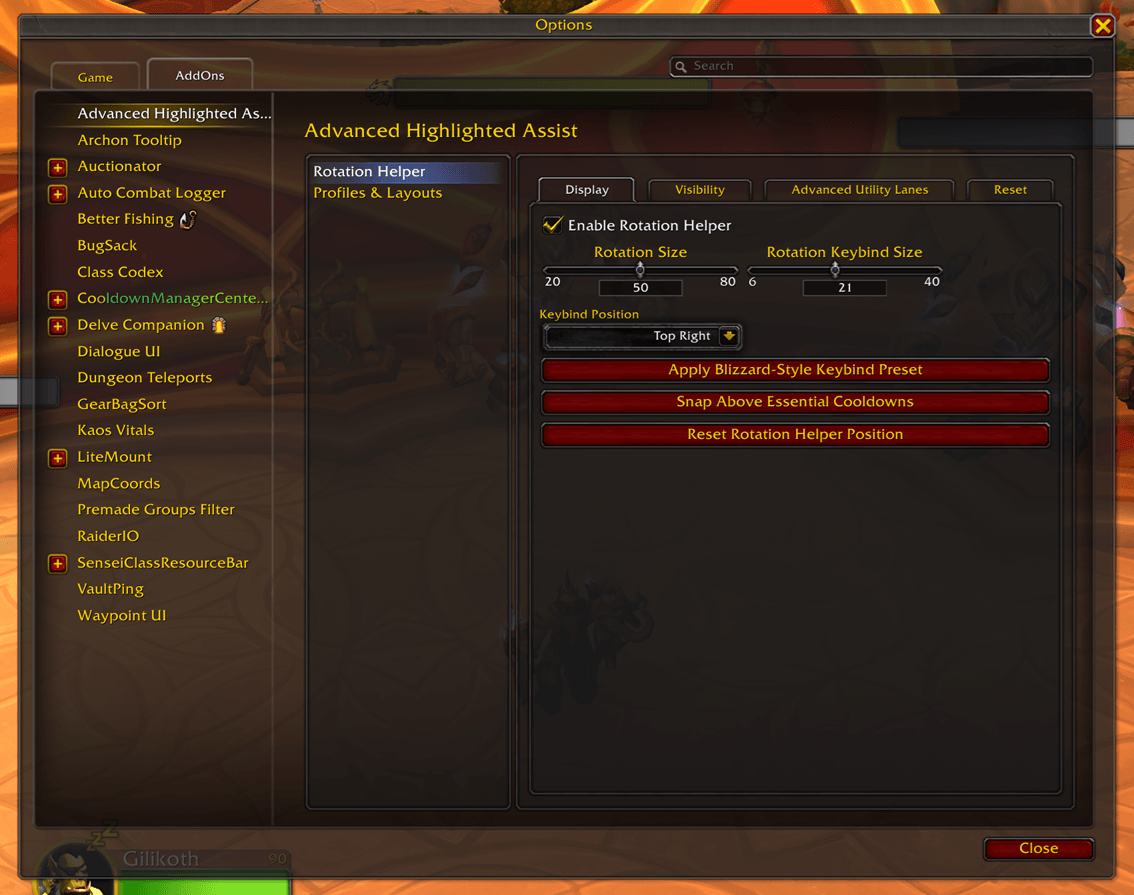
Settings.png
Description
Advanced Highlighted Assist
Advanced Highlighted Assist (AHA) expands Blizzard’s Assisted Combat and Cooldown Manager systems with a customizable recommendation layer built around your own priorities.
AHA keeps Blizzard’s recommended rotation at the center of the experience while allowing you to add abilities, defensives, interrupts, crowd control, consumables, trinkets, and utility that the default recommendation may not account for.
It does not replace Blizzard’s rotation engine. It builds on top of it.
Features
Custom Rotation Priorities
Create a priority list for each specialization using:
- Spells
- Items
- Trinkets
- Potions
- Flasks
- Temporary weapon enchants
- Other usable consumables
Reorder entries through the visual Priority Builder and decide exactly where each recommendation belongs.
Blizzard Assisted Combat Integration
AHA uses Blizzard’s Assisted Combat recommendation as the foundation of the main display.
Your custom priority entries can appear ahead of Blizzard’s recommendation when their configured requirements are met. When no custom entry qualifies, Blizzard’s normal recommendation remains visible.
Priority Builder
Manage each specialization through a drag-and-drop interface.
Entries can be organized into:
- Rotation Priority
- Personal Defensive
- Group Defensive / Utility
- Interrupt
- Control / Disruption
You can also ignore Blizzard recommendations that you do not want appearing in the rotation queue.
Conditional Recommendations
Each priority entry can be configured with content and gameplay requirements.
Available conditions include:
- Anywhere
- Mythic+ before or during a run
- Raid only
- Mythic+ or raid
- Instanced PvE, including dungeons, raids, and Delves
- Boss targets only
- Require a valid target
- Require the target to be in range
- Require an assigned aura to be present
- Require an assigned aura to be missing
- Hide after the ability has been cast on the current target
Conditions can be combined to create recommendations for specific encounters, content types, buffs, targets, and situations.
Consumable and Maintenance Reminders
Item entries support specialized maintenance conditions for:
- Applied item buffs
- Flasks
- Potions
- Main-hand temporary enchants
- Off-hand temporary enchants
- Weapon oils
- Sharpening stones
- Other item-based buffs
Consumable recommendations automatically hide when none of the selected item remains in your inventory.
Mythic+ conditions also recognize the preparation period after a keystone has been inserted, allowing pre-run flask and weapon-buff reminders to appear before the timer begins.
Optional Utility Lanes
AHA can display separate standalone recommendation boxes for:
- Personal defensives
- Group defensives and utility
- Interrupts
- Crowd control and disruption
Utility lanes can be placed beneath or beside the main recommendation.
These lanes are optional and are intended primarily for players who do not already display the equivalent Blizzard Cooldown Manager viewers.
Native Cooldown Feedback
Custom recommendations display Blizzard-style cooldown and global-cooldown clock sweeps.
This preserves the visual feedback normally shown on action buttons, making it clear when an ability is recommended but still waiting for the global cooldown or its own cooldown to finish.
The sweep uses Blizzard’s native cooldown timing and does not depend on a custom SpellQueueWindow setting.
Keybind Overlays
Display action-bar keybinds directly on recommendation icons.
Keybind text can be:
- Enabled or disabled
- Resized
- Repositioned
- Displayed separately for the main recommendation and utility lanes
Display and Positioning Controls
AHA integrates with Blizzard Edit Mode and supports:
- Custom recommendation size
- Custom utility-lane size
- Manual positioning
- Snapping above Essential Cooldowns
- Always-visible mode
- Target-only visibility
- Combat-only visibility
- Mounted-state hiding
- Vehicle and pet-battle hiding
- Healer-role hiding
Profiles and Sharing
Create multiple addon profiles for different characters, layouts, or playstyles.
AHA supports:
- Full profile import and export
- Per-specialization import and export
- Shareable priority configurations
- Saved Edit Mode positions
- Saved display and layout settings
Import handling also supports strings copied through chat applications, code blocks, quotation marks, wrapped text, and other common formatting.
Philosophy
Advanced Highlighted Assist is designed to enhance Blizzard’s Assisted Combat system rather than replace it with a separate rotation simulator.
Blizzard continues to provide the core rotational recommendation. AHA gives you control over the information surrounding it, including abilities, consumables, defensives, interrupts, encounter requirements, and personal priorities that the default system may not represent.
The goal is a recommendation display that remains familiar, responsive, lightweight, and flexible enough to fit the way you actually play.
Commands
Use /aha to open the AHA settings.
Use /cdm to open Blizzard’s Cooldown Manager.
Short Description
Advanced Highlighted Assist expands Blizzard’s Assisted Combat and Cooldown Manager with customizable spell and item priorities, conditional recommendations, utility lanes, keybinds, profiles, and shareable specialization setups.
Advanced Highlighted Assist Team