Advanced Cooldown Manager
- By
Extends WoW Forever's built-in Cooldown Manager with all spells for all classes and a custom tracker for all forms for druids.
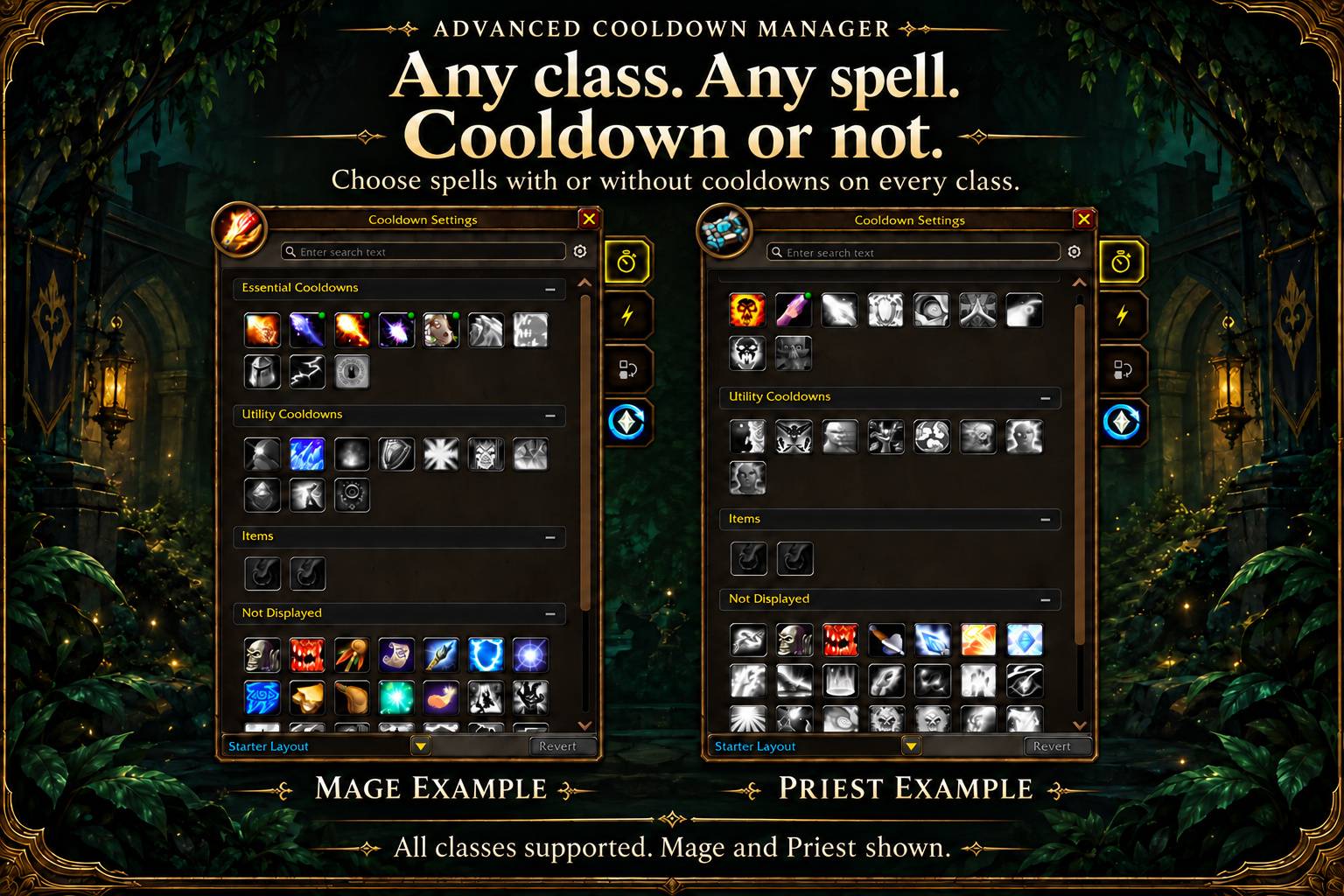
01-all-classes.jpg
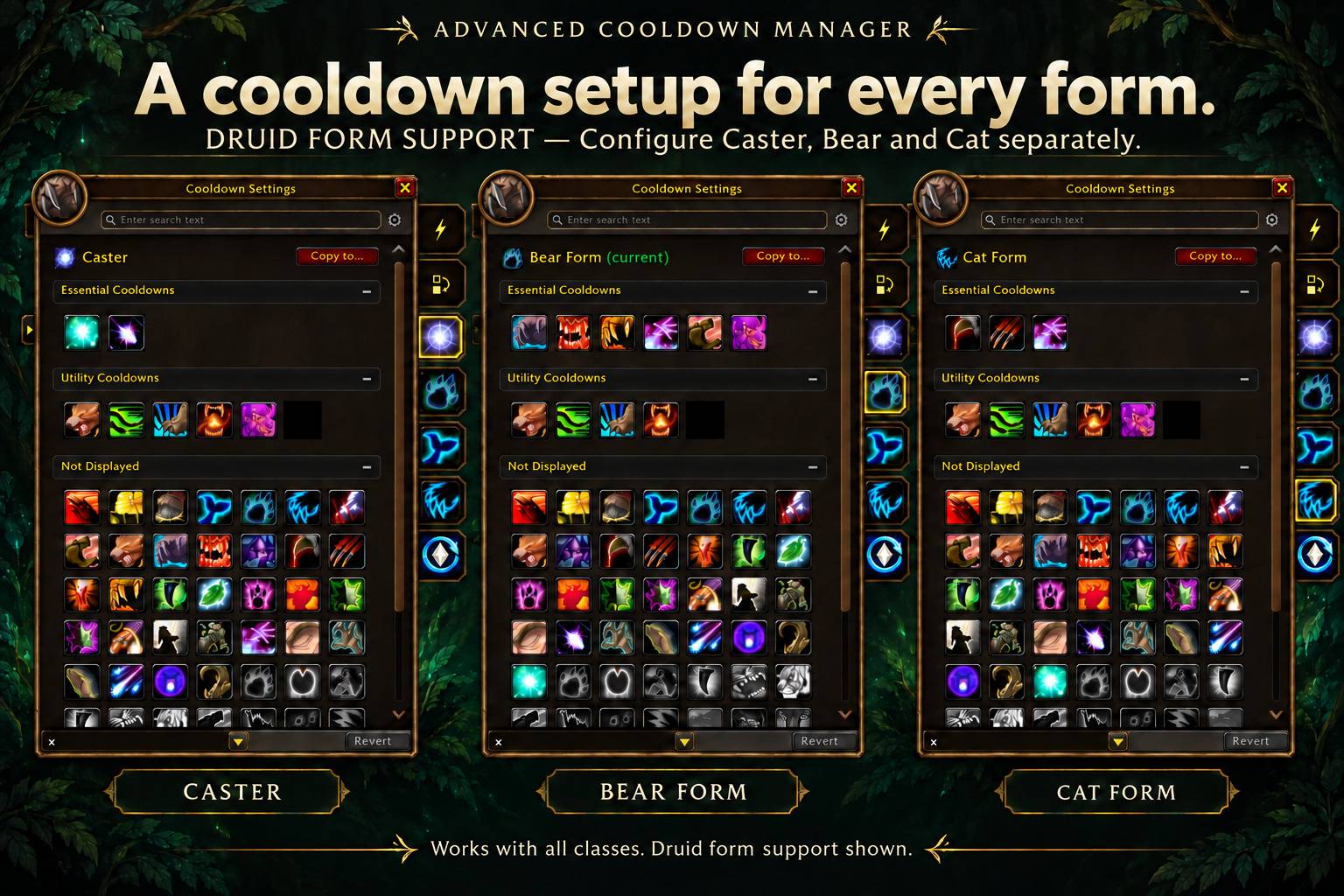
02-druid-form-support.jpg
Description

The Cooldown Manager you already have, with the gaps filled in. Made for World of Warcraft: Forever.
WoW Forever has Blizzard's modern Cooldown Manager, but it only tracks the spells Blizzard picked. Instants with no cooldown, like Swipe, Shred or Maul, aren't on it, and neither are many buttons you press every fight. Better Cooldown Manager adds them into Blizzard's own bars, next to Blizzard's icons. You manage them in Blizzard's own Cooldown Settings window, so there are no extra frames to place and no new settings screen to learn.
Track the spells Blizzard leaves out
Put any spell in the Essential or Utility row. Custom icons work like Blizzard's own:
- Cooldown and global cooldown swipe
- Charges
- Tint when the spell is unusable or you lack the resource
- Red tint when your target is out of range
- Glow when the spell procs
- Tooltips
You can turn each of these on or off.
Made for Classic spell ranks
Add a spell once and its icon always shows your highest learned rank. Put Swipe (Rank 1) on your bar at level 16 and it's Rank 5 at 60, with nothing to update. Spells you haven't learned yet stay hidden until you train them.
Set up with drag and drop
Open Cooldown Settings. The Spells tab's Not Displayed section already lists every spell you know that Blizzard doesn't track. Your class's unlearned trainer spells and talents follow, grayed out, so you can plan your bars before you learn them.
- Drag a spell into Essential or Utility, to the exact spot you want
- Drag it back to stop tracking it
- Right-click a custom tile (marked with a green dot) to move, hide or remove it
- Click the + tile to add anything else by name or spell ID
Druids: a bar for each form
Every form (Caster, Bear, Cat…) gets its own Essential and Utility bars, and they swap automatically when you shift. Bear shows Maul, Swipe and Enrage; Cat shows Shred, Rake and Tiger's Fury.
- One tab per form in Cooldown Settings, which opens on your current form
- One spell can go on several bars and in several forms. Hold Shift while dropping to keep it in both bars.
- Copy to… copies a form's layout to another form, or to all of them
- Dire Bear Form counts as Bear Form
Centered layout built in
No need for a separate centering add-on:
- Cooldown rows can be centered, left- or right-aligned, and grow up or down
- Buff icons can be centered and buff bars can grow from the top or bottom, or both can stay on Blizzard's default
- Edit Mode's selection box stretches to cover your added icons
Safe in combat
The modern client hides some spell information from add-ons during combat, and an add-on that tampers with Blizzard's frames can break them. Better Cooldown Manager never modifies Blizzard's Cooldown Manager. It only sits alongside it, and it uses Blizzard's own cooldown handling, so Blizzard's bars keep working normally in combat.
Saved per class
Your setup is saved per class (and per specialization, if the game reports one), so each character class keeps its own bars.
Commands
/acm: open Cooldown Settings/acm options: open the add-on's options/acm add Swipeor/acm add 779 utility 3: add a spell, optionally choosing the bar and position/acm remove Swipe: remove a custom spell/acm list: list your custom spells/acm formbars//acm forms: druids, open your current form's tab / list your forms/acm bars: print your bar setup, to include in bug reports
Good to know
- Requires WoW Forever. This is not a Retail or Classic Era add-on.
- Options are in Cooldown Settings, on the Advanced Cooldown Manager side tab below Spells, Auras and Group Buffs.
Found a bug? Create an issue in our public github. Please include the output of /acm bars in your report when possible.
Advanced Cooldown Manager Team