ActionHUD
- By
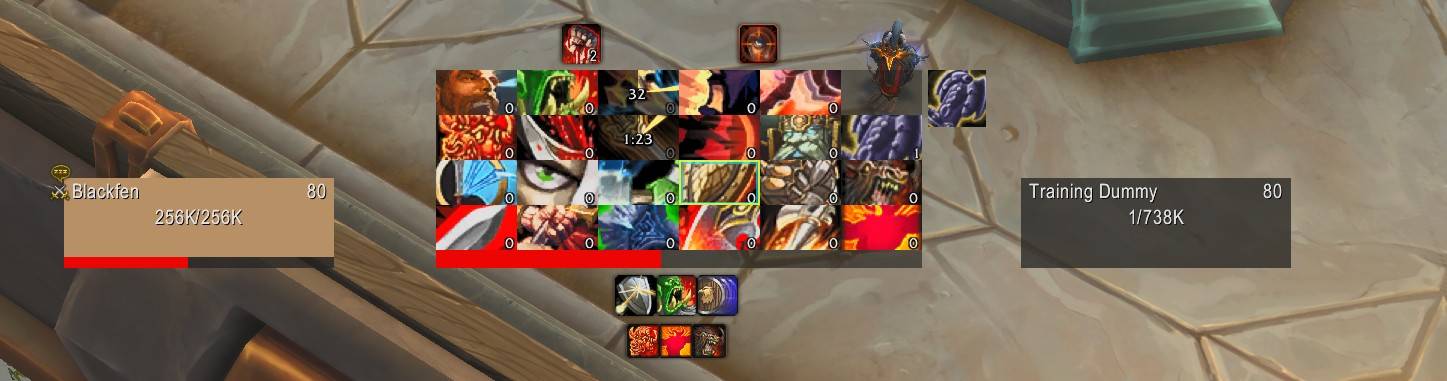
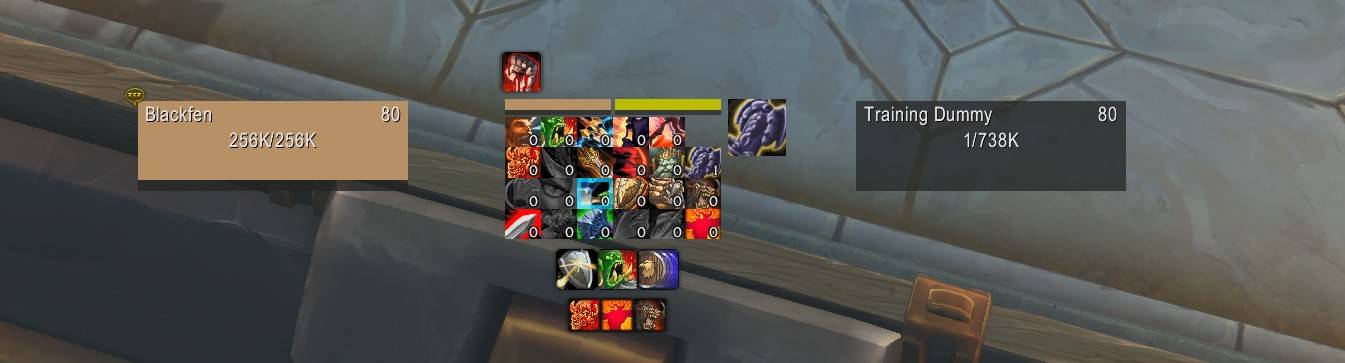
A lightweight, high-performance action bar HUD for World of Warcraft Retail. Displays a compact grid of your primary action bars, synchronized with Blizzard's native Edit Mode settings.
actionhud2.jpg
actionhud3.jpg
actionhud1.jpg
Description
ActionHud
A lightweight, high-performance action bar HUD for World of Warcraft Retail. Displays a compact grid of your primary action bars, synchronized with Blizzard's native Edit Mode settings.




Midnight Compatibility: This addon is fully prepared for WoW 12.0 (Midnight). It uses passthrough patterns for secret values during combat, defensive API wrappers, and graceful degradation for restricted zones.
Complete Your UI for Midnight
Check out these complementary addons to round out your interface:
- Danders Frames – Clean party & raid frames
- TweaksUI: Cooldowns – Cooldown and buff skinning
- ClassyMap – Lightweight map replacement
- Weekly – Activity tracker for Midnight and pre-expansion events
Features
- Action Bar Mirroring – Dynamically synchronizes with Blizzard's Action Bar 1 and Action Bar 2 layout (rows/columns) from Edit Mode.
- Stance/Form Support – Automatically updates for Druid forms, Rogue stealth, and other bar swaps.
- Visual Feedback:
- Yellow Glow – Proc tracking via Spell Activation Overlay.
- Blue Glow – WoW 11.x Assisted Combat rotation recommendations.
- Cooldowns – Clear countdown numbers with configurable font size.
- Charges – Stack counts for charge-based abilities.
- Usability – Desaturates unusable skills; tints out-of-range abilities red.
- Resource Bars:
- Health, Power & Class – Compact bars for Player and Target.
- Dynamic Stacking – Individual visibility toggles; HUD height automatically adjusts when bars are hidden.
- Unit Frame Reskin – Minimalist styling for Player, Target, and Focus frames:
- Hide portraits and borders for a cleaner look.
- Flat, solid bar textures with adjustable heights.
- Layout Manager – Unified system to reorder HUD modules and set custom spacing.
- Visualization Tools – Toggle layout outlines to see component bounds and position empty modules easily.
- Profiles – Support for character-specific settings and profile sharing.
- Integration – Minimap button, Addon Compartment, and DataBroker (LDB) support.
⚠️ Temporarily Disabled: The Cooldown Manager module is disabled while Blizzard's interface APIs stabilize in WoW 12.0 (Midnight). It will be revisited once the APIs are more reliable.
Installation
- Download or clone this repository.
- Place the
ActionHudfolder in your WoW addons directory:
World of Warcraft\_retail_\Interface\AddOns\- Restart WoW or type
/reloadif already running.
How to Use
ActionHud synchronizes with your Blizzard Action Bars.
Step 1: Configure Your Action Bars
- Open Edit Mode (
Esc→Edit Mode). - Select Action Bar 1 and Action Bar 2.
- Configure them as you like (e.g., 6x2 grids).
- ActionHud will automatically mirror the number of buttons and row layout from these bars.
Step 2: Place Your Abilities
- Put the abilities you want on the HUD in Action Bar 1 and Action Bar 2.
- ActionHud will automatically display whatever is on these bars.
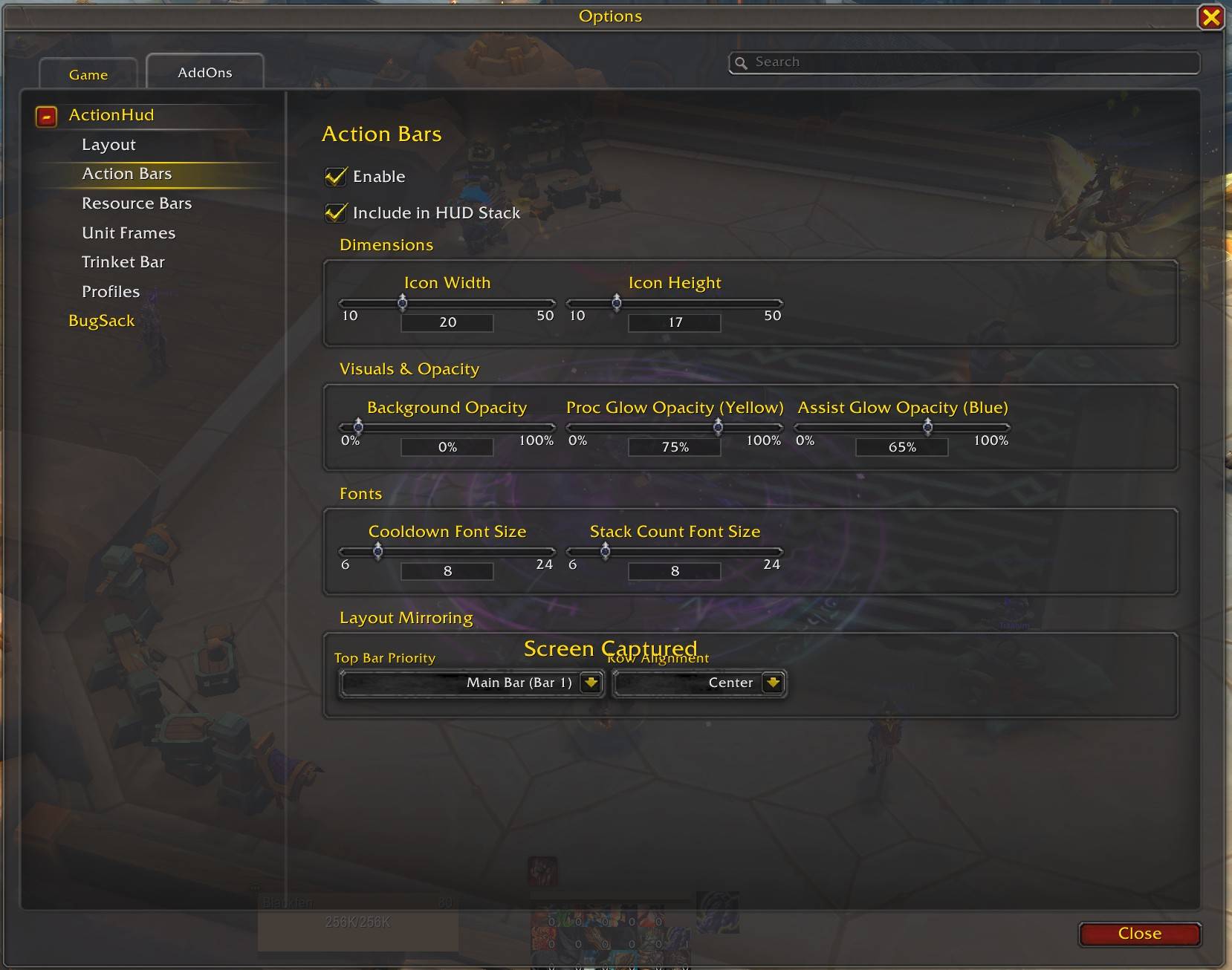
- Use the Top Bar Priority setting in ActionHud to choose which bar appears first in the stack.
Step 3: Position the HUD
- Open ActionHud settings (
Esc→Options→AddOns→ActionHud). - Uncheck Lock Frame (a green overlay appears).
- Tip: Enable Show Layout Outlines in the Layout tab to see the bounds of all active modules.
- Drag the HUD to your preferred screen position.
- Re-check Lock Frame to lock it in place.
Tip: You can hide the default Action Bars 1 and 2 in Edit Mode once you've confirmed ActionHud is showing everything correctly.
Prerequisites
To get the most out of ActionHud, enable this native WoW feature in Gameplay → Gameplay Enhancements:
- Assisted Highlight – Required to see the blue glow recommendations on the HUD.
Slash Commands
| Command | Description |
|---|---|
/ah or /actionhud |
Opens the configuration dialog |
/ah reset |
Resets profile to defaults |
Configuration
Open the settings panel via slash command or Esc → Options → AddOns → ActionHud.
Settings Sections
- General – Lock frame, Minimap icon, and prerequisites info.
- Action Bars – Icon dimensions, opacity, mirroring priority, and alignment.
- Resource Bars – Individual toggles for Health/Power/Class bars and sizing.
- Unit Frames – Reskin options for Player, Target, and Focus frames.
- Trinkets – Configure the dedicated Trinket tracking module.
- Layout – Reorder modules, set gaps, and toggle visualization outlines.
- Help & Slash Commands – Built-in command reference and troubleshooting tools.
- Profiles – Create, Copy, Delete, or Reset profiles for different characters.
Requirements
- World of Warcraft Retail 11.0+ or Midnight Beta
- Action Bars 1 and 2 configured as described above
Files
| File | Purpose |
|---|---|
ActionHud.toc |
Addon manifest |
ActionHud.lua |
Addon initialization, slash commands |
Utils.lua |
Shared utility functions (safe API wrappers) |
LayoutManager.lua |
Centralized module positioning and stack management |
ActionBars.lua |
Action bar grid (6×4 button frames) |
Resources.lua |
Health, Power, and Class Resource bars |
UnitFrames/ |
Unit frame styling for Player, Target, Focus |
Settings/ |
AceConfig settings modules |
Technical Notes
- Event-Driven – Primary updates react to game events; minimal polling with adaptive throttling (20 Hz active, 2 Hz idle)
- Static Frames – All 24 buttons are created once at load, never during combat
- Minimal Memory – Reuses textures, frames, and tables; eliminates per-frame allocations
- API Resilience – All critical APIs wrapped with
pcallfor stability across patches - Midnight Ready – Passthrough patterns for secret values; graceful degradation when data is restricted
- Ace3 Framework – Uses AceAddon, AceDB, AceConfig for robust infrastructure
Credits
A special thanks to the authors of:
- Cooldown Manager Tweaks – For logic references related to styling native cooldown frames
- Addon Bars Enhanced – For inspiration and implementation details on hijacking native frames
Support
If you find ActionHud useful, consider sponsoring on GitHub to support continued development and new addons. Every contribution helps!
License
GPL-3.0 License – see LICENSE for details.
ActionHUD Team