AB Call
- By
A lightweight World of Warcraft Classic Era addon for calling out incoming enemies and base status in Arathi Basin.
Screenshot 2026-08-03 at 01.35.53.png
Screenshot 2026-08-03 at 01.36.30.png
Screenshot 2026-08-03 at 01.37.23.png
Description
AB Call
A lightweight World of Warcraft Classic Era addon for calling out incoming enemies and base status in Arathi Basin, built entirely on Classic Era-safe APIs.
The idea is simple: you're guarding a base, you see enemies approaching (or get sapped out of nowhere) — you need to warn your team instantly, without fumbling for chat commands. AB Call turns that into a single click.
Requirements
- WoW Classic Era (client interface
11509) - English (enUS) client — the addon reads real battleground chat text (e.g. "The Alliance has taken the blacksmith!") to track who owns each base, so it's tuned to English wording specifically.
Installation
- Download/clone this repo.
- Copy the
ABCallfolder into yourWorld of Warcraft/_classic_era_/Interface/AddOns/directory. - Make sure it's enabled on the AddOns screen at character select.
Features
One-click alerts
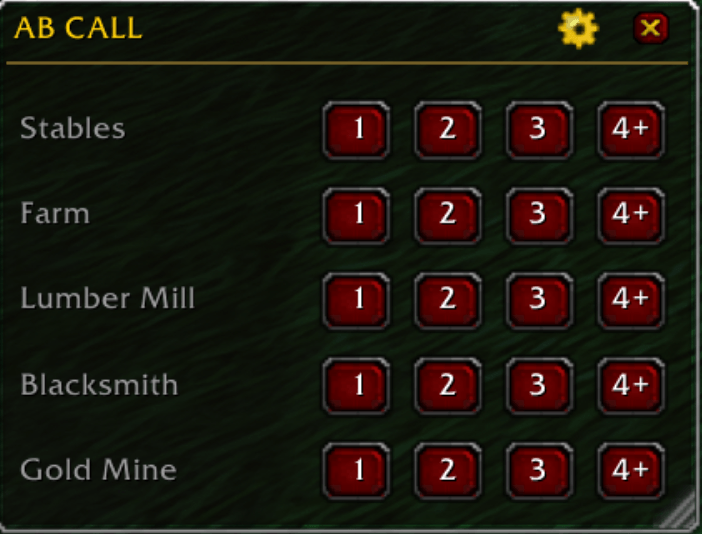
Each of the 5 Arathi Basin bases (Stables, Farm, Lumber Mill, Blacksmith,
Gold Mine) gets its own row with four count buttons: 1 / 2 / 3 / 4+.
Click the number that matches how many enemies you see — it instantly sends
[Base] N incoming! to the battleground's Instance chat, which is what your
whole raid actually sees in AB.
"All clear" report
Right-click a base's name to report it safe: [Base] Clear, safe now!.
No extra buttons needed — just right-click instead of left-click.
Automatic Sap alert
If you get Sapped while near a base your team owns, AB Call notices (by
watching your own debuffs) and automatically fires
[Base] I'm Sapped! Possible stealthed enemy nearby! — because you obviously
can't click anything yourself while sapped. This only fires for a base your
team actually controls, so getting sapped while pushing an enemy node won't
trigger a false alarm. Toggle in Settings (on by default).
Live base ownership tracking
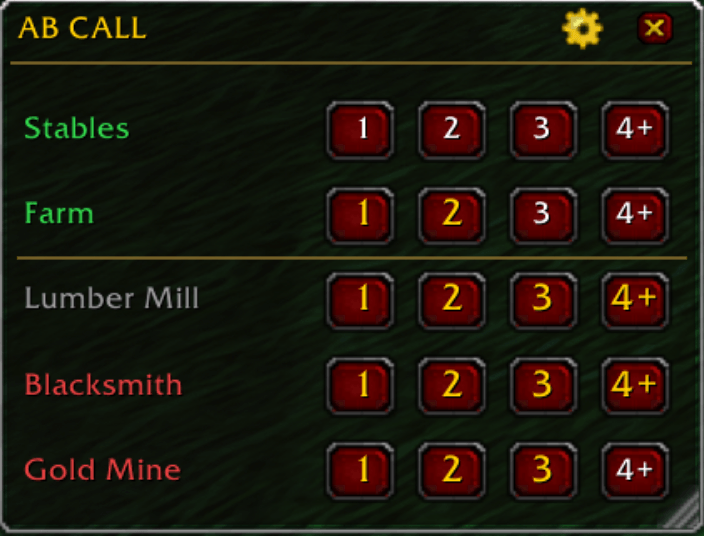
AB Call listens to the real battleground announcements ("The Horde has taken the farm!", "X has assaulted the lumber mill!", etc.) and reflects the current state directly on each base's name:
| Color | Meaning |
|---|---|
| Grey | Neutral / unknown |
| Muted green | Your team is capturing it (the ~1 minute "unchallenged" window is still running) |
| Bright green | Confirmed — your team owns it |
| Muted red/orange | The enemy is capturing it |
| Bright red | Confirmed — the enemy owns it |
Bases you own (or are about to own) automatically float to the top of the list, everything else sinks to the bottom, with a divider line between the two groups — so at a glance you know what needs defending.
Undefended base warning (optional)
Off by default, since it does a bit of extra periodic work: if enabled, AB
Call watches your raid's positions and warns the team
([Base] is undefended! Need defenders!) if one of your owned bases has had
nobody nearby for about 20–30 seconds — the classic AB failure mode where
everyone pushes one side and a held base gets capped in silence. Enable it
from Settings (small performance cost noted there).
Manual ownership correction
Shift+Left-click a base's name to manually cycle its status (neutral → yours → enemy's → neutral). This is a fallback for after a long disconnect — chat-based tracking can't retroactively learn about captures you missed while offline, so this lets you fix the display by hand if it looks out of date.
Two themes
Switch anytime from Settings, no reload needed:
- Classic — real classic-era beveled buttons and the authentic gold/black tooltip-style border, matching the stock Vanilla/Classic UI. (Default)
- Modern — a flat, minimalist skin closer to current retail UI.
A panel that gets out of your way
- Only shows up while you're actually inside Arathi Basin.
- Drag the title bar to move it, drag the bottom-right corner to resize (scales the whole panel, text included).
- Lock it in place once you've got it positioned how you like.
- Everything (position, size, theme, settings) is remembered — including
across a
/reloador reconnect mid-match, so the panel doesn't reset to looking "blank" partway through a game.
Settings
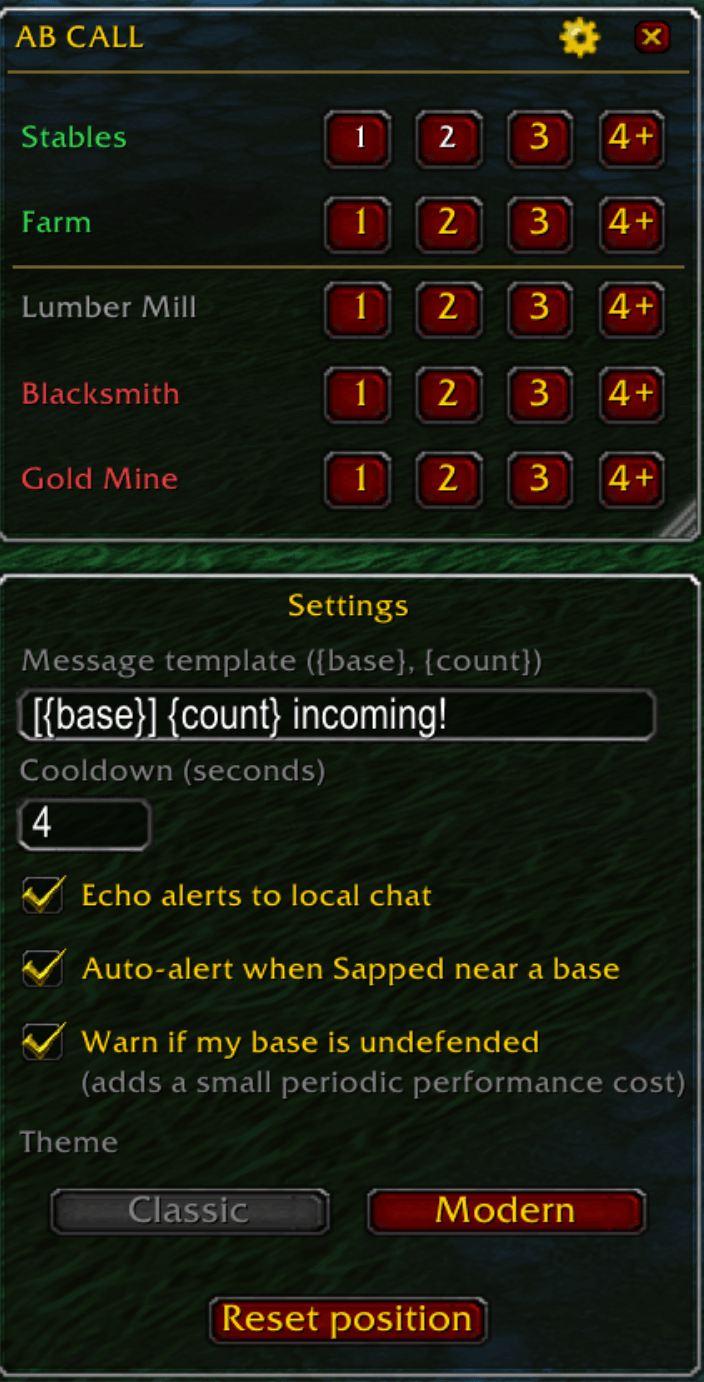
Click the gear icon in the title bar to open Settings:
- Message template — customize the incoming-alert text (
{base}and{count}tokens). - Cooldown (seconds) — minimum time between alerts for the same base
(default
4s; automatic alerts use a longer floor internally so they can't spam even if this is set low). - Echo alerts to local chat — also print your own alerts to your chat window, not just send them (on by default).
- Auto-alert when Sapped near a base — see above (on by default).
- Warn if my base is undefended — see above (off by default).
- Theme — Classic / Modern.
- Reset position — snaps the panel back to the center of the screen.
Slash commands
| Command | Effect |
|---|---|
/abc |
Toggle the panel on/off |
/abc lock |
Lock the panel in place (can't be dragged) |
/abc unlock |
Unlock it again |
/abc reset |
Reset the panel's position |
Good to know
- Base ownership is learned purely from the battleground's own chat messages — there's no official API to directly query "who owns this base right now" in Classic Era, so tracking starts fresh (all grey) at the start of every match and builds up as captures happen. If you join mid-match, ownership for bases that haven't changed hands since you joined will stay unknown until they do (or until you set it by hand with Shift+Left-click).
- The proximity checks (auto Sap-alert, undefended-base warning) use best-effort published Arathi Basin flag coordinates rather than precision-measured ones — if either feature seems to trigger a bit too early/late/rarely at a specific flag, that's the tuning knob.
License
The AB Call Team