Latency Monitor

Abandoned
Shows your real latency with options for moving and what have you. Forget about Alt + F1!
item image

Description

Authors

  • UnknownViper (owner)
  • Olivar Nax (Developer & Maintainer)

Description

Want to know your real latency? Now you can! Forget Alt + F1!


Now I say real latency - what does that mean? It means that the latency you see from Alt + F1 is actually not correct, at least it's not what you want to know. That one only shows you the time a ping takes, but not the actual time it takes for you to get a reply from the server, so it's actually rather misleading. 

But hey, now you don't have to worry about that. You can see your real latency and have it placed wherever you want.


Features

  • Freely movable - place it anywhere you like!
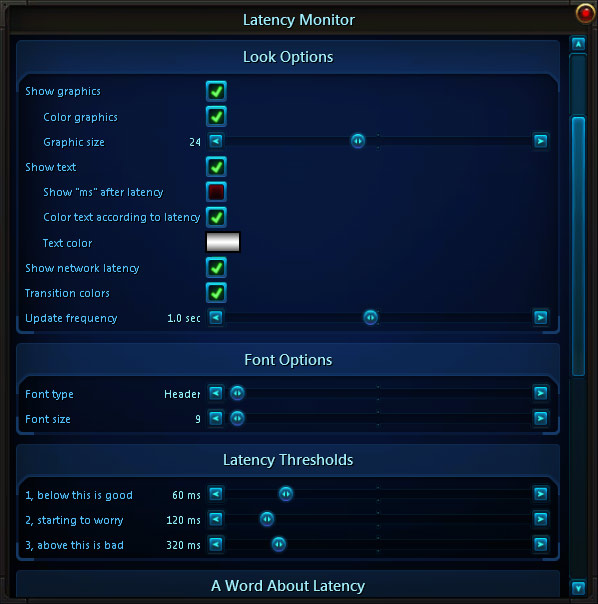
  • Control over what things you want to see. Don't like the orb? Hide it. Don't want to see "ms"? Hide it.
  • Control over how things are colored.
  • Customizable thresholds to set your latency comfort zones for coloring (green -> yellow -> red).

Accessing options

Type "/vlm" or use the menu entry in the interface menu (opened from the bottom left corner) to open the options window.

Moving the frame with the mouse is possible when the options window is open, at all other times it's locked and transparent to the mouse cursor.

Threshold color explanation

The threshold coloring works like this:

If you are below threshold 1 it will be green.

If you go above threshold 1 it will either turn to yellow or transition from green to yellow (if color transition is enabled) up until the threshold 2 value.

Once above threshold 2 it will turn red or transition from yellow to red (if color transition is enabled) up until the threshold 3 value, which will stay red for anything above threshold 3.

The Latency Monitor Team

profile avatar
  • 20
    Projects
  • 455.0K
    Downloads
Donate

More from Forge_User_63920161View all

  • Viper's Stopwatch project image

    Viper's Stopwatch

    • 7.9K
    • Addons

    A sleek stopwatch with a few nice options thrown in there for good measure.

    • 7.9K
    • July 23, 2014
    • Addons
  • Not Now Master Loot project image

    Not Now Master Loot

    • 5.3K
    • Addons

    Shows you a button to open the master loot window instead of it forcefully opening on you.

    • 5.3K
    • July 23, 2014
    • Addons
  • Framerate Monitor project image

    Framerate Monitor

    • 4.8K
    • Addons

    Shows your FPS and adds a few options for it as well. Freely movable of course!

    • 4.8K
    • July 23, 2014
    • Addons
  • Extended Chat Macros project image

    Extended Chat Macros

    • 3.6K
    • Addons

    Allows you to create macros using a host of different identifiers to use information from your current target.

    • 3.6K
    • July 23, 2014
    • Addons
    • +1
  • Viper's Stopwatch project image

    Viper's Stopwatch

    • 7.9K
    • Addons

    A sleek stopwatch with a few nice options thrown in there for good measure.

    • 7.9K
    • July 23, 2014
    • Addons
  • Not Now Master Loot project image

    Not Now Master Loot

    • 5.3K
    • Addons

    Shows you a button to open the master loot window instead of it forcefully opening on you.

    • 5.3K
    • July 23, 2014
    • Addons
  • Framerate Monitor project image

    Framerate Monitor

    • 4.8K
    • Addons

    Shows your FPS and adds a few options for it as well. Freely movable of course!

    • 4.8K
    • July 23, 2014
    • Addons
  • Extended Chat Macros project image

    Extended Chat Macros

    • 3.6K
    • Addons

    Allows you to create macros using a host of different identifiers to use information from your current target.

    • 3.6K
    • July 23, 2014
    • Addons
    • +1