Interactive objects framework
- By
A modding framework that lets content packs and C# mods attach an interaction menu, with conditions, costs, cooldowns and effects, to any big craftable or furniture. Requires Content Patcher to create the objects.
Capture dâeÌcran 2026-08-25 aÌ 22.09.52.png
Description
Interactive Objects Framework
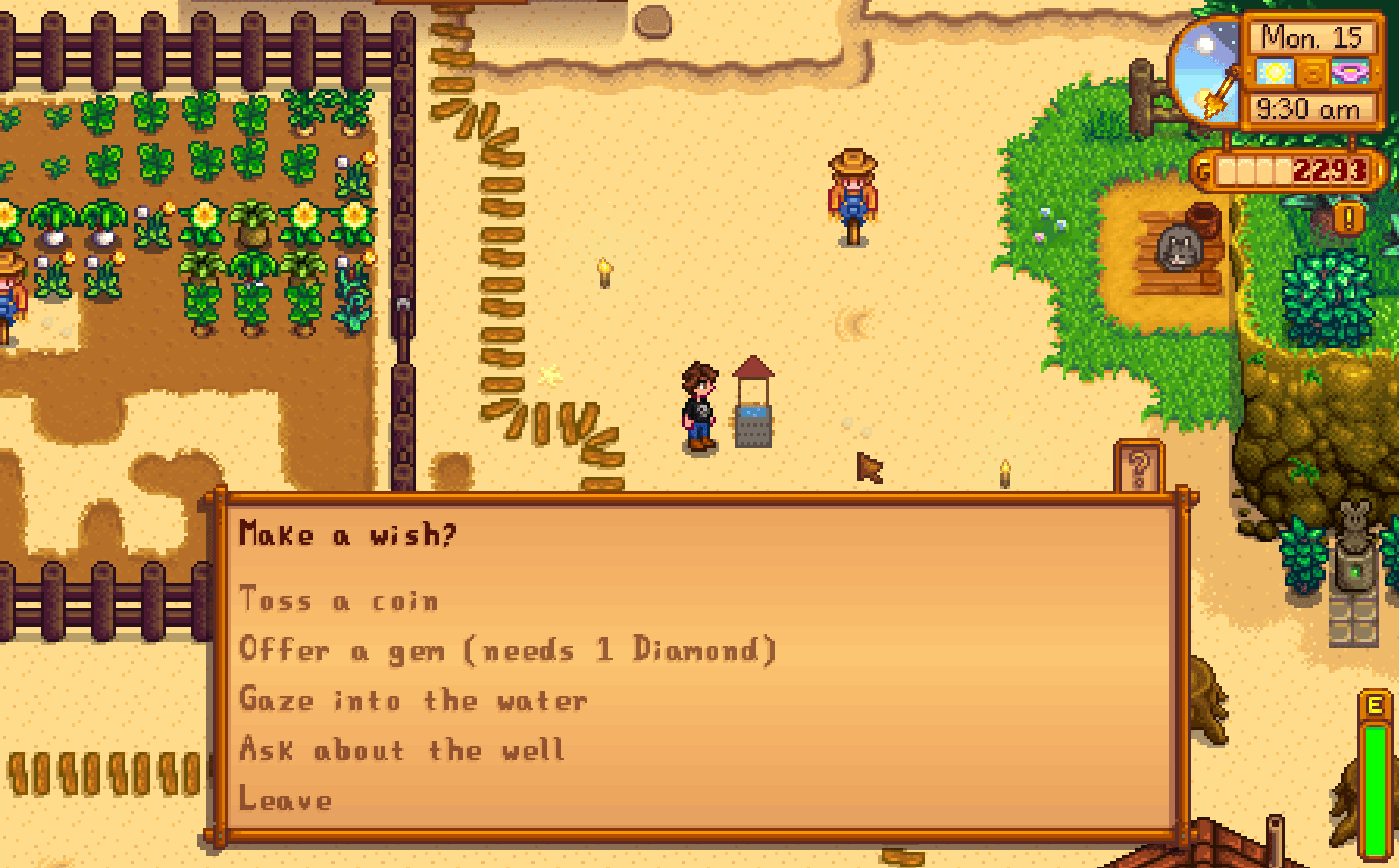
A framework for Stardew Valley 1.6 that lets content packs and C# mods attach an interaction menu to any big craftable or furniture. When the player interacts with a registered object, a question dialogue opens with options you define. Each option can be gated by conditions and by a price, and can run effects such as giving items, applying buffs, playing sounds, or running any vanilla trigger action.
This mod does nothing on its own. It is a dependency for other mods.
Creating the object itself (its sprite and data) is done with Content Patcher, the standard tool. This framework only owns the interaction layer, what happens when the object is clicked.
Requirements
- Stardew Valley 1.6 or later
- SMAPI 4.0.0 or later
For players
Install SMAPI, then unzip this mod into your Mods folder, along with any mod that depends on it. There is nothing to configure.
For content pack authors
Create a content pack with a manifest that targets this framework, and an interactions.json file next to it.
manifest.json:
{
  "Name": "Your Pack Name",
  "Author": "You",
  "Version": "1.0.0",
  "Description": "...",
  "UniqueID": "you.yourPack",
  "MinimumApiVersion": "4.0.0",
  "ContentPackFor": { "UniqueID": "tomokisan.interactiveObjectsFramework" }
}
interactions.json maps a qualified item id to an interaction:
{
  "(BC)you.YourObject": {
    "Question": "What would you like to do?",
    "Options": [
      {
        "Id": "buy",
        "Label": "Buy a mystery box (500g)",
        "Cost": { "Money": 500 },
        "Cooldown": "day",
        "Effects": [
          { "Type": "GiveItem", "ItemId": "(O)MysteryBox", "Count": 1 },
          { "Type": "Message", "Text": "Thanks for your purchase." }
        ]
      }
    ]
  }
}
Interaction
An interaction, and each submenu, has these fields:
- Question, the prompt shown at the top of the menu. Optional.
- Options, the list of options.
- Menus, a set of named submenus that an option can open with GoTo. Only read on the top level.
Option
- Id, a short identifier, unique within its menu. Used for cooldown tracking and GoTo.
- Label, the text shown for the option.
- Condition, a GameStateQuery. The option is locked if it does not match. Optional.
- Cost, a price in money and, or, items. Checked before the option can be picked, and consumed on success. Optional.
- Cooldown, how often the option may be picked, per placed object. One of "always" (default), "day", "season", "ever", or a number of days such as "3". Optional.
- OncePerDay, a shorthand for Cooldown set to "day". Optional.
- HideWhenLocked, if true the option is hidden while locked instead of shown greyed out. Optional, default false.
- LockedMessage, the text shown when a locked option is picked. Overrides the automatic reason. Optional.
- GoTo, opens a submenu after any effects run. Use a name from Menus, or "root" to return to the main menu. Optional.
- Effects, the list of effects to run when the option is picked.
Cost
"Cost": { "Money": 100, "Items": [ { "ItemId": "(O)72", "Count": 1 } ] }
If the player cannot pay, the option is locked and shows the requirement. On success the money and items are consumed automatically.
Effects
| Type | Fields | Effect |
|---|---|---|
| GiveItem | ItemId, Count, Quality | Gives an item to the player. |
| TakeItem | ItemId, Count | Removes items from the player. |
| GiveMoney | Amount | Adds money. |
| TakeMoney | Amount | Removes money, floored at zero. |
| ApplyBuff | Id | Applies a buff by id. |
| RandomItem | Items, Weights, Count, Quality | Gives one item picked at random from Items. Weights is optional and must match the length of Items. |
| PlaySound | Sound | Plays a sound cue. |
| Message | Text | Shows a message. |
| RunAction | Action | Runs a vanilla trigger action string, which gives access to the full action vocabulary such as AddItem, AddMail, or AddMoney. |
Every effect may also have a Condition, a GameStateQuery, and is skipped if it does not match.
Text and translations
Any text field, Question, Label, Message, and LockedMessage, accepts:
- Plain text.
- Tokenizable strings, for example "[LocalizedText Strings\path]".
- A translation key from your own pack, written as "{{i18n:your.key}}". The framework reads it from your pack's i18n folder, so you can ship default.json, fr.json, and so on, the same way SMAPI mods do.
Conditions
Condition fields use GameStateQuery. See the Stardew Valley wiki page "Modding:Game state queries" for the full list. For example, "PLAYER_CURRENT_MONEY Current 100" is true when the current player has at least 100g.
Notes
- Cooldowns are stored on the object's own save data, per player. Each placed object tracks its own cooldown, it survives saving and loading, and it works in multiplayer. Breaking and replacing the object resets its cooldown, since the game recreates the item without its stored data.
- Registering an object that already has a vanilla interaction, such as a chair, replaces that behavior. Prefer a new object with no vanilla interaction.
For C# mods
Copy the IInteractiveObjectsApi interface into your project, then request the API after the game launches:
var api = this.Helper.ModRegistry.GetApi<IInteractiveObjectsApi>("tomokisan.interactiveObjectsFramework");
api.RegisterInteractionFromJson("(BC)you.YourObject", interactionJson);
The JSON string uses the same schema as interactions.json, for a single interaction. Translation keys are not resolved for API registrations, so use plain text or tokenizable strings there.
Example
This mod ships with a worked example, a Wishing Well. One content pack, a Content Patcher pack, adds the big craftable. A second content pack, for this framework, attaches the interaction. It shows a money cost, an item cost, per day and per season cooldowns, a submenu, and translations. See the folders whose names start with "[CP]" and "[IOF]".
Interactive objects framework Team

Owner