Mussfis Enhanced Lighting
- By
Automatically creates a more natural day/night lighting routine with cozy accent lights at night and EA Auto Lights during the day.
!UPDATE: still working on version 1.128
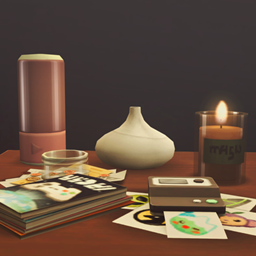
Mussfis Enhanced Lighting is a lightweight Lot Challenge for more natural and atmospheric lighting in The Sims 4.
I made this mod for my own game because I wanted houses to actually feel different at night — and then decided to share it in case anyone else wanted the same thing. ✨
-----------
✨ Mussfis Enhanced Lighting — Pet-Safe Auto Lights / Full Ceiling Control Addon is here!
MAIN MOD IS REQUIRED!
Please make sure the main Mussfis Enhanced Lighting mod is installed. Pet-Safe Auto Lights is an optional addon and does not work by itself.
A new optional addon is now available for Mussfis Enhanced Lighting: Pet-Safe Auto Lights / Full Ceiling Control.
The addon replaces EA's daytime Auto Lights behavior for ceiling lights with a lightweight room-based system.
✦ How it works
During the day, ceiling lights now respond only to awake human Sims:
* An awake human Sim enters a room → the ceiling light turns on.
* The last awake human Sim leaves → the ceiling light turns off.
* Sleeping Sims do not keep the ceiling light on.
* Cats, dogs, horses, and other non-human Sims do not trigger ceiling lights.
* Human guests count normally.
* Vampires, spellcasters, werewolves, mermaids, aliens, ghosts, and other human-species occult Sims are treated like other human Sims.
At night, the addon steps aside completely and Enhanced Lighting continues using its normal nighttime profile.
✦ Night profile
21:00–05:59
* Table lamps — ON
* Floor lamps — ON
* Wall lights — ON
* Outdoor lights — ON
* Ceiling lights — OFF
✦ Day profile with the addon
06:00–20:59
* Table lamps — OFF
* Floor lamps — OFF
* Wall lights — OFF
* Outdoor lights — OFF
* Ceiling lights — controlled per room by awake human presence
The addon does not require Cats & Dogs, Horse Ranch, or another pet DLC. It checks Sim species generically, so it is safe to install on Base Game setups as well. Without non-human Sims, it still provides the sleep-aware and room-aware ceiling-light behavior.
The main Enhanced Lighting mod has also been updated with an optional integration hook. If the addon is installed, it takes over daytime ceiling lights. If it is not installed, Enhanced Lighting behaves exactly as before and continues using EA Auto Lights.
✦ Tested in a real save
The current release has been tested with:
* entering and leaving Build/Buy during the night;
* entering and leaving Build/Buy during the day;
* sleeping Sims after 06:00;
* pets moving through rooms;
* Sims waking up;
* Sims moving between rooms;
* multiple occupancy scenarios;
* normal nighttime transitions.
Everything is working correctly in testing. 🎉
The addon is completely optional.
If you like the original EA Auto Lights behavior during the day, you can continue using Enhanced Lighting by itself.
-----------
A lightweight Lot Challenge for more natural and atmospheric lighting in The Sims 4.
Enhanced Lighting automatically changes your lot’s lighting throughout the day.
At night, softer accent lighting takes over while ceiling lights switch off. In the morning, accent lights turn off and ceiling lights return to the game’s standard EA Auto Lights system.
No manual setup, no individual lamp selection — just add the Lot Challenge and let the mod handle the rest.
✦ Night Mode — 9:00 PM to 5:59 AM
• Table Lamps — ON
• Floor Lamps — ON
• Wall Lights — ON
• Outdoor Lights — ON
• Ceiling Lights — OFF
This creates a softer and warmer nighttime atmosphere without flooding the whole house with bright ceiling lights.
✦ Day Mode — 6:00 AM to 8:59 PM
• Table Lamps — OFF
• Floor Lamps — OFF
• Wall Lights — OFF
• Outdoor Lights — OFF
• Ceiling Lights — EA Auto Lights
During the day, ceiling lights return to the normal Sims 4 automatic lighting system and behave just like they normally would.
✦ How to Use
After installing the mod:
1. Open the lot settings.
2. Add the Enhanced Lighting Lot Challenge.
3. That’s it.
The lighting routine will run automatically.
Properly categorized CC lights should also work.
✦ Requirements
Lot 51 Core Library is required.
You also need:
• Enable Custom Content and Mods
• Script Mods Allowed
Restart the game after enabling script mods.
✦ Installation
Place both files in your Mods folder:
Mussfis_EnhancedLighting.package
Mussfis_EnhancedLighting.ts4script
Both files are required.
Additionally, you can install the optional addon file and place it in the same folder.
Mussfis_EnhancedLighting_PetSafeAutoLights.ts4script
Also make sure you have Lot 51 Core Library installed.
After updating the mod, deleting localthumbcache.package before restarting the game is recommended.
✦ Lightweight by Design
Enhanced Lighting was made to have a very small performance impact.
It does not constantly perform heavy scans or run unnecessary background logic.
Most of the time, the script simply waits for the next lighting transition and only intervenes when needed.
✦ Known Minor Issue — Main Mod Only
After exiting Build/Buy Mode during daytime, lights may take a brief moment to update. This is expected and allows the game to fully return to Live Mode before Enhanced Lighting restores the correct lighting state. If it takes too long, please enter Bild/Buy mode and return to Live mode.
✦ Compatibility
Enhanced Lighting only manages lighting objects.
It does not modify Sims, autonomy, careers, needs, weather, or other gameplay systems.
Mods that completely replace or heavily modify EA’s lighting automation may potentially conflict with this mod.
✦ Permissions
Personal edits are allowed.
If you modify, translate, adapt, fork, or publicly redistribute any version of this mod, you must:
• clearly credit Mussfis Mods as the original creator;
• include a visible link back to the original mod page/download;
• clearly state that your version is modified and is not the original release.
Please do not remove creator credit or present modified versions as entirely original work.
Translations may also be shared under the same conditions: credit + link to the original mod.
✦ Credits
Creator: Mussfis Mods
Required library: Lot 51 Core Library
Mussfis Enhanced Lighting Team