


Height Diversity
- By
Gives your Sims different body heights by age and gender, so a household stops looking like a line of identical clones.
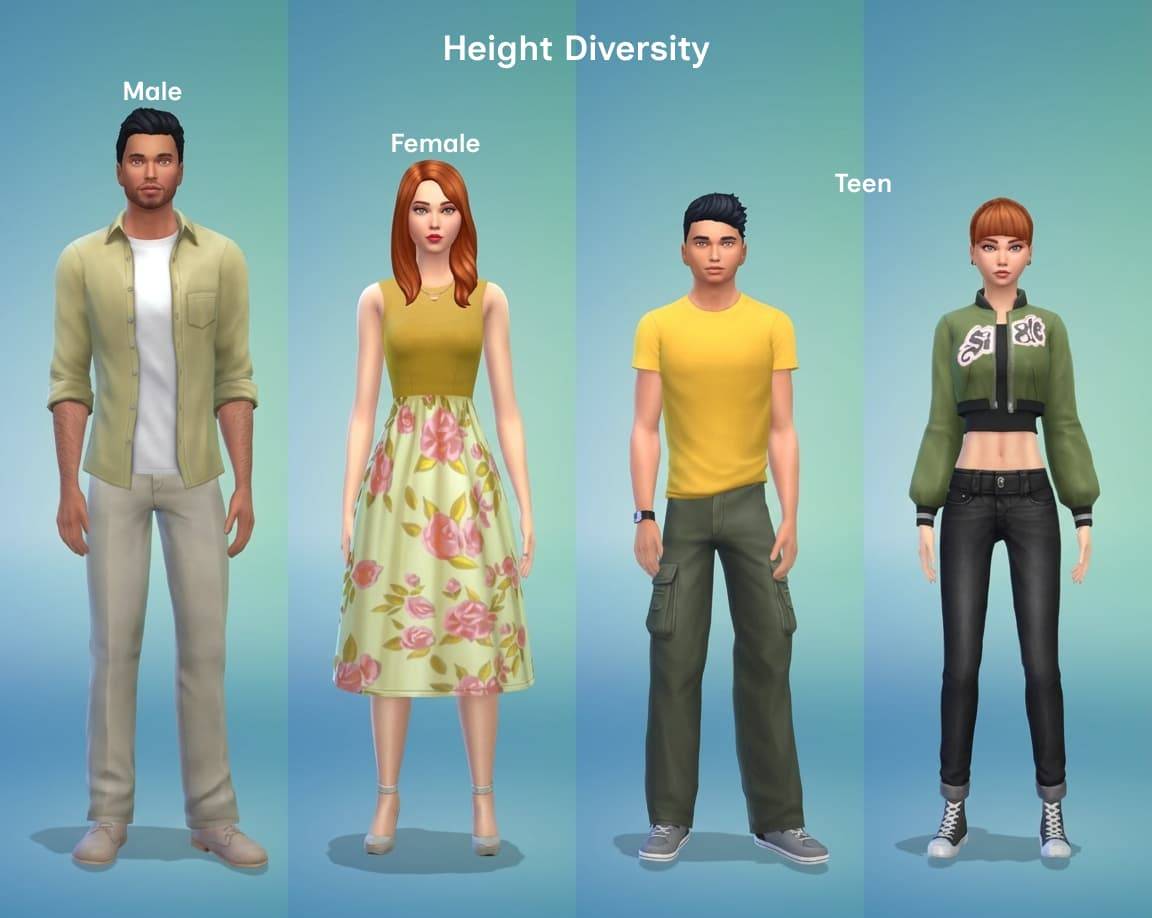
Lzv Heigth Diversity.jpg
Description
Version: 0.3.0
Tested with game version: 1.129.39.1030
What it does
- Automatic heights. When a Sim changes age, it receives the height for its age and gender: teens get the teen height, and young adults, adults and elders get the male or female height for their gender. An elder keeps the height of its gender.
- Children, toddlers and infants are not affected.
- The same three heights are also available in Create A Sim (CAS) under the Forehead category, so a Sim can also get its height while you edit it. A preset belongs to one age and gender (teen, female, male): the game offers the one that matches the Sim you are editing, so CAS is not a free height choice.
- Back to the original height. A fourth preset in the same Forehead list restores the game's own height, so you can compare your Sim with and without the mod without leaving CAS.
- Every preset has an icon in CAS, so you can tell them apart at a glance: the three heights share one preview and the "back to default" preset has its own.
- Each height changes the Sim's overall height without deforming the body, and the Sim keeps it through save and reload.
Sims that do not change age keep the height they already have. Applying the height to every Sim on load is planned for a later release.
Requirements
- DLC required: None (base game only).
- Script mods allowed in Game Options: Yes.
Installation
- Copy
LyzerVice_HeightDiversity.packageandLyzerVice_HeightDiversity.ts4scriptinto yourMods/folder. - Enable "Custom Content and Mods" and "Script Mods" in Game Options (they are two separate options).
- Restart the game. Heights are applied automatically as your Sims change age; in CAS the preset for the Sim's own age and gender is available under the Forehead category.
- Updating from an older version: delete
localthumbcache.packagefromDocuments/Electronic Arts/The Sims 4/before starting the game. It is a thumbnail cache, not a save. The game keeps CAS icons there, so without this step the new preset icons can stay hidden.
Compatibility
- Conflicts: other mods that change how tall Sims are (other height mods) — do not combine.
- Patch sensitivity: the heights rely on game internals that can change with a patch.
Known issues
- The height is applied when a Sim changes age. A Sim that never changes age keeps its current height; applying the height to every Sim on load is planned for a later release.
- Changing the previewed age inside CAS does not change the height there. The Sim gets the correct height as soon as it is in the world and changes age.
- The "back to default" preset is a CAS choice. When the Sim changes age, the automatic height for the new age applies again.
- If the presets show no icon in CAS, delete
localthumbcache.packagefromDocuments/Electronic Arts/The Sims 4/and start the game again. - All Sims share one set of animations, so Sims of very different heights can look slightly off together in some interactions; adapted animations are planned.
Uninstallation
- Delete
LyzerVice_HeightDiversity.packageandLyzerVice_HeightDiversity.ts4scriptfrom yourMods/folder. The game starts without errors and the Sims return to their default height; the presets disappear from CAS.
Terms of use
Free to use in your game, your saves, your videos and your streams — credit Lyzer Vice and link back to the original download. Please do not reupload the files or place them behind a paywall.
This mod is not affiliated with, endorsed by or supported by Electronic Arts or Maxis.
Height Diversity Team
