Lazy Storage
Lazy Storage fixes several inventory management annoyances.
The Storage Ledger can deposit items you wanted to keep on you, sorting can rearrange carefully organised inventories, and removing the last item from a chest can stop the Ledger recognising that item type. New pickups also tend to land in your hotbar when you'd rather keep that space reserved.
Lazy Storage solves those problems with:
- Protected slots
- Chest placeholders
- Smart pickups
- Multiplayer support
- Per-player and server-controlled settings
All item movement uses the game's own inventory systems, so weight calculations, UI updates and multiplayer synchronisation continue to work normally.
This mod was created with Claude AI.
Which Version Do I Need?
Lazy Storage is split into two modules.
Lazy Storage - Solo
Runs locally in your game.
Features:
- Protected slots
- Placeholders
- Smart pickups
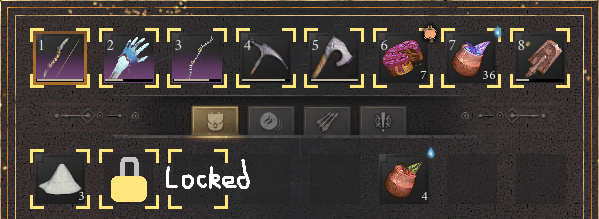
- Protected slot indicators
- Personal settings if allowed by server owners
If you only play solo, this is the only version you need.
Lazy Storage - Multi
Runs on the server.
In multiplayer, inventories and containers are controlled by the server, so inventory corrections have to happen there.
Features:
- Protected slots
- Placeholders
- Smart pickups
- Server-wide controls
- Per-feature enable/disable options
Players do not need to install anything to benefit from Multi.
Installation Guide
| Situation |
Install |
Result |
| Playing solo |
Solo |
Full feature set with personal settings |
| Running a dedicated server |
Multi |
Applies to all players |
| Joining a server without Solo |
Nothing |
Uses server settings |
| Joining a server with Solo |
Solo |
Uses personal settings where allowed by the server |
| Hosting with Multi only |
Multi |
Everyone uses server settings |
| Hosting with Multi and Solo |
Multi + Solo |
Host uses personal settings, guests behave as normal multiplayer users |
Mod Menu Pages
Lazy Storage - Solo contains your personal settings.
Lazy Storage - Multi contains server settings. These only apply when hosting or running a dedicated server.
Features
Protected Slots
Choose slots that the Storage Ledger, Fill Stacks (F) and sorting (V) should leave alone.
By default this includes:
- Hotbar
- First three inventory slots
- Runes tab
- Ammo tab
- Quest item tab
If the only matching stack exists in a protected slot, the Ledger leaves it alone.
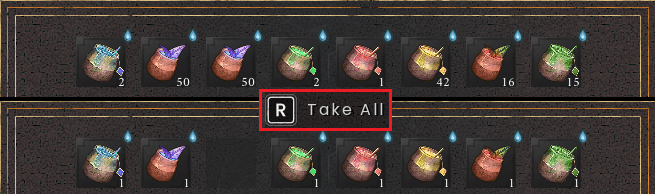
Placeholders
Removing the last item from a chest can leave a placeholder behind.
This allows the Storage Ledger to continue recognising that item type.
Works with:
- Take All
- CTRL-click
- Dragging a complete stack
Supports linked chests, all chests, or all non-private chests.
Smart Pickups
Items gained from gathering, crafting, processing, looting or chest transfers are sent to the first available unprotected inventory slot.
Items never appear in the hotbar unless you place them there yourself.
Existing stacks in protected slots can optionally be topped up.
Recovering a gravestone restores your inventory layout correctly.
Protected Slot Indicators
Solo can display gold corner markers on protected slots.
Server Controls
Multi allows server owners to:
- Enable or disable individual features
- Choose behaviour for players without Solo
- Force server or player protected slots
In-Game Configuration
All settings can be adjusted through Mod Menu.
Changes apply immediately.
Safe Item Handling
Each item move is validated.
Items are not duplicated, deleted or dropped on the ground.
How It Works
When the Ledger, Fill Stacks, Take All, sorting or a pickup occurs, the game performs its normal action first.
Lazy Storage records the inventory state and then uses the game's own transfer functions to move items back into the intended slots.
Because the game performs the actual moves:
- UI updates correctly
- Weight updates correctly
- Multiplayer synchronisation remains intact
In multiplayer, all processing happens on the server.
Requirements
Installation
Solo
- Install UE4SS for RSDragonwilds
- Extract
LazyStorageSolo into ue4ss\Mods\.
- Start the game.
- Verify
UE4SS.log contains:
[LazyStorage-Solo] vX.X.X loaded.
Multi - Dedicated Server
- Back up your world.
- Stop the server.
- Install UE4SS into
RSDragonwilds\Binaries\Win64\.
- Replace
dwmapi.dll with version.dll from the UE4SS package.
- Extract
LazyStorageMulti into ue4ss\Mods\.
- Start the server.
- Verify the log contains:
[LazyStorage-Multi] vX.X.X loaded.
Multi - Hosting
- Install UE4SS for RSDragonwilds
- Extract
LazyStorageSolo into ue4ss\Mods\.
- Start the game.
- Verify
UE4SS.log contains:
[LazyStorage-Multi] vX.X.X loaded.
- Multi only: uses server settings.
- Solo + Multi: host uses personal settings.
Joining a Server
Players do not need to install anything.
Install Solo if you want personal settings and gold corner indicators.
Known Issues
- Sorting can occasionally place an item into a protected slot. This is due to recent changes in how sorting works and the games failure to report these sorts occasionally.
Good To Know
- Solo requires Multi on the server to function in multiplayer.
- Solo needs one free inventory slot when sending settings to the server.
- Avoid UE4SS "Restart All Mods". Restart instead.
- Protected-slot item flicker during multiplayer sorting is normal.
- A completely full inventory may prevent item repositioning.
- Soul Fragment storage is never modified.
Other Lazy Mods
- Lazy Miner - Reduces mining friction.
- Lazy Count - Shows remaining node deposits.
Settings
Edit config.ini in the mod's folder and restart, or change them in game with Mod Menu (Esc > MODS). Both show the same settings in the same order. When a new version changes the layout, the mod rewrites config.ini in the new layout and keeps your values.
Solo – LazyStorageSolo\config.ini
1. Features
| Setting |
Default |
What it does |
enabled |
true |
Switch Solo on or off. Off in multiplayer = you get vanilla. |
protect_ledger |
true |
The Ledger leaves protected slots alone. |
protect_fill_button |
true |
So does Fill Stacks (F). |
protect_sort |
true |
Sorting (V) keeps protected slots as they were. |
placeholders |
true |
Emptying a chest leaves one behind. |
smart_pickups |
true |
New items go to the first unprotected inventory slot, never the hotbar or a protected slot. |
2. Protected slots
| Setting |
Default |
What it does |
protected_slots |
0-10 |
Slots to protect. Numbers and ranges, e.g. 0-7, 8, 15, or none. |
protect_runes |
true |
Protect the whole runes tab. |
protect_ammo |
true |
Protect the whole ammo tab. |
protect_questitems |
true |
Protect the whole quest items tab. |
show_protected |
true |
Gold corners on protected slots. |
show_protected_tabs |
false |
Gold corners on the runes, ammo and quest items tabs too. |
3. Placeholders
| Setting |
Default |
What it does |
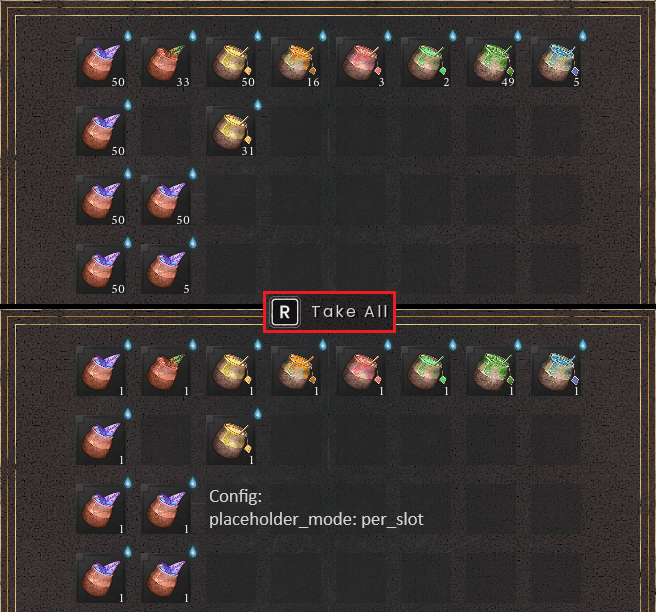
placeholder_mode |
per_item |
per_item: one of each item. per_slot: one in every emptied slot, so the chest keeps its layout. |
placeholder_chests |
linked |
linked, not_private, or all. |
placeholder_on_drag |
true |
Also leave a placeholder when dragging a whole stack out. |
4. Pickups
| Setting |
Default |
What it does |
pickup_top_up |
true |
Pickups top up stacks of the same item you already have in the hotbar or protected slots. |
smart_pickups_armour |
true |
Armour, rings and amulets taken off with right-click follow the smart pickups rule. |
Other
| Setting |
Default |
What it does |
placeholder_containers |
crate, chest, storage, barrel |
Which things players build count as chests, by words in their name. |
verbose |
false |
Log everything the mod does (for troubleshooting). |
In multiplayer, the server owner decides which features you may use, and may set your protected slots, placeholders and pickups for you.
Multi – LazyStorageMulti\config.ini
1. What's allowed on this server – off: nobody gets it, with Solo or without.
| Setting |
Default |
What it does |
enabled |
true |
Switch Lazy Storage on or off for every player. |
protect_ledger |
true |
The Ledger leaves protected slots alone. |
protect_fill_button |
true |
So does Fill Stacks (F). |
protect_sort |
true |
Sorting (V) keeps protected slots as they were. |
placeholders |
true |
Emptying a chest leaves one behind. |
smart_pickups |
true |
New items go to the first unprotected inventory slot, never the hotbar or a protected slot. |
2. Players without Solo
| Setting |
Default |
What it does |
players_without_solo |
server_settings |
server_settings (the features allowed above, with the settings below) or vanilla. |
protected_slots |
0-10 |
The server's protected slots. Numbers and ranges, e.g. 0-7, 8, 15, or none. |
protect_runes |
true |
Protect the whole runes tab. |
protect_ammo |
true |
Protect the whole ammo tab. |
protect_questitems |
true |
Protect the whole quest items tab. |
placeholder_mode |
per_item |
per_item: one of each item. per_slot: one in every emptied slot, so the chest keeps its layout. |
placeholder_chests |
linked |
linked, not_private, or all. |
placeholder_on_drag |
true |
Also leave a placeholder when dragging a whole stack out. |
pickup_top_up |
true |
Pickups top up stacks of the same item already in the hotbar or protected slots. |
smart_pickups_armour |
true |
Armour, rings and amulets taken off with right-click follow the smart pickups rule. |
3. Players with Solo – they use their own settings for the features allowed in section 1, or the server's, as chosen here.
| Setting |
Default |
What it does |
protected_slots_from |
player |
Whose protected slots they use: player (their own) or server (section 2's, for every feature and their gold corners). |
settings_from |
player |
Whose placeholder and pickup settings they use: player (their own) or server (section 2's). |
Other – for everyone.
| Setting |
Default |
What it does |
placeholder_containers |
crate, chest, storage, barrel |
Which things players build count as chests, by words in their name. |
verbose |
false |
Log everything the mod does, with each player's name (for troubleshooting). |
Slot numbers
Hotbar:          0   1   2   3   4   5   6   7

Inventory:       8   9  10  11  12  13  14  15
                16  17  18  19  20  21  22  23
                24  25  26  27  28  29  30  31
                32  33  34  35  36  37  38  39

Runes tab:      40 - 71
Ammo tab:       72 - 103
Quest items:   104 - 175
Changelog
1.0.3:
- Added: placeholders can leave one in every emptied slot, so a chest keeps its layout (placeholder_mode = per_slot).
- Added: server owners can make players with Solo use the server's placeholder and pickup settings (settings_from). (Multi)
- Changed: both config files and Mod Menu pages are reorganised into clear sections, in the same order. Your config.ini is rewritten in the new layout on first start, with your values kept.
- Changed: the default storage words are now crate, chest, storage, barrel (a config still on the old default list is updated).
- Fixed: when hosting without Solo, Multi's settings now apply from the start, not only after a change in Mod Menu. (Multi)
1.0.2:
- Multi: fixed smart pickups (and Ctrl-click / Take All landing outside protected slots) stopping for a player partway through a session, until they rejoined.
- Solo: no changes; version number matches Multi.
1.0.1
- Multi: Fixed smart pickups and protected slot restoration stopping for players after reconnecting.
- Solo: No functional changes.
1.0.0
- Initial release.
- Protected slots.
- Placeholders.
- Smart pickups.
- Gold corner indicators.
- Multiplayer support.
- Mod Menu integration.