Lazy Count
This mod was created using Claude AI.
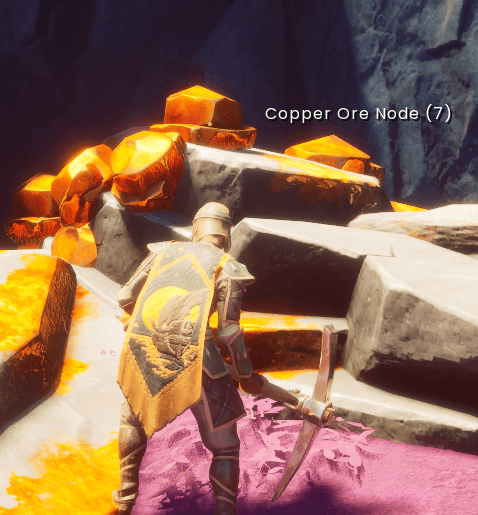
Adds the number of deposits left to an ore node's name, for example "Iron Ore Node (3)". When the node is empty, the count disappears and the game's own "Depleted" label shows as normal.
Display only. Mining, ore, XP and saves are untouched.
Multiplayer
Lazy Count is client-side. Each player who wants the counts installs it. It isn't needed on servers, and players without it see the normal name. Counts stay in sync with what's actually on the node, including other players' mining, Rocksplosion and respawns.
Requirements
Installation
I recommend using the CurseForge App to manage your mods. This should work for both Solo and Co-Op self hosting
- Install UE4SS for RSDragonwilds.
- Click the 'Install' button from the Lazy Miner project page via the CurseForge App
- Launch the game.
-
Manual:
- Install UE4SS for RSDragonwilds.
- Download Lazy Count from the project page via your web browser.
- Extract the
LazyCount folder into RSDragonwilds\Binaries\Win64\ue4ss\Mods\
- Launch the game.
-
Companion mod
Lazy Miner - The original inspiration for this, which moves the remaining ore deposits on a node to the spot you're mining, so you never chase ore in walls again.
Changelog
1.0.2: Added enabled.txt to prevent need to modify the "mods" file.
1.0.1: Removed redundant (0) when node is depleted.
1.0.0: First release.