Lazy Chronicle
Lazy Chronicle keeps track of the world's timers for you.
The game doesn't tell you how many deposits are left in an ore node, when a stump or an empty rock comes back, when your crops will be ready, or when a mini boss or a Vault Core will be back. You either remember it or go and check.
Lazy Chronicle adds:
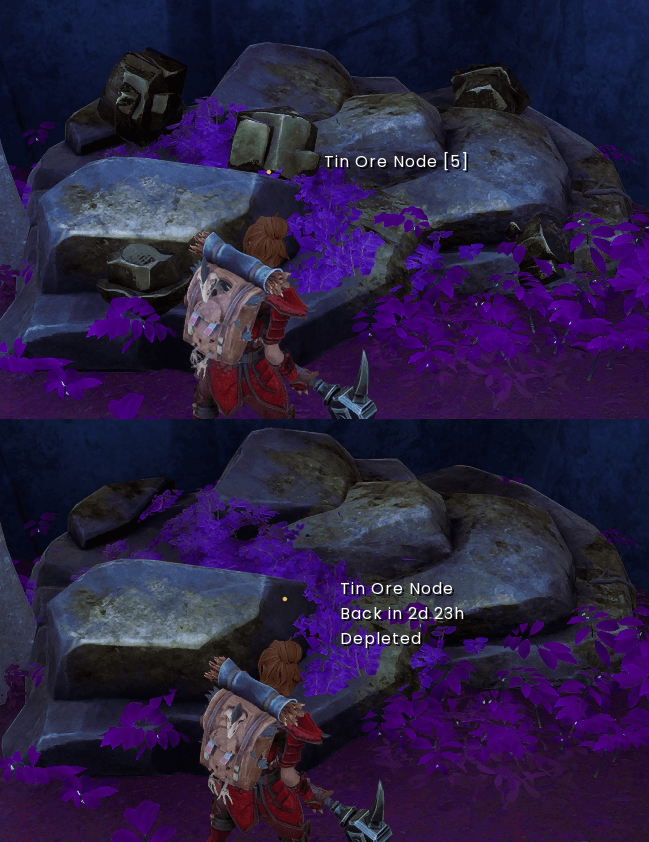
- Deposits left in an ore node's name as you mine it, e.g. "Copper Ore Node [4]"
- When an empty ore node or a stump is back, and when a sapling you planted is grown
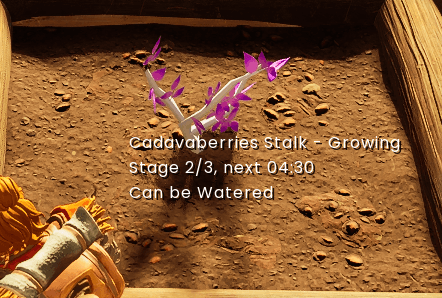
- A farm plot's growth stage and its next growth time
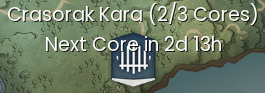
- A Vault's Cores on its door, and when the next one is back
- A calendar on the Esc menu: crops ready, mini bosses back and Vault Cores back, with everything you've done struck through
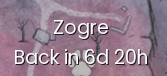
- Vault names on the map's Dungeon Entrances, and an icon for every mini boss you've killed
- The lore calendar, or real-world dates if you prefer
- Controller support for the calendar (see Controller)
It only reads the game's own timers. Nothing about how the world works is changed.
Lazy Chronicle replaces Lazy Count and Day Count. Remove them when you install it.
This mod was created with Claude AI.
Features
Look at Things
Look at something and its prompt tells you more. The game's own name stays on the first line; a count goes in square brackets after it, and a timer goes on its own line underneath.
- Ore nodes: the deposits left, e.g. "Copper Ore Node [4]". The count goes down as each ore reaches your bag. An empty node shows "Back in 2d 7h". Once its time is up it says "Due back - move away": the game only refills a node when nobody is near it.
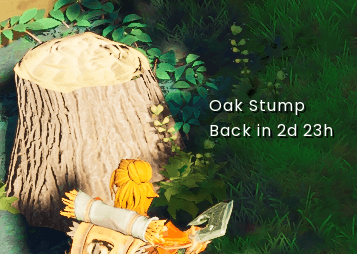
- Stumps: "Ash Stump" with "Back in 2d 23h" under it.
- Saplings you planted: "Ash Shoot" with "Grown in 1d 6h" under it.
- Farm plots: "Cadavaberries Stalk - Growing" with "Stage 2/3, next 04:30" under it. Crops grow once a day at 04:30. A seed planted or a plot picked less than 2 hours before that waits until the next day, and the time shown allows for it.
- Vault doors: "Crasorak Kara [1/3 Cores]" with "Next Core in 1h 7m" under it. A Vault's Cores are learnt the first time you're inside, and kept up to date whenever one is taken.
Which ore nodes get a count and a timer is up to you: copper, tin, iron, silver, gold, coal, mithril, adamantite, blurite and clay by default. Times are in in-game time ("1d 14h"), or in real minutes ("~38m") if you prefer.
The Calendar
Choose Lazy Chronicle on the Esc menu, or press your calendar key, to open the calendar.
- One page per month, in the game's own style. Today is marked, and each day shows what's due.
- Hover a day (or step onto it with a controller) to see everything due that day, with times and places, e.g. "Abyssal Demon back: Bloodblight Swamp".
- Coming up on the right lists today, tomorrow and the day after.
- What it shows: your crops, mini bosses coming back (where they are) and Vault Cores coming back.
- Done things check themselves off: crops picked, bosses killed again and Cores taken are struck through.
- The whole history is kept. Page back to see what happened in any month since you installed it.
- The lore calendar by default ("Caistleday, 5 Raktuber"). Switch on real-world dates for "Monday, 24 April" instead; the pages stay the same.
- No calendar key is set at first. Pick one in Mod Menu or
config.ini; the same key closes the calendar.
The Map
- Point at a Dungeon Entrance and it says which Vault it is, and its Cores once you've been inside, e.g. "Skeklac Kara (1/3 Cores)".
- Every mini boss you've killed gets a beast print on the map where it spawns: grey with the time until it's back while it's dead, red once it's back. Icons stay once a boss is known.
Controller
In the calendar:
- D-pad / left stick: move between days.
- LB / RB: previous / next month.
- Y: back to today.
- B: close.
On the Esc menu, select Lazy Chronicle and press A to open it.
Settings in Game
Change the settings with Mod Menu. Changes apply straight away.
Solo and Multi
Lazy Chronicle comes in two parts:
- Lazy Chronicle - Solo (
LazyChronicleSolo) goes in your own game. It shows everything above.
- Lazy Chronicle - Multi (
LazyChronicleMulti) goes on a dedicated server, or in the host's game when hosting. In multiplayer your own game can't see the world's timers, so Multi reads them and tells Solo.
Who needs what
| How you play |
Install |
| Solo world |
Solo |
| Dedicated server |
Multi on the server; Solo for each player who wants Lazy Chronicle |
| Hosting |
Multi and Solo in the host's game; Solo for each player who wants Lazy Chronicle |
| Joining someone else's world |
Solo (the host needs Multi) |
- Players without Solo play vanilla.
- Solo on a server or in a hosted world without Multi does nothing: you play vanilla.
- Multi does nothing in a solo world or in a guest's game. Both can always stay installed.
In multiplayer
- The owner's switches in Multi decide which features are allowed. Each player can switch off what they don't want.
- Mini bosses and Vault Cores are shared: a boss killed or a Core taken by anyone shows for everyone.
- Crops are personal: your calendar only shows the crops you planted.
- The owner's list of ores is used by every player.
- Solo needs one empty inventory slot to talk to the server. Nothing is ever put in it.
Requirements
Installation
- Install UE4SS for RSDragonwilds.
- Remove Lazy Count and Day Count if you have them.
- Extract
LazyChronicleSolo into your game's ue4ss\Mods\.
- For a server: extract
LazyChronicleMulti into the server's ue4ss\Mods\. For hosting: extract it into your own game's ue4ss\Mods\ as well.
- Start the game (and the server).
- Verify
UE4SS.log contains: [LazyChronicle-Solo] vX.X.X loaded (and [LazyChronicle-Multi] vX.X.X loaded where Multi is installed).
Settings
Edit config.ini in the mod's folder and restart, or change them in game with Mod Menu (Esc > MODS). Both show the same settings in the same order, one section per feature.
Solo – LazyChronicleSolo\config.ini
| Setting |
Default |
What it does |
enabled |
1 |
Switch Lazy Chronicle on or off. From Mod Menu it works straight away; the Esc menu entry follows the next time a world loads. |
ore_counts |
1 |
Deposits left in an ore node's name. |
ore_timers |
1 |
An empty ore node shows when it's back. |
ores |
copper, tin, iron, silver, gold, coal, mithril, adamantite, blurite, clay |
Which ore nodes get a count and a timer. Others (Rune Essence, stone, granite…) stay plain. In multiplayer the owner's list is used. |
stump_timers |
1 |
A stump shows when its tree is back. |
sapling_timers |
1 |
A sapling you planted shows when it's grown. |
farm_stages |
1 |
A growing plot shows its stage and next growth time. |
vault_cores |
1 |
A Vault's door shows its Cores. |
calendar |
1 |
The calendar on the Esc menu. |
real_dates |
0 |
1: real-world day and month names. 0: the lore calendar. |
calendar_key |
none |
A key that opens and closes the calendar, e.g. F6 (Unreal key names). |
map_vaults |
1 |
Dungeon Entrances on the map say which Vault they are. |
boss_markers |
1 |
A beast print on the map for each mini boss you've killed. |
real_time |
0 |
1: times in real minutes ("~38m"). 0: in-game time ("1d 14h"). |
verbose |
0 |
More lines in UE4SS.log (for bug reports). |
Multi – LazyChronicleMulti\config.ini
Each switch says whether that feature is allowed for players with Solo. Off = nobody gets it. A dedicated server reads config.ini when it starts. When hosting, Mod Menu changes reach players as they play.
| Setting |
Default |
What it does |
enabled |
1 |
0: Lazy Chronicle is off for everyone. |
ore_counts, ore_timers |
1 |
Allow ore counts and ore node timers. |
ores |
copper, tin, iron, silver, gold, coal, mithril, adamantite, blurite, clay |
Which ore nodes get a count and a timer, for every player. |
stump_timers, sapling_timers |
1 |
Allow stump and sapling timers. |
farm_stages |
1 |
Allow farm plot stages. |
vault_cores |
1 |
Allow Vault Cores on doors (shared by everyone). |
calendar |
1 |
Allow the calendar. |
map_vaults, boss_markers |
1 |
Allow Vault names and boss icons on the map. |
verbose |
0 |
More lines in UE4SS.log (for bug reports). |
Real-world dates, the calendar key and real time are each player's own choice, so they're only in Solo.
The calendar, Vaults and history are kept in calendar.txt, vaults.txt and the history folder in the mod's folder (on a server, also plots.txt: who planted what). Keep them when you update.
Compatibility with Other Mods
- Lazy Chronicle only changes the names shown in prompts and on map icons, and adds its own calendar and map icons. It never changes game data or other mods' files.
- Works alongside Lazy Storage, in solo and in multiplayer.
What Lazy Chronicle can't do
Lazy Chronicle can't stop another mod from breaking the game. Crashes or problems caused by another mod are not caused by Lazy Chronicle.
Before reporting a problem
Try again with only Lazy Chronicle and UE4SS installed. If the problem goes away, it comes from another mod or a combination of mods. Tell us which mods you use and it will be looked at, but other mods can only be fixed by their authors.
Good to Know
- A mini boss killed from range shows on the calendar and the map once a player goes near where it spawns.
- A Vault's Cores are learnt inside. Until someone has been in, its door and map icon show only the name.
- In multiplayer, crops planted before Multi was installed stay off the calendar until they're replanted (nobody is known to have planted them).
- Switching Lazy Chronicle off in Mod Menu works straight away; its Esc menu entry goes the next time a world loads.
- Don't use UE4SS's "Restart All Mods". It can crash the game. Restart instead after editing
config.ini.
Troubleshooting
- Check
UE4SS.log shows the "loaded" line (see Installation).
- In multiplayer, nothing shows? Check the server or host has Multi installed and switched on, and that you have an empty inventory slot.
- Using other mods? Try again with only Lazy Chronicle and UE4SS installed (see Compatibility). If the problem goes away, it comes from another mod.
- Turn on
verbose in config.ini (or Mod Menu), restart, and do whatever caused the problem again.
- Leave a comment or report the issue. Please include:
- What happened, and what you expected instead.
- Whether you were playing solo, hosting, or on a server.
- Which other mods you have installed.
- Your
UE4SS.log (in the ue4ss folder), and the server's too if you play on one. Send it before you restart, as each launch replaces it.
- If the game crashed: the crash file (
crash_….dmp) from the same ue4ss folder, if there is one.
Other Lazy Mods
- Lazy Storage – protected slots, chest placeholders, the Lazy Ledger and Lazy Processing
- Lazy Lodestones – a Lodestones list on the Lodestone map, with your own names, pictures and colours
- Lazy Miner – makes ore nodes less clunky to mine (server-side)