ZZPetSummCheck
- By
Works like PetSummCheck from Yuukaa96 just as a plugin for ZZInfobar instead of an action button: When clicking it feeds your pet and summons it. Shows the summon status in green/red. More small leveling functions added.
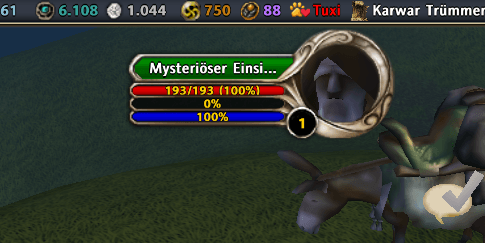
This is the default look of the button when the pet (name: "Tuxi") is not summoned: the name is shown in red.
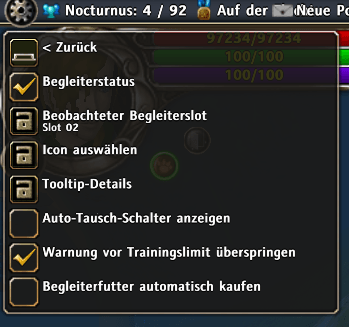
As you can see there are a lot of settings to customize the behaviour of the plugin.
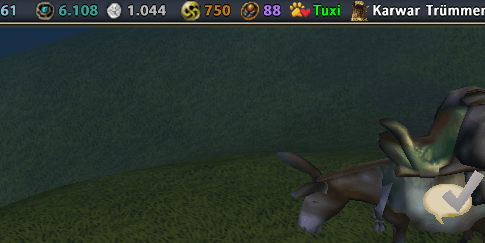
When the pet is summoned, its name is shown in green.
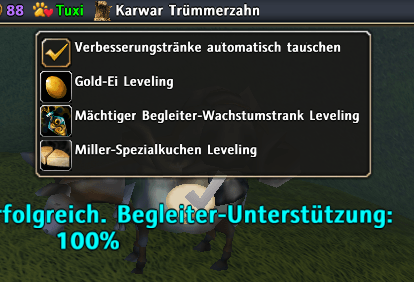
When right-clicking the button you can access this special menu where various functions for leveling are available (more in the description).
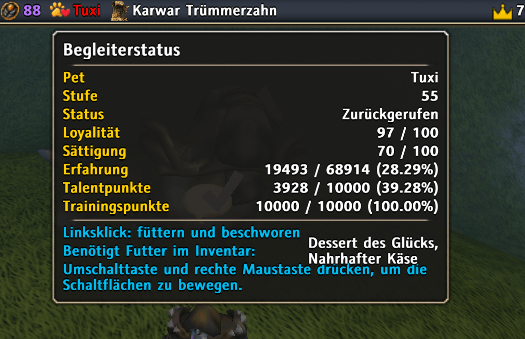
This is the tooltip shown on hovering over the button with the mouse. You can customize what should be shown here in the settings menu.
Description
ZZPetSummCheck
A comprehensive ZZInfoBar plugin for Runes of Magic that provides powerful pet management features, including quick feeding, summoning, automated pet care, and bulk leveling options.
Why "yet another pet plugin" for ZZInfoBar? There is already ZZMyPet → I was missing the behaviour of the PetSummCheck button: Feeding does not have to be done manually but is done automatically when summoning the pet. Thats why I created this plugin: to use the power of PetSummCheck as an ZZInfoBar user.
🌟 Features
🐾 Core Pet Management
- Pet Status Display: Shows your pet's name and status directly on the ZZInfoBar
- Quick Feed & Summon: Left-click to automatically feed your pet to full (loyalty and hunger) and summon it
- Pet Return: Left-click when pet is summoned to return it to the stable
- Detailed Tooltip: Hover over the button to see comprehensive pet information:
- Pet name and level
- Summon status (summoned/stabled)
- Loyalty and hunger levels
- Experience points and progress to next level
- Talent points and training points
📈 Advanced Leveling Features
- Miller Special Cake Leveling: Feed all Miller Special Cakes from your inventory at once
- Each cake: 10 EP + 1 training point (cost: 3500 gold)
- Works even if pet is already full
- Gold Egg Leveling: Feed all Gold Eggs at once
- Each egg: 100 experience + 50 training points
- Powerful Pet Growth Potion Leveling: Feed all potions at once
- Each potion: 1000 experience + 500 training points
- Training Cap Warning: Warns when feeding would exceed the 10,000 training point cap (can be disabled in settings)
⚡ Automation Features
- Auto-Exchange Enhancement Potions: Automatically trade Gold Eggs for Enhancement Potions when talking to Pykesile
- Auto-Buy Pet Food: Automatically restock Nutritious Cheese and Dessert of Happiness to full stacks (99) when opening a pet shop
🎨 Customization
- Icon Selection: Choose from a variety of icons for the status button
- Tooltip Customization: Show/hide specific details in the tooltip
- Pet Slot Selection: Track any of the 6 pet slots
📖 How It Works
Basic Usage: Right-click the button to open the dropdown menu and select a pet slot. Left-click the button to:
- Feed your pet to full (if not summoned)
- Summon your pet (after feeding)
- Return your pet (if already summoned)
Bulk Feeding: When you select a leveling option from the dropdown menu, the addon automatically feeds all items from your inventory. A summary message shows how many items were fed:
Fed 150 Miller Special Cakes.
Auto-Features:
- Auto-exchange activates when talking to Pykesile (if enabled)
- Auto-buy activates when opening a pet shop (if enabled)
- All automation features can be toggled on/off in the settings
⚙️ Settings
Access via AddonManager or by right-clicking the button:
- Pet Status: Enable/disable the button
- Tracked Pet Slot: Select which pet slot (1-6) to monitor
- Show Auto-Exchange Toggle: Show/hide the auto-exchange option in the dropdown
- Skip Training Cap Warning: Automatically proceed when feeding would exceed the training cap
- Auto-Buy Pet Food: Enable automatic pet food purchasing
All settings are saved per character.
📦 Installation
- Extract the
ZZPetSummCheckfolder to yourinterface/addons/directory - Ensure you have the required dependencies installed:
- ZZInfoBar (minimum build: 20140409164507)
- ZZLibrary (comes with ZZInfoBar)
- awsmDropdown (comes with ZZInfoBar)
- Restart the game or reload the UI (
/reloadui) - The button should appear on your ZZInfoBar
🌍 Multi-Language Support
Works in multiple languages:
- English (BASE)
- German (DE)
- Italian (IT) - Automatically translated
- French (FR) - Automatically translated
- Spanish (ES) - Automatically translated
- Portuguese (PT) - Automatically translated
- Polish (PL) - Automatically translated
🛠️ Technical Notes
- Requires ZZInfoBar addon (minimum build: 20140409164507)
- All settings are saved per character
- Suppresses system messages during bulk feeding for cleaner chat
- Automatically handles pet state changes and updates
📋 Files Included
plugin.lua- Main addon codefeed.lua- Feeding workflow moduleauto_buy.lua- Auto-buy functionalityauto_exchange.lua- Auto-exchange functionalitycore_suppression.lua- Message suppression systemicon_sel/- Icon selection menulocales/- Language filesgraphics/- Icons and texturesREADME.txt- Detailed documentation
🐛 Known Issues
- Icon menu may close immediately on second use if dropdown menus are still open (workaround: do
/reloaduibefore the second usage)
Version: 1.0.0
Author: Xcalmx
Special Thanks: Yuukaa96 for granting usage of the original PetSummCheck code
License: MIT (except icon_sel directory - all rights reserved)
The ZZPetSummCheck Team