Forever Stats
- By
Lifetime stats for every character: time per level, gold, kills, deaths, loot, and a dungeon tracker with a pull planner
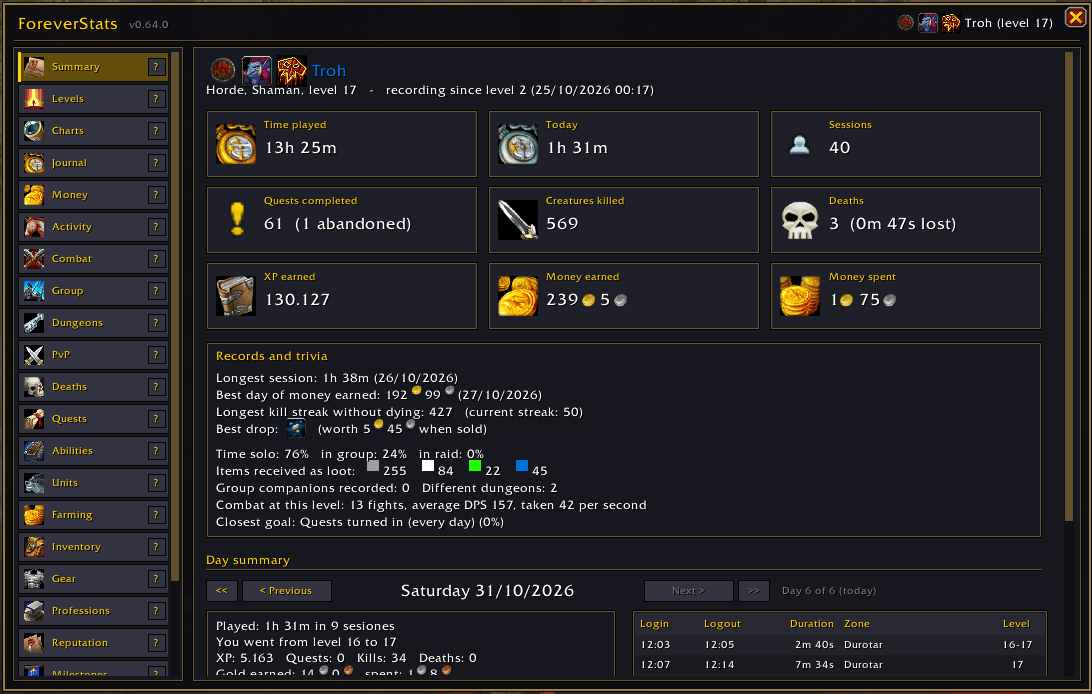
01 -Summary-1.png
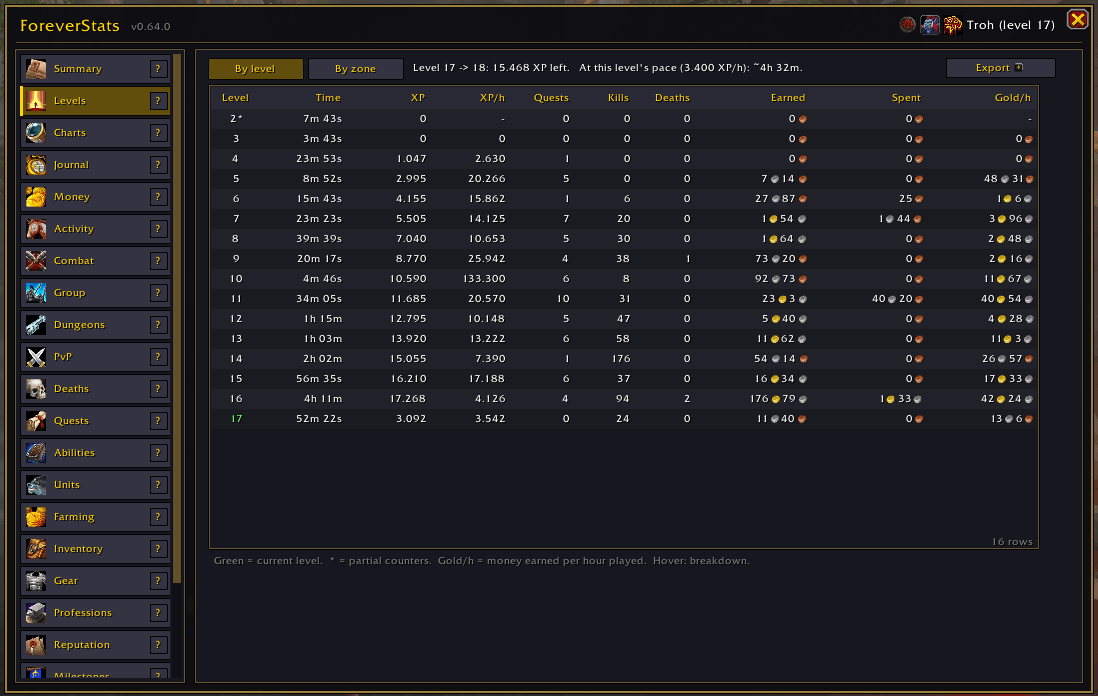
03- Levels.png
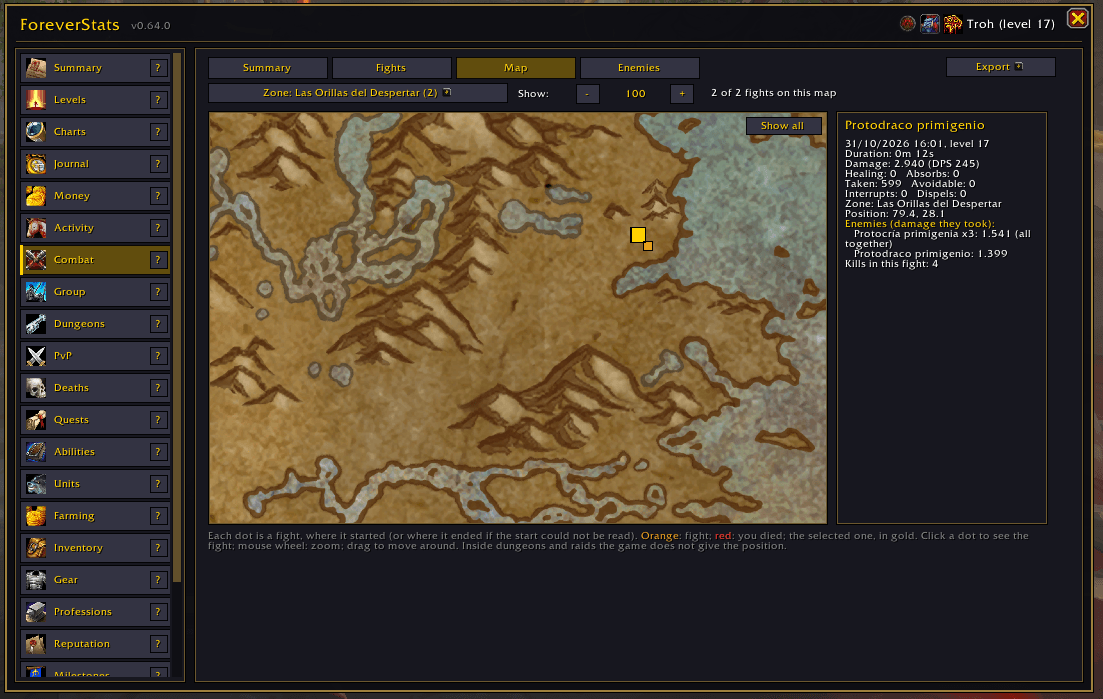
16 - Combat - Map Node Zoom.png
20 - Dungeons - Planner.png
30 - Units - Kills and loot.png
Description
ForeverStats
Lifetime statistics for every character. ForeverStats keeps your characters' whole history — every level, session, quest, kill, death, fight, coin, achievement and dungeon run — and shows it in one window with tables and charts. Nothing is reset when you log out: the name means stats forever.
Features
Leveling and time
- Time played per level and per session, today and in total, solo / group / raid.
- XP by source (quests, kills, exploration), XP and gold per hour by level and by zone.
- Estimated time to the next level at your recent pace.
Combat (from the game's own damage meter)
- Damage, DPS, healing, absorbs, damage taken, interrupts and dispels for every fight, by level, day and zone, also inside dungeons.
- Every fight with all its enemies ("x3" when there were several of the same type) and your average DPS against each creature.
- Fight map: each open-world fight is a dot on the zone map, where it started; red if you died.
- When you die, the death shows which fight it was, how much damage you took and who hit you hardest; click it to open the fight.
- Filters by period (the current session by default), open world or dungeons, and only the fights you died in. A "Last fight" card in Summary, a Combat view in Units, and links between fights and dungeon pulls.
- HPS and damage taken per second in Charts. Very old fights can be archived while keeping all totals and records.
Gold
- Money earned and spent by category: loot, quests, vendors, repairs, flights, mail, auction house, bank.
- Latest transactions with the category each one was given.
- Current gold and inventory value (bags, bank, equipped) of all your characters.
Creatures, loot and deaths
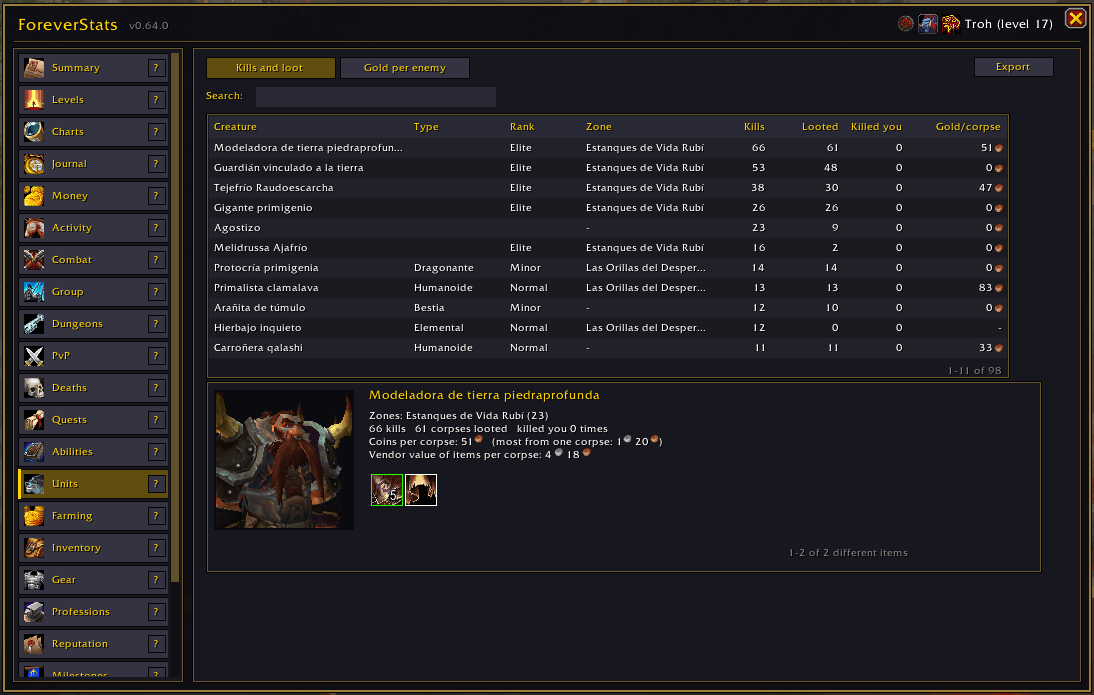
- Kills, loot and drop rates for each creature, gold per corpse and best gold sources.
- Every death: who or what killed you, where, and how much time you lost.
Records and goals
- Records: best days, fastest level, best XP per hour, best farming, fastest run of each dungeon, best DPS, most achievements in a day and more, for each character or the whole account.
- Goals: reach a level, earn XP or gold, kills, quests, play time, dungeon runs or a reputation rank, once or every day, week or month. Progress, an estimate, an alert when you reach it, and statistics: streaks, completion rate, average and best period.
Milestones and achievements
- A timeline of level ups, new zones and areas, flight paths, spells and skills learned.
- Achievements: each new one with its date, level and zone; the ones you already had are read from the game with their date.
Reputation and currencies
- What you gain with each faction (renown too) and each currency, today, this week and in total.
Journal
- Daily journal with a year calendar and a notes field for each day.
- Week and year summaries, compared with the previous one, ready to copy and paste.
Dungeon tool
- Records each run pull by pull: enemies, kills, deaths, the spells you used and your loot.
- Damage, DPS, healing, interrupts and dispels per pull and per group member, from the game's damage meter.
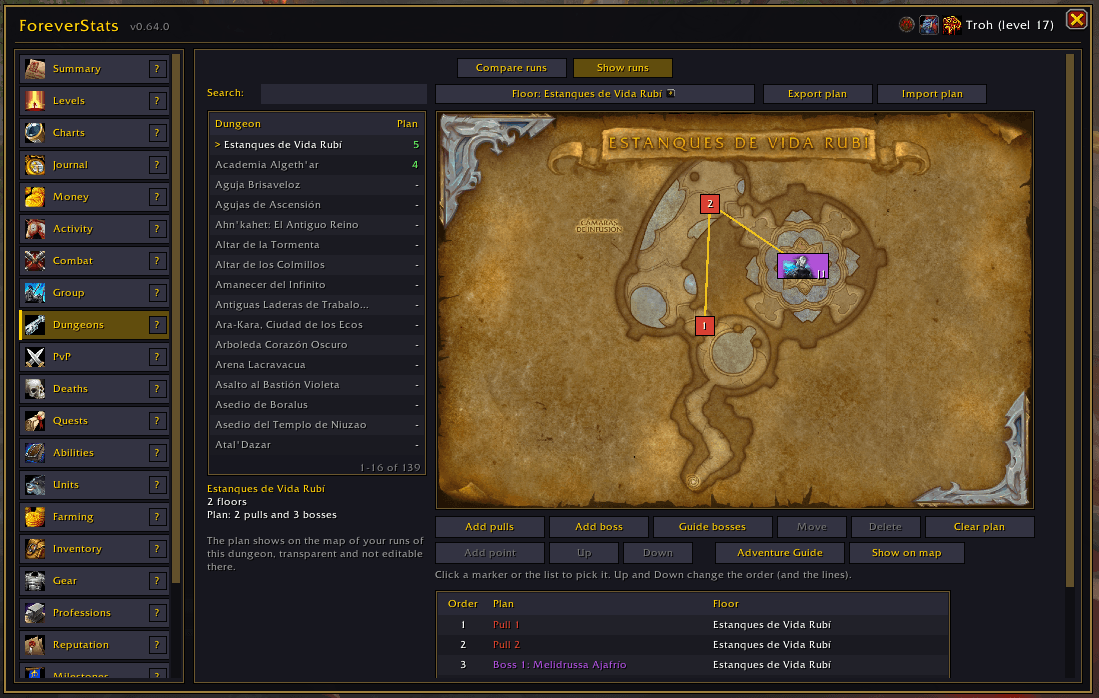
- Place each pull on the dungeon floor maps. Bosses are placed automatically and shown with their portrait from the Adventure Guide.
- Name your runs, add notes, mark favorites, compare runs of the same dungeon (best time, averages, chart) and copy the route of a previous run.
- Pull planner: pick any dungeon, browse all its floors and mark where each pull and boss will be. Export and import plans as text. Your runs show the plan on the map, semi-transparent.
- Group sharing (optional): group members who also use ForeverStats share their pulls, spells, map positions and run names.
- All maps can be zoomed with the mouse wheel and dragged.
And more
- Professions: rank and when you gained each point, everything you craft with its value, material cost and profit, and gathering (including skinning, disenchanting, prospecting and milling).
- Activity (mounted, flying, taxi, swimming, AFK), PvP, gear and item level per level.
- Abilities you use most, by level and zone.
/rollstatistics. - Farming sessions with gold, XP and kills per hour, and a small floating panel.
- A shopping list per character, filled from the professions window, that counts what you already have.
- Configurable charts (data, grouping, calculation and range), a character comparison chart, and CSV export from each tab.
- A side menu you can reorder, with favorites, hidden tabs and a help button (?) for every tab.
- Colour themes: Default, Midnight, Emerald, Crimson, Void and "My character" (faction, race and class colours, with the faction crest and your specialization).
Installation and modules
The download has five folders; copy all of them to Interface\AddOns and restart the game (a /reload is not enough the first time):
- ForeverStats: the core (needed by the others).
- ForeverStats_Dungeons: dungeon, raid and delve runs, the route planner and group sharing.
- ForeverStats_Combat: every fight from the damage meter, the fight map and your combat pet.
- ForeverStats_PvP: battlegrounds, arenas, honorable kills and open-world PvP.
- ForeverStats_Guild: guild sharing (recipes, orders, records, materials, "Wanted").
You can turn off any of the last four in the game's AddOns list: its tab disappears and nothing is recorded for it, but what it already saved is kept in its own file and comes back when you turn it on again.
Game versions
- Retail (Midnight) and Forever: tested.
- Classic versions are declared but not tested yet.
Languages
English, Spanish and Basque (machine translation). The interface follows the game language, or choose it in System > Options > Language. Command names are in Spanish (/fstats muertes, /fstats farmeo…).
Data and privacy
- Everything is saved locally in your SavedVariables, with no limit by default ("stats forever"); each record can be given a limit in System > Options.
- Automatic weekly backups (compressed in retail) and manual backups (
/fstats copia). Old dungeon runs can be archived to save space. - Nothing is sent anywhere outside the game. Inside it, only with addon messages and only if you have the addon part: dungeon sharing and quest votes with your own group, and guild sharing with your guild members (each part can be turned off in System > Options > Guild, and what you don't share you don't see from others).
- Midnight restrictions are respected: the combat log is not used, and some information the game hides inside instances is simply not recorded.
Commands
/fstatsopens the window (or click the minimap button)./fstats diagnosticochecks what your client supports./fstats erroreslists errors, if any./fstats farmeostarts a farming session./fstats objetivosshows your goals and how they are going./fstats sincroshows the group sharing status.
Map credits
Some dungeon maps in the Dungeons tool are by Santiago Reyes (Proyecto Atlas de Azeroth: Forever, sreyesmaps.com), used with his permission. They are his artistic reinterpretations, not official World of Warcraft art, and keep his watermark and credits. The maps are not covered by the addon's GPL-3.0 license.
Feedback
Bug reports and ideas are welcome in the comments.
ForeverStats (Español)
Estadísticas para siempre de cada personaje. ForeverStats guarda la historia completa de tus personajes —cada nivel, sesión, misión, kill, muerte, combate, moneda, logro y visita a una mazmorra— y la muestra en una ventana con tablas y gráficos. No se borra nada al salir: por eso se llama ForeverStats.
Funciones
Niveles y tiempo
- Tiempo jugado por nivel y por sesión, hoy y en total, solo / en grupo / en banda.
- XP por fuente (misiones, kills, exploración), XP y oro por hora por nivel y por zona.
- Tiempo estimado hasta el siguiente nivel a tu ritmo reciente.
Combate (del medidor de daño del propio juego)
- Daño, DPS, curación, absorciones, daño recibido, interrupciones y disipaciones de cada combate, por nivel, día y zona, también dentro de mazmorras.
- Cada combate con todos sus enemigos («x3» si había varios del mismo tipo) y tu DPS medio contra cada criatura.
- Mapa de combates: cada combate del mundo abierto es un punto en el mapa de la zona, donde empezó; rojo si moriste.
- Al morir, la muerte dice contra quién era el combate, cuánto daño recibiste y quién más te hizo; al pulsarla se abre el combate.
- Filtros por periodo (la sesión actual por defecto), mundo abierto o mazmorras, y solo los combates en los que moriste. Tarjeta «Último combate» en Resumen, vista Combate en Unidades y enlaces entre combates y pulls de mazmorra.
- HPS y daño recibido por segundo en Gráficos. Los combates muy antiguos se pueden archivar sin perder totales ni récords.
Oro
- Dinero ganado y gastado por categoría: botín, misiones, vendedores, reparaciones, vuelos, correo, subasta, banco.
- Últimos movimientos con la categoría de cada uno.
- Oro actual y valor del inventario (mochilas, banco, equipado) de todos tus personajes.
Criaturas, botín y muertes
- Kills, botín y tasas de drop de cada criatura, oro por cadáver y quién da más oro.
- Cada muerte: quién o qué te mató, dónde y cuánto tiempo perdiste.
Récords y objetivos
- Récords: mejores días, nivel más rápido, mejor XP por hora, mejor farmeo, visita más rápida a cada mazmorra, mejor DPS, más logros en un día y más, de cada personaje o de toda la cuenta.
- Objetivos: llegar a un nivel, ganar XP u oro, kills, misiones, tiempo de juego, visitas a mazmorras o un rango de reputación, una vez o cada día, semana o mes. Con progreso, estimación, aviso al cumplirlo y estadísticas: rachas, porcentaje cumplido, media y mejor periodo.
Hitos y logros
- Una línea temporal con las subidas de nivel, zonas y áreas nuevas, rutas de vuelo, hechizos y habilidades aprendidos.
- Logros: cada uno nuevo con su fecha, nivel y zona; los que ya tenías se leen del juego con su fecha.
Reputación y monedas
- Lo que ganas con cada facción (también el renombre) y con cada moneda, hoy, esta semana y en total.
Diario
- Diario con calendario del año y una nota para cada día.
- Resumen de la semana y del año, comparado con el anterior, listo para copiar y pegar.
Herramienta de mazmorras
- Graba cada visita pull a pull: enemigos, kills, muertes, los hechizos que usaste y tu botín.
- Daño, DPS, curación, interrupciones y disipaciones por pull y por miembro del grupo, del medidor de daño del juego.
- Coloca cada pull en los mapas de las plantas. Los jefes se colocan solos y salen con su imagen de la Guía de aventuras.
- Ponle nombre y notas a tus visitas, márcalas como favoritas, compara las visitas a una misma mazmorra (mejor tiempo, medias, gráfico) y copia la ruta de una visita anterior.
- Planificador de pulls: elige cualquier mazmorra, recorre todas sus plantas y marca dónde irá cada pull y cada jefe. Exporta e importa planes como texto. Tus visitas muestran el plan en el mapa, semitransparente.
- Compartir con el grupo (opcional): los miembros del grupo que también usan ForeverStats comparten sus pulls, hechizos, posiciones en el mapa y nombres de visita.
- Todos los mapas tienen zoom con la rueda del ratón y se pueden arrastrar.
Y además
- Profesiones: rango y cuándo subiste cada punto, todo lo que fabricas con su valor, el coste de los materiales y el beneficio, y la recolección (también desollar, desencantar, prospección y molienda).
- Actividad (montado, volando, taxi, nadando, AFK), PvP, equipo y nivel de objeto por nivel.
- Las habilidades que más usas, por nivel y zona. Estadísticas de
/roll. - Sesiones de farmeo con oro, XP y kills por hora, y un panel flotante pequeño.
- Una lista de la compra por personaje, que se rellena desde la ventana de profesiones y cuenta lo que ya tienes.
- Gráficos configurables (datos, agrupación, cálculo y rango), gráfico comparativo de personajes y exportación a CSV desde cada pestaña.
- Un menú lateral que puedes ordenar, con favoritas, pestañas ocultas y un botón de ayuda (?) en cada pestaña.
- Temas de color: Default, Medianoche, Esmeralda, Carmesí, Vacío y «Mi personaje» (colores de la facción, la raza y la clase, con el escudo de la facción y tu especialización).
Instalación y módulos
La descarga trae cinco carpetas; cópialas todas a Interface\AddOns y reinicia el juego (la primera vez no basta con /reload):
- ForeverStats: el núcleo (lo necesitan los demás).
- ForeverStats_Dungeons: visitas a mazmorras, bandas y profundidades, el planificador y compartir con el grupo.
- ForeverStats_Combat: cada combate leído del medidor de daño, el mapa de combates y tu mascota de combate.
- ForeverStats_PvP: campos de batalla, arenas, muertes honorables y PvP del mundo abierto.
- ForeverStats_Guild: lo que se comparte en la hermandad (recetas, pedidos, récords, materiales, «Se busca»).
Cualquiera de los cuatro últimos se puede desactivar en la lista de addons del juego: su pestaña desaparece y no se graba nada de esa parte, pero lo que ya guardó se queda en su propio archivo y vuelve al activarlo.
Versiones del juego
- Retail (Midnight) y Forever: probado.
- Las versiones Classic están declaradas pero aún sin probar.
Idiomas
Inglés, español y euskera (traducción automática). La interfaz sigue el idioma del juego, o elígelo en Sistema > Opciones > Idioma.
Datos y privacidad
- Todo se guarda en tu equipo (SavedVariables), sin límite por defecto («estadísticas para siempre»); a cada registro se le puede poner un límite en Sistema > Opciones.
- Copias de seguridad automáticas cada semana (comprimidas en retail) y manuales (
/fstats copia). Las visitas a mazmorras antiguas se pueden archivar para que ocupen menos. - No se envía nada fuera del juego. Dentro, solo con mensajes de addon y solo si tienes esa parte: mazmorras y votaciones de misiones con tu propio grupo, y lo de la hermandad con sus miembros (cada cosa se apaga en Sistema > Opciones > Hermandad, y lo que no compartes tampoco lo ves de los demás).
- Respeta las restricciones de Midnight: no usa el registro de combate, y lo que el juego oculta dentro de las instancias simplemente no se graba.
Comandos
/fstatsabre la ventana (o el botón del minimapa)./fstats diagnosticocomprueba qué permite tu cliente./fstats erroresmuestra los errores, si los hay./fstats farmeoempieza una sesión de farmeo./fstats objetivosmuestra tus objetivos y cómo van./fstats sincromuestra el estado de compartir con el grupo.
Créditos de los mapas
Algunos mapas de mazmorras de la herramienta de Mazmorras son de Santiago Reyes (Proyecto Atlas de Azeroth: Forever, sreyesmaps.com), usados con su permiso. Son reinterpretaciones artísticas suyas, no arte oficial de World of Warcraft, y conservan su marca de agua y sus créditos. Los mapas no están bajo la licencia GPL-3.0 del addon.
Sugerencias y fallos
Se agradecen en los comentarios.
Forever Stats Team