HolidayHerald
- By
Never miss a WoW holiday! What's happening now and next, what's left to collect, secrets to discover, and a cheer when you finish. Works with ItemWatch for shopping (holidays and DMF quests), configurable options, coordinates for some things, and more!
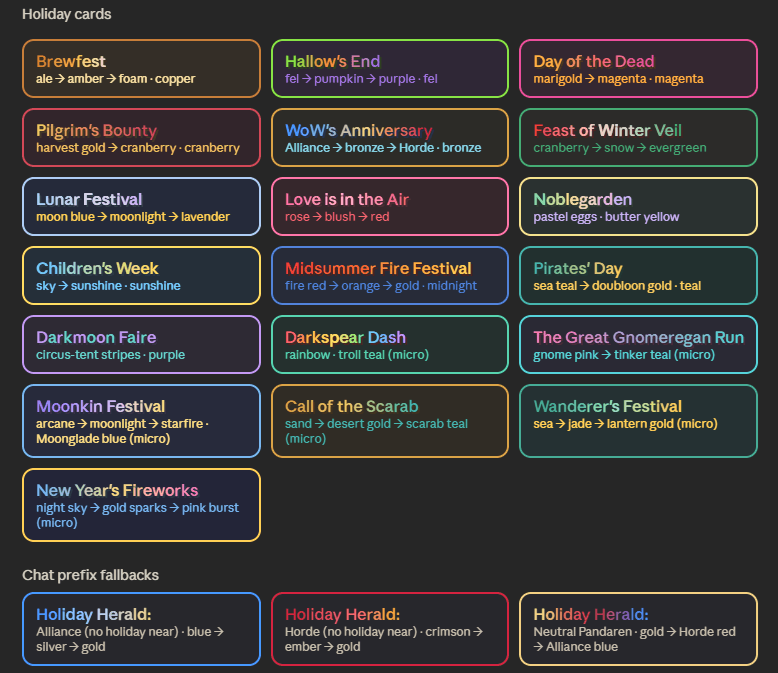
Color palette for all holiday info cards! No two are alike! For the chat line: Newly added faction and neutral (for leveling pandas) if no holiday is coming up soon, if a holiday is coming the chatline will show the upcoming holiday's gradient instead.
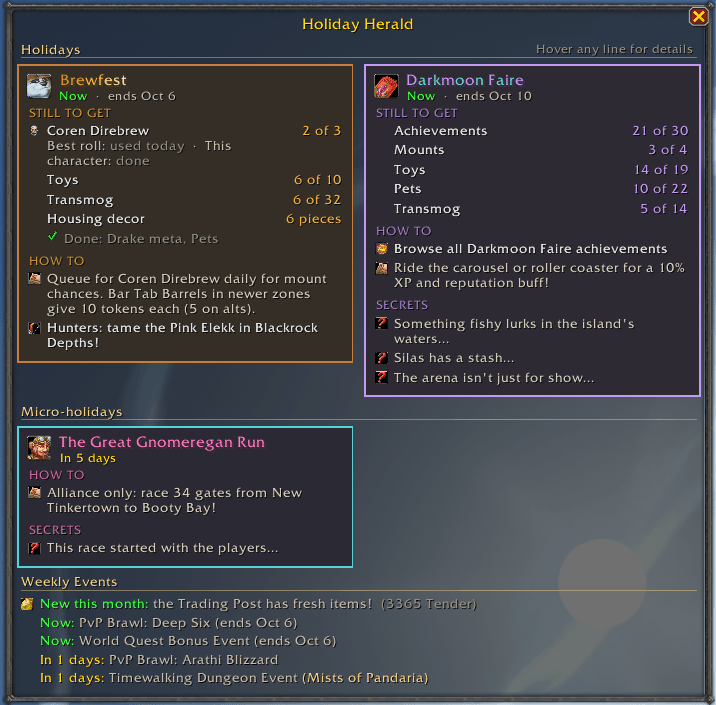
Sample info cards, mouse over most lines for more details, secrets, coordinates (use TomTom to enter /way points), what you still need to collect vs what you already have and more! Shows if you've done your 'best roll' for mounts today (alts can still try)
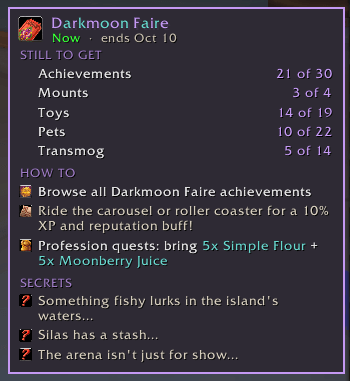
Use ItemWatch (download separately from Curseforge) to CTRL + Click items you need to buy for quests (Flour; Moonberry Juice) it will add/update goals for the items, and if you don't have that profession it won't show up. Tailoring will show dye, etc.
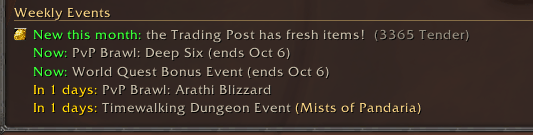
Shows your total tender and reminds you to check the trading post, and shows where Timewalking dungeons will take you this go 'round. Plus bonus events, pvp brawls etc! Click on the Trading Post line to open Adventure Guide!
Description
Holiday Herald
Never miss a holiday again! Holiday Herald reads the in-game calendar and tells you what's happening now and in the next week: what you can still collect, where to go, what to do each day, and a few secrets most players never find.
Built after missing Pirates' Day (and the Jolly Roger toy) five days after getting "Avast Ye, Admiral!" sigh. Never again!
Features
- Now with ItemWatch support! If a holiday asks you to buy something, like the profession quest supplies at the Darkmoon Faire or the flour and milk for Day of the Dead, you can send it straight to ItemWatch: Ctrl-click the shopping line on the holiday card to add the whole list in one go, with the amounts added on top of any goals you've already set! Grab ItemWatch from CurseForge to get this feature!!
- Daily quest checklist. Holidays with dailies show how many you've done today, like "2 of 10," grouped by where you do them. Hover for who gives each quest and where. It resets with the daily reset, so you always know what's left.
- Daily reset time. A line under the holiday cards shows exactly when dailies reset, with a countdown on hover.
- Server time or your time. Choose how start, end, and reset times are shown: server time (like the in-game calendar), your own time, or both side by side.
- Themed holiday cards. Each holiday gets its own colors, title style, and icon, even in chat messages.
- Collection tracking. Mounts, toys, pets, transmog, drake armor manuscripts, ensembles, and achievements are checked against your collection. Collected items gray out, so you only see what you're missing. A great way to round out your holiday collections!
- Housing decor shopping list. Every piece of a holiday's decor in one hover, grouped by what it costs, with where to buy it. Pieces you already have turn gray.
- Holiday currency totals. See how many Tricky Treats (and more to come) you'd need for one of everything you're still missing, next to how many your whole account has: every character's bags and banks plus the warband bank. Hover to see who has how many.
- Map pins. With HandyNotes installed, holiday spots show on your zone and continent maps while the holiday is on: event hubs, vendors, quest towns, and anyone you need to talk to first. Each holiday's pins wear its own icon, so they're easy to tell apart. Hover a pin for details, and with TomTom installed, click it for a waypoint. Turn them off in the settings.
- Event timers. Repeating events, like Hallow's End's Community Candy Crawl in your neighborhood and the Wickerman speech that gives the buff, show whether they're on now or how long until the next one.
- Always-current achievements. Each holiday's achievement list is read straight from the game, so brand new achievements show up on their own. Hover to see only what you still need.
- Holiday boss info. See every drop at a glance, plus whether your account's best daily roll is still available and whether this character has done the boss today. Click the boss line to open the Dungeon Finder with the holiday dungeon already picked. Just hit Find Group! And if you're still missing the boss's mount, you get a little "good luck!" too.
- Clickable achievements. Click any achievement line to open it, or shift-click to link it in chat. Great for showing off or comparing progress with friends! Meta lines jump straight to the holiday's part of What a Long, Strange Trip It's Been (Violet Proto-Drake).
- Smart shopping lists. Holidays that need you to bring something list it for you, like Winter Veil's cookies and the ingredients to bake them. Profession quests only show what your professions need.
- Exact times. See exactly when each holiday starts and ends, down to the minute.
- Tips for new and returning players. Hover for where to go, what to do, and which expansion a zone belongs to. Got TomTom? Use its /way command with any coordinates for an arrow.
- Secrets! Spoiler teasers that only reveal when you hover. Hidden pets, sneaky toys, and more.
- Fold-up sections. Already read the tips and secrets? Click the heading to fold them away. Each holiday's sections get their own colors from its theme.
- Class goodies. Lines like "Hunters: tame the Pink Elekk!" are shown to everyone, so you won't miss something for your alts.
- Short-holiday alerts. Short holidays get a quiet chat reminder as they get close, then a loud on-screen alert the day before and the day of, so they can't slip by. Pick how early the reminders start, or turn them off.
- Stays quiet. A full popup when a holiday first shows up and again on the day it starts, then just a chat line after that. Click the chat link, or type
/heraldat any time to see the popup. - Micro-holidays. Little holidays like The Great Gnomeregan Run get a chat line on the day and their own card.
- Weekly events. PvP Brawls, bonus events, and Timewalking (with its expansion) listed in their own section. Click a Timewalking or Brawl event that's on now to open the right window, ready to queue.
- Trading Post reminder. See your Trader's Tender at a glance, get a heads-up when new items arrive on the 1st, and click to open the Traveler's Log.
- Celebration toast. Finish a holiday's meta and the NerdyBertie herald gives you a thumbs-up. (I call her Matilda) <3
- Achievement toasts. Every achievement you earn gets a little cheer from a very dapper herald.
- Tidy layout. With three or more holidays at once, the popup switches to two columns.
Holidays covered
Full cards: Brewfest, Hallow's End, Day of the Dead, Pilgrim's Bounty, Feast of Winter Veil, WoW's Anniversary, Lunar Festival, Darkmoon Faire, and Pirates' Day. (more to come!)
Micro-holidays: The Great Gnomeregan Run, Moonkin Festival, Wanderer's Festival, New Year's Fireworks, and Call of the Scarab. (more to come!)
Every other holiday (Love is in the Air, Noblegarden, Children's Week, Midsummer, and Darkspear Dash) has a themed card, with full details added before each one arrives.
Works in every region. Holiday details currently need an English game client; holidays still show with their dates on other languages.
Commands
/herald: show the popup/herald options: open settings/herald resetpos: move the popup back to the middle of the screen- Minimap button and addon compartment: left-click for the popup, right-click for settings
Settings
Find them under Options → AddOns → NerdyBertie → Holiday Herald. Quick presets (All on, Visuals only, Quiet), plus toggles for every piece: themes, tips, secrets, alerts, sounds, the start-day popup, achievement toasts, the daily reset line, the Trading Post reminder, how times are shown, and more. There's also a button to reset the popup's position.
The AddOns and Options menus now group my addons together, so you can find them all under the NerdyBertie heading (minus plugins that depend on other addons, like Dive Bar Front Crawl for the Tortollan housing endeavor).
More from NerdyBertie
If you enjoy Holiday Herald, feel free to check out my other addons!
- HandyNotes: Dive Bar Front Crawl — map pins for every underwater Tortollan dive bar in the Dive Bar Front Crawl housing endeavor
- HandyNotes: Seeking The Soulstones — map pins for the soulstones in Outland for the Warlock Green Fire questchain
- ItemWatch & Shopping List — track how many of an item you have toward a goal, with a recipe shopping list that counts your bags, bank and warband bank
- Boomkin Buff Watcher — keeps Balance Druids on top of their Astral Power and Eclipse state
- Chum Chimes — A friendly chime when guildies or friends are in your zone or nearby
- Pinkies Up! — Achievement Gratses for everyone! Plays nice with Holiday Herald, 40 plus cute sayings.
Find them all by searching NerdyBertie on CurseForge, WoWInterface, WoWUp, or Wago.
If you find this addon, or any of my other addons, useful, consider supporting me on Ko-fi — totally optional, but always appreciated! You can also find me on Twitch, Tiktok, YouTube, or Discord - NerdyBertie
HolidayHerald Team