Panorama Forever
- By
Hidden graphics settings in one panel: view distance, shadows, water, grass, sun shafts, camera zoom, nameplate distance and more. Safe limits, reapplied on every login. /pano
01-panorama-window.png
02-view-distance-and-vegetation.png
03-shadows-and-lighting.png
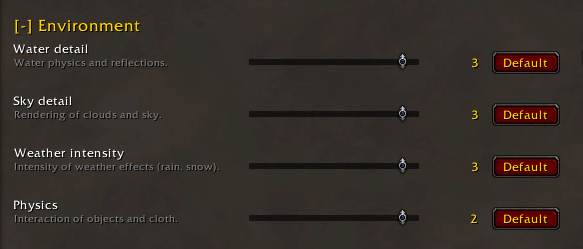
04-environment.png
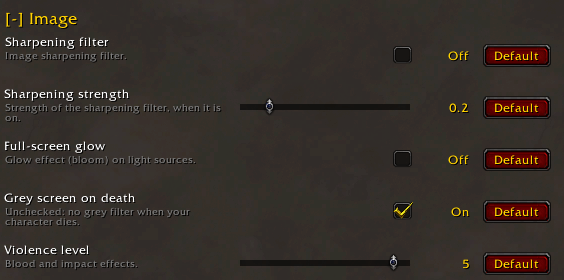
05-image.png
Description
Panorama
The graphics settings hidden behind /console, in one window, reapplied at every login.
View distance, shadows, water, camera: 43 settings with sliders and checkboxes, for WoW Forever.
🎮 Your game, as far as the eye can see
Many graphics options of WoW Forever only exist as console commands. Panorama puts them in one window, with safe limits, and writes them again every time you log in.
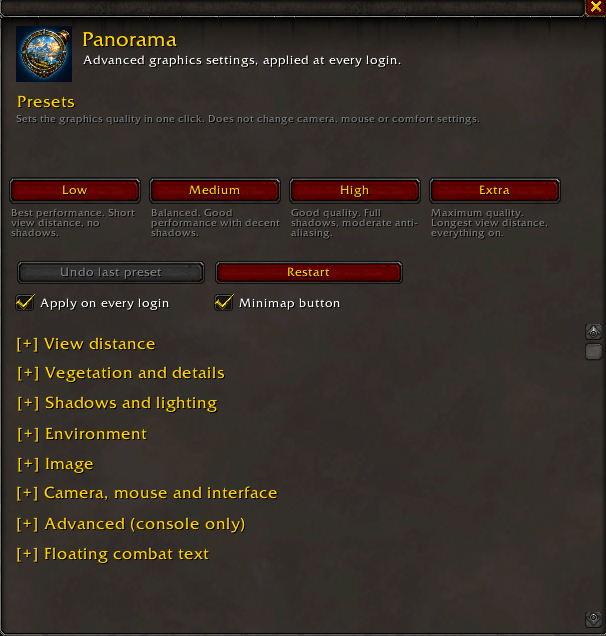
Low · Medium · High · Extra
One click sets every graphics setting at once. Camera, mouse and comfort settings stay as they are.
🚀 Quick start
- Install Panorama and start the game.
- Click the Panorama button on the minimap, or type /pano.
- Pick a preset, or move any slider. The change shows in the game right away.
Nothing changes until you touch a control: on first install, Panorama starts from your current game settings.
⚡ Why Panorama?
| Game Graphics menu | Panorama | |
|---|---|---|
| Water reflections and ripples, terrain and building detail distance | ✖ | ✔ |
| Floating combat text options | ✖ | ✔ |
| Settings written again at every login | ✖ | ✔ |
| Undo the last preset | ✖ | ✔ |
| Every setting in one window, with a Default button per line | ✖ | ✔ |
🧰 What you get
- Its own window. Drag it anywhere, close it with Escape. It also opens from Options > AddOns > Panorama.
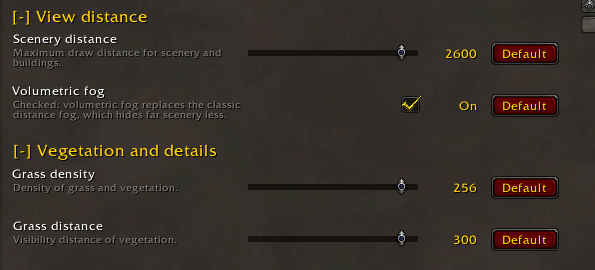
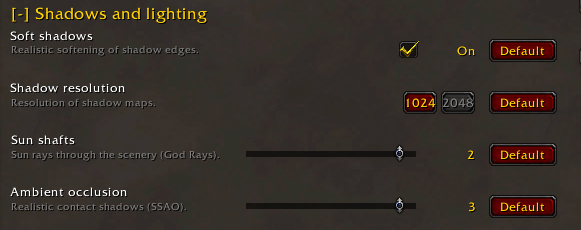
- 43 settings in collapsible sections: view distance, vegetation, shadows and lighting, environment, image, camera and interface, advanced, floating combat text.
- Safe values. Sliders stay inside the limits the game accepts. A setting your client does not support is hidden and never written.
- Stays in sync. A change made in the game's Graphics menu or with
/consoleshows in the window. - Reapply on login. Your values are written again at login, in case the game changed them between sessions. You can turn it off.
- Combat safe. A change made during combat is applied when combat ends.
- Default button on every line, and an Undo button for the last preset.
- Minimap button: left click opens the window, right click shows presets, undo and graphics restart.
- 10 languages: English, French, German, Spanish, Italian, Portuguese, Russian, Korean, Simplified and Traditional Chinese.
🆕 New in 1.3.0
- Own window instead of a page in the game's Options.
- Minimap button with presets, undo and graphics restart.
- Advanced section: 8 console-only settings (water reflections and ripples, terrain, building and creature detail distance, particle density…). They are written only after you change them.
- Floating combat text: 12 options for what the combat text shows.
- Undo the last preset, and a redesigned layout with preset cards.
Full list in the Files tab.
⌨ Commands
| Command | Action |
|---|---|
/pano |
Open or close the window |
/pano low, medium, high, extra |
Apply a preset |
/pano undo |
Restore the settings from before the last preset |
/pano apply |
Write all settings again |
/pano restart |
Restart the graphics engine |
/pano minimap |
Show or hide the minimap button |
🎯 Limits
⚠ Works, with limits
- Advanced settings have estimated limits: they are not in the game's menus.
✖ Does not do
- It does not change the game's Graphics menu presets. To undo every change, use the Defaults button in that menu.
🔄 Updating from 1.2.0
- Your settings are kept. The saved data format did not change.
- The window no longer sits in Options > AddOns: type /pano or click the minimap button.
- Restart the game once after updating, so the new logo loads.
Questions, ideas, bugs? Join the Discord.
⚖ License
- Panorama © 2026 dldvlpr, released under the GNU General Public License v3 or later. The license file is included in the download.
- No warranty. This addon is provided as is, without warranty of any kind, as stated in the GPL v3.
- Not affiliated with or endorsed by Blizzard Entertainment. World of Warcraft and WoW Forever are trademarks of Blizzard Entertainment, Inc.
Panorama Forever Team