Forever Meter Threat, damage, healing and more
- By
Lightweight damage, healing and threat meter for WoW Forever (12.x engine). Single Lua file, zero dependencies,built on Blizzard's C_DamageMeter since the combat log is off-limits to addons. 8 modes, per-fight sessions,per-spell breakdown, 11 languages.
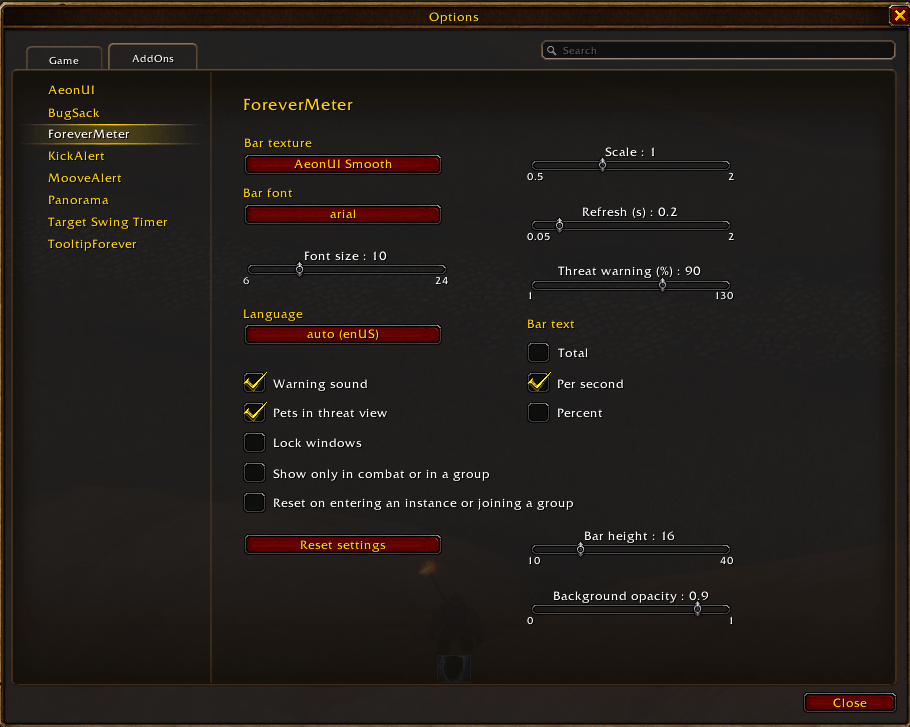

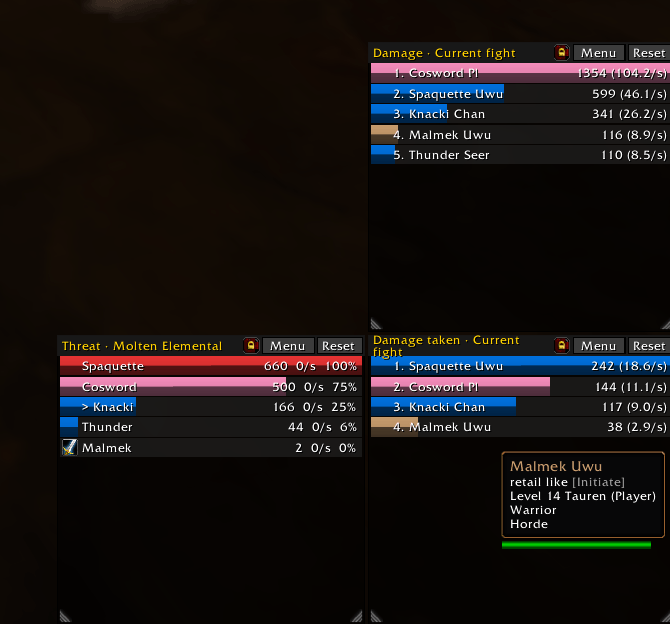
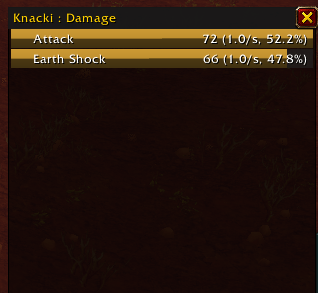
Capture d'écran 2026-09-26 125815.png
Description
ForeverMeter
Damage, healing, damage taken and threat meter that keeps working in combat on WoW Forever.
Classic meters break on WoW Forever. ForeverMeter reads the game's own meter instead. Pure Lua, no libraries required.
💬 Discord · 📖 Wiki · 🐞 Report a bug
🚀 Quick start
- Install ForeverMeter, then restart the game the first time: new textures and fonts load only at startup.
- A window opens on login. Click Menu or right-click the title to pick a display and a session.
- Click the gear in the title bar, or type /fm options, to change the look. Type /fm for the full command list.
⚡ Why ForeverMeter?
WoW Forever looks like Classic, but it runs on the modern game engine. That engine forbids the combat log to addons, and the meters that read it stay empty or throw Lua errors.
ForeverMeter reads Blizzard's server-side meter (C_DamageMeter) and the game's threat API.
| Combat log meters | ForeverMeter | |
|---|---|---|
| Bars update during the fight | ✖ | ✔ |
| No flood of Lua errors in combat | ✖ | ✔ |
🧰 What you get
- 10 displays: damage, healing, absorbs, damage taken, enemy damage taken, avoidable damage taken, interrupts, dispels, deaths, threat. Plus DPS: damage with the per second value only.
- Up to 4 windows, each with its own display, session, size and lock. Windows snap to each other.
- Per window: bar text (total, per second, percent), my bar only, no title bar, big number. Together they make a plain DPS counter.
- Your own bar always shown, with your real rank, even below the visible rows.
- Sessions: current fight, overall, or any fight kept by the game.
- Per-spell breakdown on click, top 5 spells on hover, spell-by-spell comparison of two players.
- Death recap: time of death and last hits taken.
- Threat warning, visual and sound, above an adjustable threshold.
- Chat report (
/fm report 5) and copy as text for Discord. - Options panel: bar textures, six bundled fonts, LibSharedMedia support, bar height, background opacity, scale.
- Auto show (only in combat or in a group), auto reset (new instance or new group), key bindings, addon compartment button, test mode.
- 11 languages: enUS, frFR, deDE, esES, esMX, itIT, ptBR, ruRU, koKR, zhCN, zhTW.
🆕 New in 1.14.0
- DPS display: Menu → Display → DPS shows damage with the per second value only.
- Per window, from its menu: bar text, My bar only, No title bar, Big number.
- In combat, totals are abbreviated by the game (
12K).
Full list in the Files tab.
⌨ Commands
| Command | Effect |
|---|---|
/fm options |
Options panel |
/fm mode <display> |
Display of the first window |
/fm report [N] |
Top N to chat |
/fm windows <1-4> |
Number of windows |
/fm lock / /fm unlock |
Lock or unlock every window |
/fm reset |
Clear the data |
/fm warn <%> |
Threat warning threshold |
/fm test |
Fake bars, to tune the look without a fight |
/fm lang <code> |
Force a language (auto: game language) |
/fm defaults |
Reset every setting |
🎯 Limits
⚠ Works, with limits
- In combat, names and amounts are "secret values": the game lets addons display them, not compare or add them. Bars keep the game's order. Percentages, the breakdown and the comparison fill in once combat ends.
- The options panel cannot open during combat: it opens as soon as combat ends.
✖ Does not work
- Threat against some enemies (bosses especially) is hidden in combat: the window says so instead of showing a wrong number.
🐞 Support
Found a bug? Open an issue on GitHub.
Questions, ideas, news? Join the Discord.
⚖ License
- ForeverMeter is released under the GPL-3.0-or-later. Source: github.com/dldvlpr-addons-wow/threatMeter.
- Bundled fonts are under the SIL Open Font License 1.1.
- Not affiliated with or endorsed by Blizzard Entertainment. World of Warcraft and WoW Forever are trademarks of Blizzard Entertainment, Inc.
Forever Meter Threat, damage, healing and more Team