Silent's Quest Manager and Creator
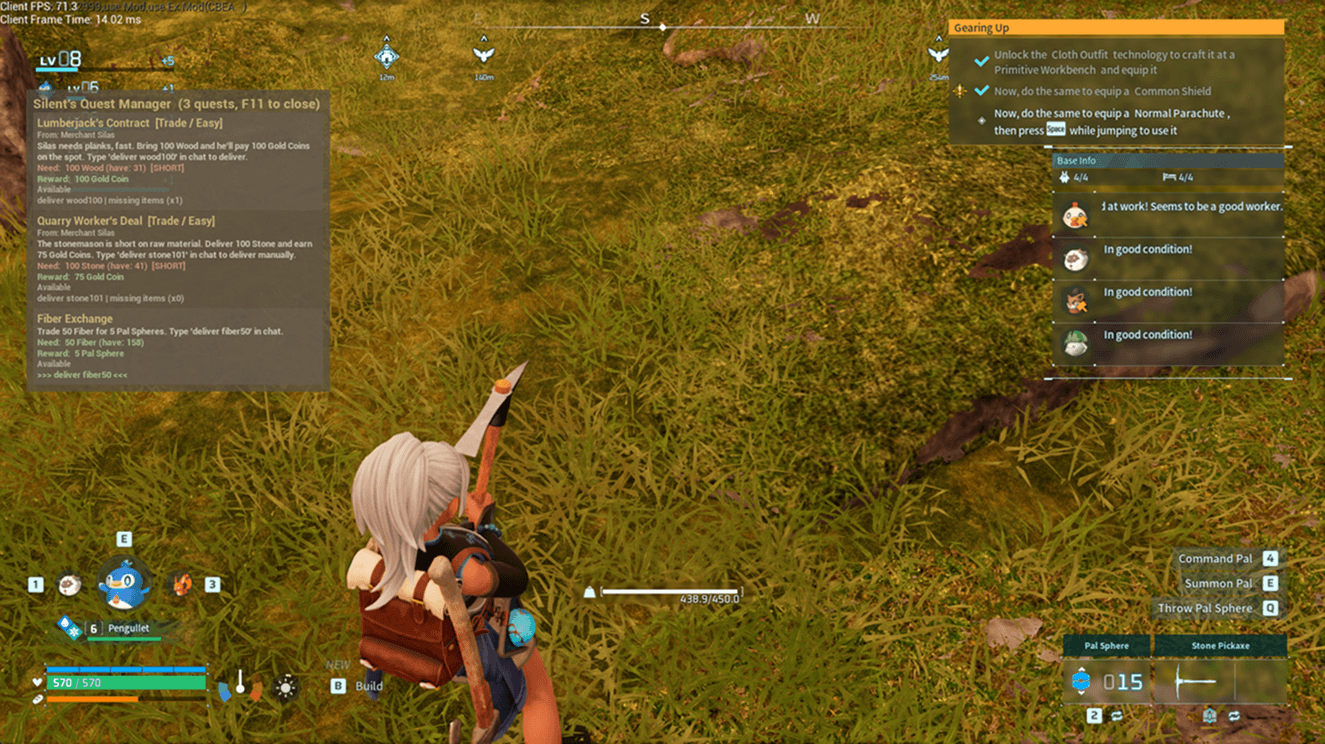
A simple quest system for Palworld. Gather items, deliver them for rewards — all through a clean in-game panel and chat commands. (Mod is still in early stages of development. But simple "get x of this for z rewards" works completely fine. More quest types will be implemented in future updates.)
What It Does
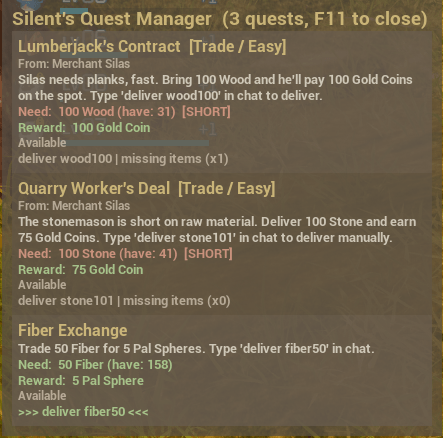
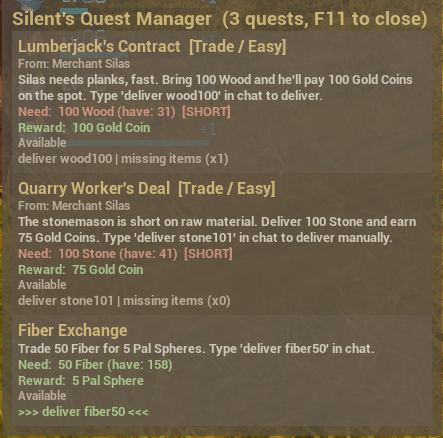
- Shows a quest panel in-game (press F11) listing all available quests
- Each quest asks for specific items and gives specific rewards
- Deliver quests by typing a command in the in-game chat (e.g. `deliver stone101`)
- You can type 'nextpage' or 'prevpage' in in-game chat if you have multiple pages of quests.
- Quests are defined in simple JSON files — anyone can create custom quests
- 5 visual themes selectable from the Mod Options menu
- Auto-delivery option for quests that should fire automatically
- Quest progress is saved between game sessions
- There is already 3 quests already loaded in the quests folder in the mod for you to see and understand how things work
Requirements
Requirements and where to get it:
- [UE4SS] https://github.com/UE4SS-RE/RE-UE4SS (Experimental Palworld build) [Nexus Mods] https://www.nexusmods.com/palworld/mods/2237
- [Darn Menu](Darn Menu) Nexusmods
- [P.R.O - Pal Resource Overview] https://www.curseforge.com/palworld/lua-code-mods/p-r-o-pal-resource-overview CurseForge
This mod will not load without P.R.O installed. It uses P.R.O to read your inventory.
Installation
- Make sure UE4SS, Darn Menu, and P.R.O are all installed and working
- Download this mod and extract the `SilentsQuestManager` folder
- Copy it into your UE4SS mods directory:
```
Palworld/Pal/Binaries/Win64/ue4ss/Mods/SilentsQuestManager/
```
- Add this line to `Mods/mods.txt`:
```
SilentsQuestManager : 1
```
- Or let Curseforge app install it for you. Should work fine as well. Though you still need to install the requirements.
How to Complete Quests
Method 1: Chat Commands (recommended)
1. Gather the items a quest requires (e.g. 100 Stone)
2. Press **Enter** to open the in-game chat
3. Type `deliver stone101` (the command shown on the quest card)
4. Press Enter — the quest delivers instantly
Each quest has a unique delivery command shown on its card in the panel. The command is defined in the quest's JSON file.
Method 2: Auto-Delivery
If a quest has `"autoDeliver": true` in its JSON and the global auto-deliver setting is ON (Mod Options → Delivery → Auto-deliver quests), the quest delivers automatically the moment you have enough items — no keypress or chat needed.
Turn auto-deliver OFF in Mod Options if you want manual control over which items you give away.
How to Create Your Own Quests
Quests are simple JSON files placed in the `quests/` folder. Each file is one quest.
Basic Example
Create a file called `04_my_quest.json` in the `quests/` folder:
{
"id": "fiber_for_coins",
"title": "Fiber Trade",
"description": "Trade 50 Fiber for 80.",
"deliveryCommand": "fiber80",
"repeatable": true,
"source": "inventory",
"requires": [
{ "itemId": "Fiber", "count": 50 }
],
"rewards": [
{ "itemId": "Money", "count": 80 }
]
}
Press Shift+F11 in-game to reload quests. The new quest appears in the panel immediately.
All Fields Explained
| Field | Required? | Type | Description |
|-------|-----------|------|-------------|
| `id` | Yes | string | A unique ID for this quest. No two quests can share an ID. |
| `title` | Yes | string | The quest name shown in the panel. |
| `description` | Yes | string | What the quest is about. Shown on the card. |
| `requires` | Yes | array | Items the player must hand over. At least one. |
| `rewards` | Yes | array | Items given to the player on delivery. At least one. |
| `deliveryCommand` | No | string | The chat command for manual delivery. If set to `"fiber50"`, type `deliver fiber50` in chat. |
| `autoDeliver` | No | boolean | If `true`, delivers automatically when the player has enough items. Default `false`. |
| `repeatable` | No | boolean | Can the player do this quest more than once? Default `true`. |
| `cooldownSeconds` | No | number | Seconds to wait between deliveries. `0` = no cooldown. Default `0`. |
| `source` | No | string | Where items are pulled from: `"inventory"` (player pockets only) or `"anywhere"` (pockets + base storage). Default `"inventory"`. |
| `giver` | No | string | Who gives the quest (flavor text). |
| `category` | No | string | A label like "Trade" or "Daily". |
| `difficulty` | No | string | A label like "Easy" or "Hard". |
Multi-Item Quests
Both `requires` and `rewards` are arrays — you can ask for multiple items and give multiple rewards:
{
"id": "supply_run",
"title": "Supply Run",
"description": "Bring Wood, Stone, and Fiber for Gold and Spheres.",
"deliveryCommand": "supply1",
"requires": [
{ "itemId": "Wood", "count": 50 },
{ "itemId": "Stone", "count": 50 },
{ "itemId": "Fiber", "count": 20 }
],
"rewards": [
{ "itemId": "Money", "count": 250 },
{ "itemId": "PalSphere", "count": 10 }
]
}
Finding Item IDs
Every item in Palworld has an internal ID used in quest files. Here are the most common ones:
| Item ID | Display Name |
|---------|-------------|
| `Wood` | Wood |
| `Stone` | Stone |
| `Fiber` | Fiber |
| `Money` | Gold Coin |
| `PalSphere` | Pal Sphere |
| `Pal_crystal_S` | Paldium Fragment |
| `Ore` | Ore |
| `Coal` | Coal |
| `Sulfur` | Sulfur |
| `Leather` | Leather |
| `AnimalSkin` | Animal Skin |
| `bone` | Bone |
| `Horn` | Horn |
| `PalEgg` | Pal Egg |
| `PalOil` | High Quality Pal Oil |
**For a complete list**, open the `itemnames.lua` file included with this mod in any text editor. It contains hundreds of item IDs mapped to their display names. Just search (Ctrl+F) for the item you want.
If you're not sure what the raw ID is for an item in your inventory:
1. Install P.R.O (required by this mod anyway)
2. Press **F10** to open P.R.O's panel
3. Any item P.R.O hasn't mapped yet shows its raw ID directly
Hotkeys
| Key | Action |
| F11 | Toggle the quest panel |
| Shift + F11 | Reload all quest JSON files (after adding/editing quests) |
| Shift + Alt + F11 | Print quest log to the UE4SS console |
| Ctrl + F11 | Force-rebuild the panel (if it ever desyncs) |
| Enter` then `deliver <command> | Deliver a quest via chat |
UI Themes
Five visual themes are available in **ESC → Mod Options → Silent's Quest Manager → Theme**:
| Theme | Look |
|-------|------|
| Dark Minimal | Dark background, cyan accents (default) |
| Parchment Scroll | Warm brown background, golden accents, wider |
| Terminal Green | Black background, bright green text |
| Crimson Dark | Dark red background, orange accents |
| Frost Blue | Icy dark blue background, light blue accents |
Themes change colors, padding, and panel width. They apply live — no restart needed.
Mod Options (Darn Menu)
Open with **ESC → Mod Options → Silent's Quest Manager**:
- **Theme** — Pick from 5 visual themes
- **Auto-deliver quests** — Toggle auto-delivery globally
- **Panel position/opacity** — Move and adjust the panel
- **Auto refresh** — How often the panel updates (ms)
How It Works
This mod reads your inventory through P.R.O's public API (a read-only interface that tracks what items you have). When you deliver a quest, it removes the required items from your inventory and adds the reward items — all through direct inventory slot manipulation.
Quest state (how many times you've completed each quest) is saved to `questlog.json` and restored when you restart the game.
Troubleshooting
**The panel doesn't appear when I press F11**
Check the UE4SS log for `[SQM]` lines. If you see `[SQM] ERROR: P.R.O not detected`, P.R.O's `api.lua` isn't installed correctly. See the Installation section.
**Chat delivery doesn't work**
Make sure you see `[SQM CHAT] Chat hook installed` in the log after loading into the world. If not, the chat hook failed to install — try closing and reopening the game.
**Quests not loading after adding a new JSON file**
Press **Shift+F11** to force-reload. Check the log for parse errors. Make sure the JSON is valid (use a JSON validator if unsure).
**Items are removed but no reward appears**
This can happen if the reward item doesn't stack with existing items and there's no empty slot. Make sure you have free inventory space.
Credits
- Built to integrate with **P.R.O - Pal Resource Overview** by SilentZeroFool (me)
- Uses the **Darn Menu** framework for Mod Options
- Item names from P.R.O's `itemnames.lua`